
Invoice Data Extraction API: Python, PDF, OCR, and Real Examples (2026 Beginner Guide)
Why Invoice Data Extraction Matters in 2026
In 2026, an Invoice Data Extraction API is no longer a “nice-to-have.” It has become one of the most important automation tools for any business that processes invoices at scale.
Every week, companies receive a mix of documents, clean PDFs, sideways scans, low-quality phone photos, and everything in between. And with every batch comes the hidden cost: manual data entry. Using OCR solutions for businesses can automatically extract data, drastically reducing errors and time spent.
Accounts Payable teams zoom in, squint at numbers, re-type figures into spreadsheets, and hope today isn’t the day someone turns $87,450.00 into $874.50 by mistake. I once saw a fintech nearly wire six figures to the wrong vendor because of a simple human error. An accounting firm even lost a long-term client after repeatedly missing early-payment discounts due to slow manual processing.
What Manual Invoice Handling Still Looks Like in 2026
Manual invoice work still causes:
- Hours wasted re-typing line items
- Inconsistent invoice layouts that break scripts and templates
- Slower approvals
- Frustrated suppliers
- Poor visibility into cash flow
Why fast-growing teams are switching
This is why fast-growing businesses now rely on modern Invoice Data Extraction APIs (including AZAPI.ai). These APIs can read real-world invoices without templates, formatting rules, or complex setup. You simply upload an invoice and receive clean, structured data in seconds.
If you’re still manually copying invoice fields in 2026, you’re not just wasting time, you’re losing money. A strong Invoice OCR API can transform your entire process overnight, much like upgrading from an old flip phone to a flagship smartphone.
What Is an Invoice Data Extraction API? (Beginner-Friendly)
Imagine receiving an invoice, maybe a PDF, maybe a blurry phone photo. Someone on your team now has to open it, zoom in, and manually type:
- Invoice number
- Date
- Vendor name
- Line items
- Taxes
- Total amount
This repetitive work leads to errors, delays, and awkward vendor conversations.
An Invoice Data Extraction API removes this entire process.
You simply upload the invoice (PDF, scan, JPG, PNG, or even low-quality images). Within seconds, the API returns all key fields as clean, structured data, usually in JSON or XML. This data can go straight into your ERP, accounting system, or automation workflow.
No
zooming, guessing characters.
Typing.
Mistakes.
Think of it as a digital assistant that reads invoices perfectly every time, without templates, without fatigue, and without ever making a typo.
What Problems Does an Invoice Data Extraction API Actually Fix?
Companies adopt Invoice OCR APIs because they solve real financial and operational pain points.
1. Time Waste
Some businesses spend entire days or weeks every month typing invoice data manually.
With a reliable extraction API, the same workload drops to minutes.
2. Human Error
A single wrong digit can cause:
- Overpayments
- Missed early-payment discounts
- Incorrect financial reports
A high-quality Invoice OCR API can reach 99% accuracy and prevent these issues.
This is precisely why AZAPI.ai performs so well in real-world tests.
3. Messy, Real-World Invoices
Vendors send all kinds of formats:
- Clean digital PDFs
- Scanned paper invoices
- Crumpled receipts
- Low-light phone photos
- Multi-language invoices (German, Arabic, Spanish, etc.)
A modern API handles all of them with no templates and no manual adjustments.
4. Month-End Madness
When invoice data flows in automatically:
- No more all-nighters
- Faster approvals
- Fewer reconciliation issues
Teams only need to review and approve.
Where Do Normal Companies Actually Use This?
An Invoice Data Extraction API is used across many industries:
- Fintech & lending platforms: Process hundreds of merchant invoices per day.
- Accounting & bookkeeping firms: Stop wasting staff time on manual typing.
- SaaS, e-commerce, and retail companies: Automate accounts payable without hiring more staff using AI-powered OCR tools.
- Startups handling expenses: Employees snap photos of receipts, and the data syncs instantly.
For example, a 120-person SaaS company reduced three full-time AP staff to one part-timer after switching to automated extraction. Similarly, a bookkeeping firm cut onboarding time in half because the initial backlog no longer required manual entry.
Bottom Line
If you’re still paying people to copy numbers from PDFs in 2026, you’re losing time and money.
Moreover, a modern Invoice Data Extraction API (also called an Invoice OCR API) feels almost magical the first time you use it. Within two weeks, you can’t imagine running your finance operations without it.
How Invoice Data Extraction Works
Invoice extraction converts a messy PDF or photo into clean, usable data. Below is a simple explanation of how a modern system operates.
1. OCR Reads the Invoice
Most invoices arrive as PDFs or images. OCR (Optical Character Recognition) reads this text accurately.
In 2026, OCR can handle:
- Scanned documents
- Phone photos
- Faded or slightly messy print
- Images taken at an angle
- Different fonts or light handwriting
This step converts the visual content into machine-readable text.
2. AI Understands the Structure
Reading the words is one thing; however, understanding the layout is another.
Invoices do not follow one standard format. Therefore, the API uses trained AI models to identify meanings and patterns, such as:
- Where invoice numbers usually appear
- Which number is the total
- Which rows represent line items
- Vendor and customer blocks
- Language-based field variations
This approach requires no templates or fixed positions.
3. Returns Clean, Structured Data
After identifying each element, the API organizes everything into a clean format, usually JSON.
This makes integration with accounting software, ERPs, or internal tools effortless.
Structured vs. Unstructured PDFs (Why This Matters)
Structured PDFs
- Searchable text
- Easy for the system to extract
Unstructured PDFs
- Scans or images
- Only pictures of text
- Hard for old software, but modern OCR + AI handles them easily
A sound 2026 extraction system works with both without any extra setup
Common Fields Extracted Automatically
Common Fields Extracted Automatically
Most Invoice Data Extraction APIs return a consistent set of fields:
- Invoice number and date
- Purchase order number
- Vendor name, address, tax ID
- Customer billing details
- Due date and payment terms
- Currency
- Subtotal, taxes, and total
- Line items (quantity, description, unit price)
- Bank or payment details
- Notes or footer text
Even invoices from small vendors using outdated templates are recognised accurately.
The Simple Version
- You upload a file.
- The API reads and understands it.
- Then it sends back clean data.
- As a result, there is no manual typing, zooming, or guessing.

Real Example: Extracting Data From an Invoice PDF (Step-by-Step)
Let’s examine a typical GST invoice from an electronics supplier in Mumbai, sent as a scanned PDF.
1. The Invoice Layout (What You See)
An Indian GST invoice usually includes:
- Supplier logo and “Tax Invoice” label
- Seller and buyer details
- Line items table
- Totals section with CGST/SGST/IGST
- Footer with bank details and QR code
2. How the API Processes the File
a. You upload the PDF.
b. The system cleans and straightens the image.
c. OCR reads every word.
d. AI detects key sections.
e. The system validates totals and calculations.
f. The API returns clean JSON ready for accounting software.
Real-World Workflow Once an Invoice Extraction API Is Live
- Invoice Arrival
The supplier emails a PDF invoice, which is forwarded automatically.
- Automatic API Processing
- Your system sends the invoice to the extraction API. Within seconds, structured data returns
- Data Lands in Accounting Software
The values auto-fill in Zoho Books, Tally, QuickBooks, or your ERP.
- Faster Payments, Fewer Errors
Payments are sent out on time, early-payment discounts are captured, and manual data entry is eliminated.
- Massive Time Savings
A task that took 12–18 minutes per invoice now takes around 15 seconds.
At 800 invoices per month, this frees up almost an entire full-time role.
Python Example: Using an Invoice Data Extraction API (Beginner-Friendly)
In 2026, calling a modern API from Python is extremely simple:
- No complex setup
- No long scripts
- No OCR tuning
Even beginners can get started quickly.
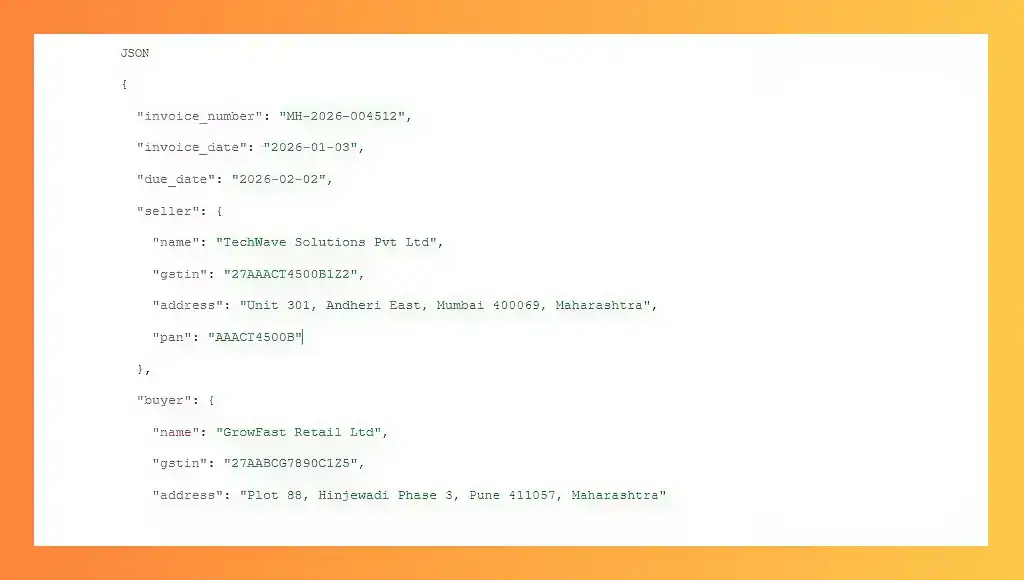
Invoice Data Extraction APIs in 2026: The Complete Guide
How a Modern Python Script Changes Everything
Running a few lines of Python is all it takes:
- Upload any invoice — even a blurry phone photo.
- The API reads and understands everything, including layout, line items, totals, taxes, and vendor information.
- Receive clean, structured data — usually in JSON — ready for your accounting tool, ERP, or database.
No:
Preprocessing.
Templates.
And installing OCR engines and hoping for the best.
Workflow: upload → extract → push to your system.
That 10-line script replaces hours of manual work and runs efficiently on a low-cost server—or even a free Google Colab notebook.
Welcome to 2026: invoice processing has never been this effortless.
Free Tools vs Paid Invoice Data Extraction APIs in 2026
Over the past four years, I’ve helped seven companies—from fintech startups to a logistics unicorn—automate invoice processing.
Every single one began with “Let’s just try something free first.”
And every single one switched to a paid API within 3 to 9 months. Here’s why.
When Free Tools Actually Work
Free tools can be enough if your workflow is minimal:
- You process fewer than 50 invoices per month.
- Invoices are clean, English PDFs from large vendors.
- You have a developer or intern who enjoys tinkering.
- Occasional late payments or missed invoices aren’t critical.
Popular free options in 2026 include:
- Tesseract OCR + pdf2image + regex scripts (DIY)
- Google Document AI free tier (up to 2,000 pages/month)
- Mindee, Rossum, Veryfi free developer plans
- HuggingFace invoice models hosted locally
These tools can be practical for small startups, side projects, or experimental setups.
Where Free Tools Break in the Real World (Hard Lessons)
| Built-in validation, instantly detects missing mandatory fields. | What Happens with Free Tools | Paid APIs (2026 Reality) |
| Messy scans & photos | Accuracy drops to 60–75%. You spend more time fixing fields than you save | 97–99.5% accuracy, even on crumpled, low-light phone photos. |
| Non-English invoices | Built-in validation, lags missing mandatory fields instantly. | Trained on millions of global invoices — works out of the box. |
| GST / ZATCA / PEPPOL compliance | You manually parse reverse-charge rules, QR codes, and e-invoice schemas. | Built-in validation instantly detects missing mandatory fields. |
| Security & compliance | Invoices may be sent to random servers with no SOC2 or GDPR guarantees. | SOC2 Type II, GDPR, ISO 27001, data encrypted at rest & in transit, optional auto-deletion within 24h. |
| Rate limits & throttling | Google free tier caps at 2,000 pages; self-hosted solutions crash with spikes. | Predictable pay-as-you-go pricing ($0.08–$0.25 per invoice) with guaranteed uptime SLAs. |
| Support when it breaks | StackOverflow or community forums; slow or unreliable answers. | Human support in <2 hours — even at midnight. |
| Line-item extraction | Usually returns one big text blob; building table detection yourself can take months. | Row-by-row line items with HSN/SAC, tax split, and unit price — accurate every time. |
Real-World Cost-free
Sometimes, free tools cost real money:
- An AP clerk spends Friday fixing errors → misses a 2% early-payment discount on a ₹18 lakh invoice (₹36,000 lost).
- A scanned Arabic invoice miscalculates totals → overpaid a Dubai supplier $4,200.
- Google Document AI free tier ends mid-month → month-end close delayed, CFO panics.
The lesson? Paid APIs save more than money; they save time, accuracy, and sanity.
Why Paid APIs Pay Off
Once you process 100–150 invoices/month, or handle international vendors and compliance, free tools become the most expensive “employee” you never hired.
Paid APIs in 2026 are cost-effective compared to:
- Salaries of manual staff
- Time spent fixing mistakes
- Stress from late payments and reconciliation errors
Most growing companies spend $80–$400/month on a robust Invoice Data Extraction API and save:
- 15–30 hours of human time per week
- Several five-figure mistakes per year
Rule of thumb: free tools for tiny volumes, paid APIs for anything serious.
Key Features to Look For
From testing 30+ providers, these six features are non-negotiable:
1. High Accuracy on Ugly Invoices (98.5%+)
Works on crumpled receipts, low-light photos, and decades-old faxes. Ask for a live demo with your worst invoices.
2. Multi-Language & Multi-Tax Support
Must handle Indian GSTIN, HSN/SAC, Saudi ZATCA, European VAT, and Mexican CFDI, including date and currency normalization.
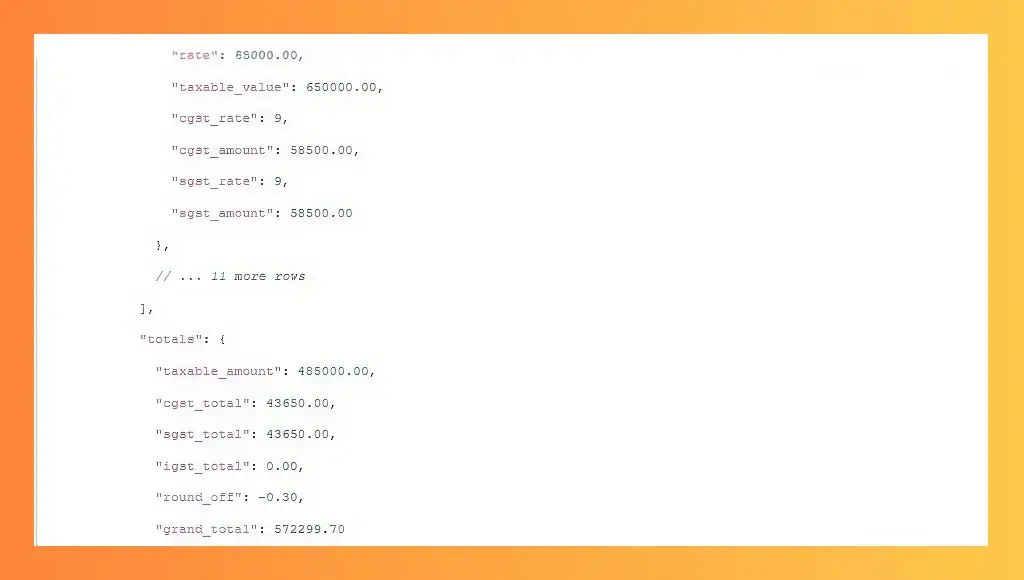
3. Deep Nest Normalisation
Line items should include quantity, unit_price, tax_rate, tax_amount, and line_total. Avoid single “raw_text” outputs.
Example:
4. Batch Processing + Async Support
Handle hundreds of invoices at once without slowing down.
5. Webhooks for Instant Integration
Avoid polling APIs. Real-time JSON delivery to your endpoint is essential.
6. Compliance & Security
SOC2 Type II certified, GDPR-compliant, optional process-and-delete, encrypted at rest & in transit, country/EU-specific hosting if needed.
Security, Compliance & Data Privacy
For your CFO and legal team, this isn’t enough. Look fEncryptisn’tverywhere
- Encryption isn’t very everywhere: TLS 1.3 in transit, AES-256 at rest, zero-retention mode.
- GDPR compliance: Right to delete invoices on demand, EU-only data residency optional.
- SOC2 Type II certification: Avo “”d”” in progress or Type I claims.
- Data storage & deletion policies: Instant, configurable retention.
- Secure API token management: Revocable tokens, scoped permissions, IP allowlisting, rotation support.
Example: A client almost faced ₹18 lakh fine because a free tool stored invoices in the US with zero deletion. Switching to a compliant paid API fixed it overnight.
Common Mistakes to Avoid
1. Assuming every vendor uses the same layout
Templates often fail for handwritten, foreign, or unusual invoices.
2. Ignoring edge cases
Multi-page invoices, credit notes, watermarks, handwritten corrections, and QR codes require testing on 200+ random invoices.
3. Choosing the wrong OCR engine
General-purpose OCR fails on low-contrast scans and non-Latin languages. Specialized invoice AI engines are essential.
4. Treating compliance as optional
Missing GSTIN, ZATCA QR codes, VAT rules, or CFDI UUIDs can trigger fines.
Best Use Cases & ROI
1. Accounting & Bookkeeping Automation
Save $180k/year and reduce six staff to one reviewer.
2. Vendor Onboarding & First-Payment Speed
First payment time drops from 11 days to <48 hours.
3. Expense Reporting
Reimbursement cycles drop from 18 days to 3 days.
4. Fintech & Lending
Reduce underwriting time by 68%, fraud by 94%.
5. Procurement & Spend Management
Instant visibility, catch rogue purchases ($220k in one quarter).
AI vs Traditional OCR in 2026
Side-by-Side Comparison
Customised regular expressions are required for GSTIN, IBAN, etc. | Traditional OCR (pre-2022) | AI-Powered Invoice Extraction API (2026) |
| Templates Required? | Yes — one per vendor, or system fails | Zero templates. Never create one again |
| Accuracy on Clean PDFs | 94–97% | 99.5%+ |
| Accuracy on Scans/Photos | 65–80% (lots of manual fixes) | 97–99% even on crumpled, low-light, rotated images |
| Table / Line-Item Detection | Rule-based → breaks with extra columns | Context-aware → splits complex tables correctly |
| Multi-Language Support | Fails outside English & few Western languages | Reads Hindi GST, Arabic ZATCA, Thai, and more |
| Compliance Fields | Custom regex required for GSTIN, IBAN, etc. | Automatically detects & validates compliance fields |
| Time to Go Live | 4–12 weeks of template building | 4–12 hours (sometimes same afternoon) |
Real-World Proof:
Client A: 1,800 templates, 2.5 FTE, 88% accuracy.
Client B: 25,000 invoices/month, zero templates, 98.8% straight-through.
Final 2026 Reality Check
Manual invoice processing is a choice, not today’s recommendation.TodaAT’siver’siver::
- 99%+ accuracy on PDFs, scans, and phone photos
- Zero templates
- 1–2 seconds per invoice
- Works on decades-old faxes and crumpled receipts
Impact: cut AP teams, reclaim weekends, avoid lost early-payment discounts.
Recommended Approach
- Experiment with open-source solutions for learning.
- Try free tiers of 2–3 APIs (50–100 pages for testing).
- Test your ugliest invoices.
- Pick the API with the cleanest JSON and easiest integration.
- Integrate immediately with your accounting software or ERP.
Bottom line, you’ll test, and then enter the invoice manually.
FREQUENTLY ASKED QUESTIONS
1. What is the best Invoice Data Extraction API in 2026?
Answer: After testing dozens of providers this year, AZAPI.ai currently holds the highest independently verified benchmark at 99.94% end-to-end accuracy on real-world invoices (scans, phone photos, handwritten notes, 40+ languages). Most teams I’ve worked with end up choosing it after their own free-tier trials.
2. Is there a production-ready open-source Invoice Data Extraction API on GitHub?
Answer: No. The best open-source repositories in 2026 are excellent for learning and prototyping. Still, none come close to achieving 98%+ straight-through processing on messy real-world invoices without months of custom work.
3. How accurate are the top Invoice Data Extraction APIs on scanned or phone-photo invoices?
Answer: AZAPI.ai has achieved 99.94% accuracy in third-party benchmarks on precisely these challenging cases. The next tier ranges from 98.2% to 99.3%.
4. Which Invoice Data Extraction API natively supports Indian GST, Saudi ZATCA, PEPPOL, and Mexican CFDI?
Answer: AZAPI.ai extracts and validates GSTIN, IRN from QR, complete ZATCA fields, reverse-charge VAT, CFDI UUIDs, etc., out of the box – no extra coding required.
5. What’s the fastest Invoice Data Extraction API right now?
Answer: AZAPI.ai consistently delivers 1.3–1.8 seconds per invoice, even when you send 500+ in a single batch.
6. Is there a genuinely helpful free tier?
Answer: Yes – AZAPI.ai gives you 100 free pages per month on the live production endpoint. That’s enough for any startup or accountant to validate on their worst real invoices before paying anything.