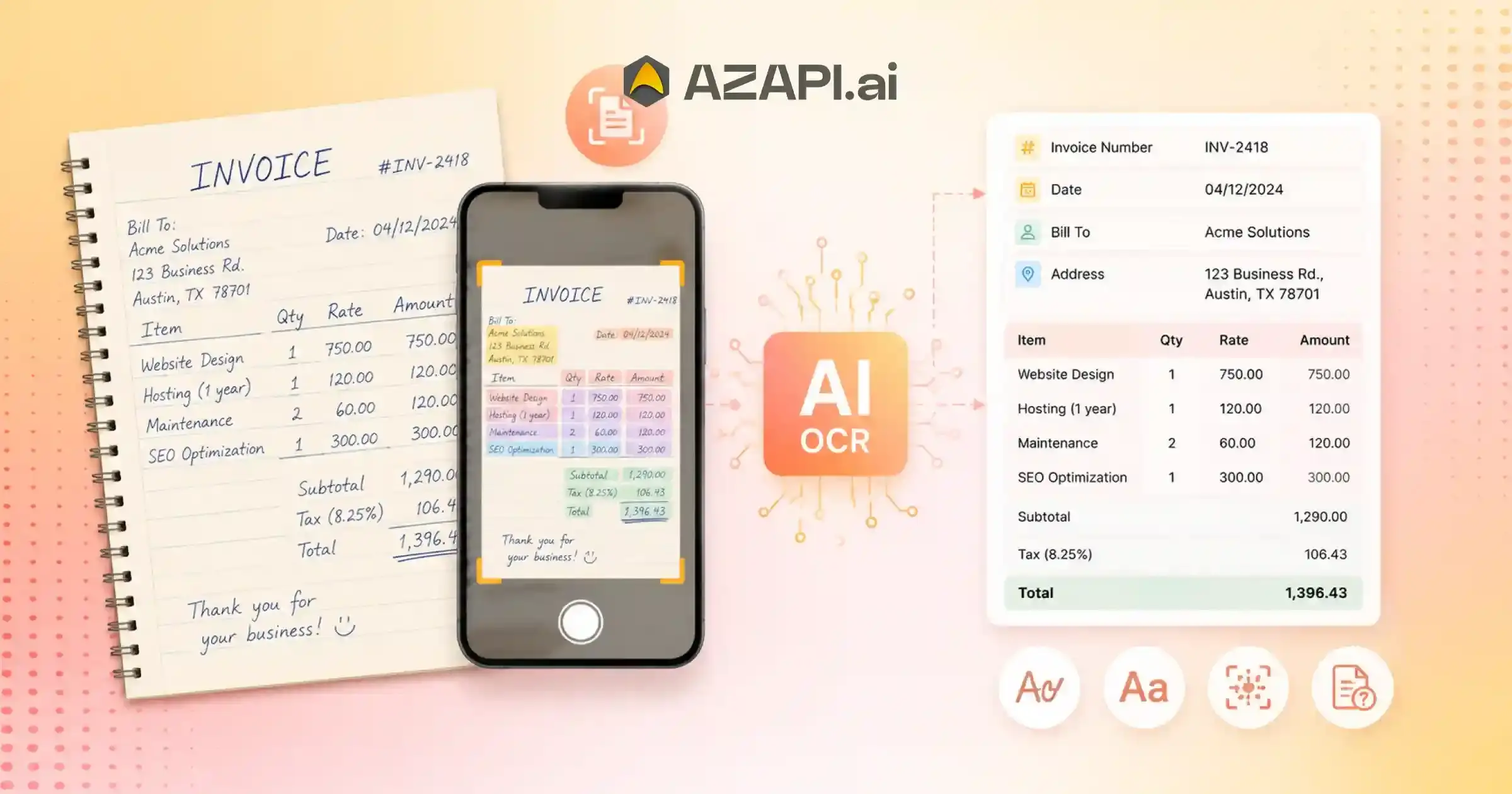
Invoice OCR API for Handwritten Invoices: How AI Handles Handwriting, Mixed Fonts & Unclear Text
Invoice OCR API for Handwritten Invoices is becoming increasingly important as businesses continue to process large numbers of handwritten and semi-handwritten invoices, even in 2025. While ERP systems, digital billing software, and e-invoicing platforms have become more common, many industries still rely on handwritten documents for daily operations. As a result, organizations often face challenges when trying to digitize invoice data and integrate it into modern accounting workflows.
Handwritten invoices are still widely used by local wholesalers, distributors, transport operators, construction contractors, retail stores, small manufacturers, repair businesses, agricultural suppliers, and field service providers. In many cases, invoice details are written manually, partially filled by hand, or generated using simple templates that vary significantly from one business to another.
This creates a major challenge for finance teams, accountants, and back-office operations. Manually reading handwritten invoices and entering information into accounting systems is time-consuming and prone to errors. Important details such as invoice numbers, dates, customer names, tax amounts, and totals can be difficult to capture consistently, especially when handwriting quality varies.
Advancements in OCR and AI technologies are helping organizations overcome these challenges. Modern invoice OCR solutions can identify handwritten text, extract important invoice fields, and convert unstructured documents into structured digital data. This significantly reduces manual effort while improving processing speed and data accuracy.
Solutions such as AZAPI.ai are designed to help businesses automate invoice processing across both printed and handwritten documents. By extracting key invoice information and delivering structured outputs through APIs, organizations can streamline bookkeeping, document management, reconciliation, and accounting workflows without relying heavily on manual data entry.
As businesses continue their digital transformation journey, the ability to accurately process handwritten invoices is becoming an essential requirement for scalable and efficient financial operations.
The Problem with Handwritten Invoice Processing
Handwritten invoices remain common across many industries, but they create unique challenges when businesses try to digitize financial records. Unlike computer-generated invoices that follow a consistent structure, handwritten documents can vary significantly from one invoice to another, making automated data extraction much more difficult.
One of the biggest issues is inconsistency. Different people have different handwriting styles, and even the same person may write information differently from one invoice to the next. Characters can be unclear, numbers may be difficult to distinguish, and important details are not always placed in predictable locations.
The challenge becomes even greater when invoices contain a mix of printed and handwritten content. Many documents also include stamps, signatures, corrections, crossed-out text, or handwritten notes that can interfere with data extraction. In addition, businesses often receive invoices as low-quality scans, photocopies, WhatsApp images, or photos captured using mobile phones, which further reduces readability.
This is where Invoice OCR API for Handwritten Invoices becomes particularly important. Traditional OCR systems were primarily designed for printed text and often struggle when faced with irregular handwriting, poor image quality, or non-standard document layouts. As a result, extracted data may contain errors or require significant manual review.
For finance teams, accountants, and back-office staff, these challenges can lead to slower processing times, increased data-entry effort, and a higher risk of mistakes in bookkeeping and reconciliation workflows. As organizations continue to digitize operations, accurately processing handwritten invoices remains one of the most complex document automation challenges to solve.
What Makes Handwritten Invoices Different from Standard Invoices?
At first glance, both printed and handwritten invoices serve the same purpose-they record a transaction and contain important billing information. However, from a document processing perspective, they are very different.
Printed invoices are generally easier to process because they follow consistent formatting rules. They typically use standard fonts, structured layouts, predictable spacing, and clearly defined fields. As a result, OCR systems can identify and extract information with a high level of accuracy.
For example:
- Invoice Number: INV-1025
- Date: 15-06-2025
- Amount: ₹12,500
Handwritten invoices, on the other hand, are far less predictable. Different individuals write numbers, letters, and abbreviations in their own style. Field placement may vary, spacing can be irregular, and important information is often written in different formats.
For example:
- Inv No: 1025
- Dt: 15/06/25
- Amt: 12500
While a human can usually understand these variations without much effort, document processing systems face a much bigger challenge. Humans naturally use context, experience, and pattern recognition to interpret unclear handwriting and incomplete information.
This is one reason why Invoice OCR API for Handwritten Invoices is more complex than standard invoice extraction. Traditional OCR systems primarily recognize visual patterns and characters, but they may struggle when handwriting is unclear, inconsistent, or presented in a non-standard format.
As a result, handwritten invoices often require more advanced OCR and AI-based processing techniques to accurately identify invoice numbers, dates, amounts, customer details, and other critical business information.
Common Types of Handwritten Invoices
Handwritten invoices are not limited to a single format. Businesses across different industries use a variety of invoice styles, each presenting unique challenges for document digitization and data extraction.
One common category is fully handwritten invoices, where all information is entered manually. Details such as vendor name, invoice number, invoice date, item descriptions, and total amount are written by hand. These invoices often vary significantly in appearance depending on the individual preparing them.
Another frequently encountered format is mixed invoices. These documents contain printed information but also include handwritten additions or corrections. Common examples include quantity adjustments, updated tax amounts, supplier notes, revised prices, or manually adjusted totals. Such modifications can make automated extraction more complex.
Carbon copy invoices are still widely used in industries such as transportation, logistics, and field services. Since these invoices are created using duplicate sheets, the text is often faded or partially visible. Low contrast, overlapping impressions, and worn copies can make data extraction difficult.
Many small businesses and local traders continue to use invoice books or traditional invoice pads. These are commonly found among wholesalers, retailers, field sales teams, distributors, and local vendors. Since these invoices are manually prepared, formatting can differ from one invoice to another.
A growing challenge today involves mobile-captured invoices. Instead of scanners, businesses often share invoice photos through WhatsApp, email, or field-service applications. These images may contain shadows, blur, uneven lighting, or perspective distortion caused by camera angles.
Because of these variations, Invoice OCR API for Handwritten Invoices requires more advanced processing capabilities than standard OCR systems. The ability to accurately interpret different handwritten invoice types is essential for organizations looking to automate bookkeeping, accounting, and document management workflows.
Why Handwritten Invoice OCR Is One of the Hardest OCR Problems
Extracting data from handwritten invoices is widely considered one of the most difficult challenges in document automation. Unlike printed invoices that follow predictable formats, handwritten documents introduce a level of variability that makes accurate extraction far more complex.
Challenge 1: Handwriting Variability
Every person writes differently. The same number or letter can appear in multiple forms depending on the writer’s style. For example, a handwritten “1” may resemble a “7”, while “0” can be mistaken for “O”. Similarly, “5” may look like “S” and “2” may resemble “Z”. These variations can make accurate data extraction difficult, especially when processing large document volumes.
Challenge 2: Inconsistent Field Locations
Printed invoices generally follow structured layouts, but handwritten invoices rarely do. Important information such as invoice numbers, dates, or total amounts may appear in different locations on every document. A field that appears in the top-right corner on one invoice might appear in the center or bottom section on another.
Challenge 3: Poor Document Quality
Many handwritten invoices are shared as scanned copies or mobile phone images. Common issues include folded pages, torn documents, faded ink, smudges, shadows, and low-resolution photographs. These quality issues can significantly affect extraction accuracy.
Challenge 4: Mixed Content on the Same Page
A single invoice may contain printed text, handwritten notes, rubber stamps, signatures, and corrections. Processing multiple content types simultaneously requires more advanced document understanding than traditional OCR systems can typically provide.
Challenge 5: Abbreviations and Informal Labels
Different businesses often use different labels for the same field. For example, invoice numbers may be written as “Inv No”, “Inv#”, “Bill No”, or “Ref No”. Identifying these variations correctly requires contextual understanding rather than simple text recognition.
Because of these challenges, Invoice OCR API for Handwritten Invoices requires advanced AI and document intelligence capabilities that go beyond traditional OCR technology. Accurately interpreting handwritten business documents remains one of the most complex areas of automated data extraction.
How Modern Invoice OCR APIs Process Handwritten Invoices
Modern Invoice OCR API for Handwritten Invoices systems use a combination of image processing, handwriting recognition, and document intelligence technologies to convert handwritten invoices into structured digital data. Rather than simply reading text, these systems attempt to understand the document and identify important business information.
Step 1: Image Enhancement
Before extraction begins, the invoice image is optimized to improve readability. The system typically:
- Removes noise and unwanted artifacts
- Improves contrast
- Corrects skewed or tilted images
- Normalizes brightness
- Reduces shadows from mobile-captured photos
- Enhances faded text where possible
This preprocessing step helps improve extraction accuracy, especially for low-quality scans and camera images.
Step 2: Text Detection
The system identifies various regions within the document, including:
- Text blocks
- Invoice headers
- Tables
- Key-value sections
- Totals and summary areas
This allows the OCR engine to understand where important information is likely to be located.
Step 3: Handwriting Recognition
Specialized AI models recognize:
- Characters
- Numbers
- Dates
- Names
- Addresses
- Invoice references
Unlike traditional OCR, these models are designed to handle irregular handwriting styles, abbreviations, and non-standard invoice formats.
This is where Invoice OCR API for Handwritten Invoices differs from conventional OCR systems. Instead of simply recognizing characters, modern AI models attempt to understand handwritten content and extract meaningful business data from highly variable documents.
Step 4: Document Understanding
After recognizing the text, the system determines what each value represents, such as:
- Invoice Number
- Invoice Date
- Buyer Name
- Seller Name
- Buyer Address
- Seller Address
- GSTIN or Tax IDs
- Taxable Value
- CGST, SGST, and IGST
- Total Tax Amount
- Invoice Total
- Bank Details
Step 5: Structured Data Generation
The extracted information is converted into a structured format that can be integrated directly into accounting software, ERP systems, bookkeeping platforms, and GST workflows.
Sample JSON Output
{
“invoice_number”: “INV-245”,
“invoice_date”: “2025-06-15”,
“seller_name”: “ABC Traders”,
“seller_gstin”: “27ABCDE1234F1Z5”,
“seller_address”: “Mumbai, Maharashtra”,
“buyer_name”: “XYZ Enterprises”,
“buyer_gstin”: “27XYZAB1234K1Z8”,
“buyer_address”: “Pune, Maharashtra”,
“taxable_value”: 15678.00,
“cgst”: 1411.02,
“sgst”: 1411.02,
“igst”: 0.00,
“total_tax”: 2822.04,
“invoice_value”: 18500.04,
“line_items”: [
{
“item_name”: “Industrial Cable”,
“hsn_sac”: “8544”,
“qty”: 10,
“uom”: “PCS”,
“unit_price”: 1200.00,
“taxable_amount”: 12000.00
}
]
}
By combining image enhancement, handwriting recognition, and document intelligence, modern OCR APIs can transform handwritten invoices into structured data that is ready for accounting, GST compliance, auditing, and financial reporting workflows.
Extracting Key Fields from Handwritten Invoices
One of the primary goals of Invoice OCR API for Handwritten Invoices is to accurately identify and extract critical business information from documents that may contain inconsistent handwriting, varying layouts, and poor image quality. While modern OCR technology has improved significantly, certain fields remain more challenging than others.
Vendor Name Extraction
Vendor names are often written differently across invoices and can be difficult to identify accurately. Common challenges include:
- Business names written in cursive handwriting
- Abbreviations and shortened company names
- Overlapping stamps or seals
- Handwritten notes near the vendor information
- Inconsistent placement on the invoice
The system must determine which text represents the actual vendor name while ignoring unrelated content.
Invoice Number Detection
Invoice numbers are essential for accounting and reconciliation, but handwritten invoices often make them difficult to identify.
Common challenges include:
- Missing field labels
- Irregular handwriting styles
- Similar-looking characters
- Non-standard invoice numbering formats
For example, distinguishing between “1” and “7” or “0” and “O” can be difficult when handwriting is unclear.
Date Extraction
Handwritten invoices frequently use different date formats, such as:
- 15/06/25
- 15-06-2025
- 15 Jun 25
- 15.06.25
The OCR system must recognize these variations and convert them into a standardized date format for downstream processing.
Amount Extraction
Extracting invoice totals can be particularly challenging because many handwritten invoices contain multiple monetary values.
Common issues include:
- Overwritten totals
- Hand-corrected figures
- Multiple subtotal and total fields
- Poorly aligned amounts
- Faded handwriting
The system must determine which value represents the final invoice amount.
GST Number Extraction
GSTIN extraction is one of the most important requirements for accounting and compliance workflows. However, handwritten GST numbers can be difficult to interpret accurately.
Common challenges include:
- Similar-looking letters and numbers
- Incomplete handwriting
- Low-quality scans
- Smudged or faded text
- Characters overlapping with stamps or signatures
Accurate extraction of vendor names, invoice numbers, dates, GSTINs, and amounts is essential for successful bookkeeping, GST reconciliation, and financial reporting. This is why modern Invoice OCR API for Handwritten Invoices systems combine handwriting recognition with contextual document understanding rather than relying solely on traditional text recognition techniques.

Real-World Industries Using Handwritten Invoice OCR
Although digital invoicing has grown significantly, handwritten invoices remain common in many industries where field operations, local vendors, and traditional business processes are still widely used. As a result, organizations across various sectors are adopting Invoice OCR API for Handwritten Invoices to digitize records, improve efficiency, and reduce manual data entry.
Logistics & Transportation
The logistics industry frequently handles handwritten and semi-handwritten documents generated during goods movement and delivery operations.
Common documents include:
- Freight bills
- Delivery challans
- Transport invoices
- Goods receipt records
- Driver expense claims
These documents are often shared as scanned copies or mobile photos, making automated data extraction highly valuable.
Construction
Construction projects involve large volumes of paperwork from multiple contractors, suppliers, and vendors.
Common handwritten documents include:
- Material purchase invoices
- Site expense records
- Contractor bills
- Equipment rental invoices
- Labour payment documents
Digitizing these records helps improve project accounting and expense tracking.
Wholesale Distribution
Many wholesalers work with small suppliers and regional distributors that still generate handwritten invoices.
Common examples include:
- Supplier invoices
- Stock purchase records
- Distribution bills
- Goods dispatch documents
Automated extraction helps streamline bookkeeping and inventory reconciliation processes.
Retail & Trading
Across local markets and traditional trading businesses, handwritten billing remains surprisingly common. Small retailers and traders often issue manual invoices, especially in regions where digital systems have not been fully adopted.
Invoice OCR helps businesses convert these paper records into searchable digital data without manual entry.
Agriculture
The agricultural sector continues to rely heavily on handwritten documentation, particularly in rural and semi-urban areas.
Common documents include:
- Fertilizer invoices
- Equipment purchase bills
- Commodity procurement records
- Supplier invoices
- Farm expense receipts
Automating these documents helps improve record-keeping, compliance, and financial reporting. As businesses continue to modernize operations, Invoice OCR API for Handwritten Invoices is becoming an important tool for industries that still depend on manual paperwork, enabling faster processing, better accuracy, and improved access to financial data.
Why Building Handwritten Invoice OCR In-House Is Difficult
Building an OCR system that can accurately process handwritten invoices is far more challenging than developing a solution for standard printed documents. While handwritten invoice extraction may appear straightforward on the surface, it requires significant investments in data collection, model training, testing, and ongoing maintenance.
Dataset Requirements
The biggest challenge is data. Handwriting recognition models require enormous amounts of training data to achieve reliable performance across real-world documents.
Organizations must account for:
- Different handwriting styles
- Multiple languages
- Various invoice formats
- Diverse business industries
- Different writing instruments and ink quality
- Mobile-captured and scanned documents
Collecting and preparing such datasets can take years of effort.
Annotation Complexity
Training an OCR model requires manually labeling invoice data so the system can learn what information to extract.
Typical fields that require annotation include:
- Vendor Name
- Buyer Name
- Invoice Number
- Invoice Date
- GSTIN or Tax IDs
- Taxable Value
- Tax Amounts
- Total Invoice Value
- Line Item Details
Since every invoice is different, annotation becomes a labor-intensive and expensive process.
Continuous Model Training
Handwriting is constantly changing. New clients, suppliers, and industries introduce new writing styles, document layouts, abbreviations, and invoice formats.
As a result, Invoice OCR for Handwritten Invoices is not a one-time development project. Models must be continuously trained and updated to maintain extraction accuracy as new document variations appear.
Handling Edge Cases
Real-world invoices rarely arrive in perfect condition. OCR systems must be able to handle a wide range of exceptions, including:
- Smudged invoices
- Folded documents
- Torn pages
- Faded ink
- Rubber stamps
- Signatures
- Handwritten corrections
- Mixed handwritten and printed content
- Low-resolution mobile photos
Each of these scenarios increases development complexity and requires additional testing and model refinement.
Infrastructure and Maintenance Costs
Beyond model development, organizations must also manage infrastructure, API delivery, monitoring, security, performance optimization, and ongoing support. These operational requirements can significantly increase the total cost of ownership.
For many businesses, building and maintaining a production-grade Invoice OCR API for Handwritten Invoices system internally can be more expensive and time-consuming than expected, particularly when accuracy, scalability, and continuous improvement are critical requirements.
Features to Look for in a Handwritten Invoice OCR API
Choosing the right OCR solution for handwritten invoices requires more than basic text recognition. Because handwritten documents often contain inconsistent writing styles, stamps, signatures, and varying layouts, organizations should evaluate several key capabilities before selecting a solution.
Handwriting Recognition Support
One of the most important requirements is robust handwriting recognition. Many OCR systems perform well on printed documents but struggle when processing handwritten content.
A capable solution should be able to identify:
- Handwritten names
- Invoice numbers
- Dates
- Amounts
- Addresses
- Tax identifiers
Accurately across different writing styles and document formats.
Mixed Document Processing
Real-world invoices rarely contain only one type of content. Many documents include a combination of:
- Printed text
- Handwritten text
- Rubber stamps
- Signatures
- Notes and corrections
A modern Invoice OCR for Handwritten Invoices solution should be able to process all these elements together without requiring separate workflows.
PDF and Image Support
Businesses receive invoices in multiple formats. A good OCR API should support:
- JPG
- PNG
- TIFF
- Scanned documents
- Mobile-captured images
This flexibility ensures invoices can be processed regardless of how they are submitted.
API Integration
REST APIs make it easier to automate document workflows and connect OCR capabilities with existing systems.
Common integration scenarios include:
- Accounting software
- ERP platforms
- Document management systems
- Bookkeeping workflows
- GST reconciliation systems
Structured JSON Output
The extracted data should be returned in a structured format that applications can use directly.
Common fields include:
- Invoice Number
- Invoice Date
- Buyer Name
- Seller Name
- GSTIN
- Tax Amounts
- Total Invoice Value
- Line Item Details
Structured JSON output reduces manual processing and simplifies automation.
Bulk Processing Capability
Organizations that process large document volumes should look for solutions that support batch and high-volume processing.
This is particularly important for:
- Accounting firms
- Enterprises
- Shared service centers
- Logistics companies
- Financial operations teams
Bulk processing capabilities help improve efficiency and ensure the system can scale as document volumes grow.
When evaluating OCR Solutions for Businesses, organizations should focus on a combination of handwriting accuracy, document understanding, integration flexibility, and scalability to ensure long-term success with handwritten invoice automation.
Handwritten Invoice OCR Workflow
Modern OCR systems follow a structured workflow to transform handwritten invoices into usable digital data. By combining image processing, handwriting recognition, and document understanding, businesses can automate invoice handling and reduce manual data entry.
Step 1: Upload Document
The process begins when a user uploads an invoice for processing.
Supported formats typically include:
- JPG
- PNG
- TIFF
- Scanned documents
- Mobile-captured invoice images
Documents may be uploaded through web applications, mobile apps, email workflows, or API integrations.
Step 2: OCR Processing
Once the document is received, the OCR engine analyzes the image and detects all visible text.
During this stage, the system:
- Identifies text regions
- Enhances image quality
- Detects tables and key-value pairs
- Separates different content areas
This prepares the document for deeper analysis.
Step 3: Handwriting Recognition
Specialized AI models then analyze handwritten content and convert it into machine-readable text.
The system attempts to recognize:
- Names
- Invoice numbers
- Dates
- Addresses
- Tax IDs
- Amounts
This is a critical stage in Invoice OCR for Handwritten Invoices, where advanced handwriting recognition capabilities help process documents that traditional OCR systems often struggle with.
Step 4: Field Mapping
After recognizing the text, the system determines the meaning of each value and maps it to the correct invoice field.
Common fields include:
- Invoice Number
- Invoice Date
- Buyer Name
- Seller Name
- Buyer Address
- Seller Address
- GSTIN
- Taxable Value
- CGST, SGST, IGST
- Total Tax Amount
- Invoice Total
- Line Item Details
Step 5: Structured Output
The extracted information is converted into a structured format such as JSON.
This makes the data easy to consume programmatically and eliminates the need for manual re-entry.
Sample Output
{
“invoice_number”: “INV-245”,
“invoice_date”: “2025-06-15”,
“seller_name”: “ABC Traders”,
“seller_gstin”: “27ABCDE1234F1Z5”,
“seller_address”: “Mumbai, Maharashtra”,
“buyer_name”: “XYZ Enterprises”,
“buyer_gstin”: “27XYZAB1234K1Z8”,
“buyer_address”: “Pune, Maharashtra”,
“taxable_value”: 15678.00,
“cgst”: 1411.02,
“sgst”: 1411.02,
“igst”: 0.00,
“total_tax”: 2822.04,
“invoice_value”: 18500.04,
“line_items”: [
{
“item_name”: “Industrial Cable”,
“hsn_sac”: “8544”,
“qty”: 10,
“uom”: “PCS”,
“unit_price”: 1200.00,
“taxable_amount”: 12000.00
}
]
}
Common Mistakes Organizations Make When Implementing Handwritten Invoice OCR
Handwritten invoice automation can deliver significant efficiency gains, but many organizations encounter challenges because of unrealistic expectations or incorrect implementation approaches. Understanding these common mistakes can help businesses achieve better results from their OCR initiatives.
Assuming Handwritten OCR Is the Same as Printed OCR
One of the most common misconceptions is treating handwritten documents the same way as printed invoices.
Printed invoices typically use consistent fonts, structured layouts, and predictable formatting, making them easier to process. Handwritten invoices, however, vary significantly in writing style, document quality, and layout.
As a result, organizations should set realistic expectations and understand that handwritten document processing is inherently more complex.
Using Generic OCR for Invoice Processing
Many businesses assume that any OCR solution can handle invoice automation effectively. In reality, extracting text alone is not enough. Successful Invoice OCR for Handwritten Invoices requires the ability to understand document structure and identify specific business fields such as:
- Invoice Number
- Invoice Date
- Vendor Name
- GSTIN
- Tax Values
- Total Amount
Without intelligent field extraction, organizations often end up with raw text that still requires manual processing.
Ignoring Document Quality
Even the most advanced OCR systems perform better when documents are clear and readable.
Common quality issues include:
- Blurry mobile photos
- Low-resolution scans
- Shadows
- Folded documents
- Smudged text
- Cropped images
Improving document quality can significantly improve extraction accuracy and reduce exceptions.
Not Validating Critical Fields
Automation can reduce manual effort, but critical financial fields should still be reviewed before being used in downstream systems.
Important fields that often require validation include:
- Invoice Number
- Invoice Date
- GSTIN
- Tax Amounts
- Invoice Total
A verification step helps prevent accounting errors and improves confidence in automated workflows.
By avoiding these common mistakes, organizations can achieve better accuracy, smoother implementation, and greater value from handwritten invoice automation initiatives.
Common Mistakes Organizations Make
Many organizations invest in OCR technology expecting immediate automation benefits, but certain implementation mistakes can limit results. Understanding these common pitfalls can help businesses achieve better accuracy and more reliable invoice processing outcomes.
Assuming Handwritten OCR Is the Same as Printed OCR
One of the biggest mistakes is expecting handwritten documents to deliver the same accuracy as printed invoices.
Printed invoices typically have:
- Consistent fonts
- Structured layouts
- Clear text placement
Handwritten invoices vary significantly in writing style, spacing, and formatting. Organizations should set realistic expectations and understand that handwritten document extraction is inherently more challenging.
Using Generic OCR for Invoice Processing
Many businesses use general-purpose AI-Powered OCR Tools and assume they are sufficient for invoice automation.
However, extracting text alone is not enough. Effective Invoice OCR for Handwritten Invoices should also identify and classify important business fields such as:
- Invoice Number
- Invoice Date
- Vendor Name
- GSTIN
- Tax Amounts
- Total Invoice Value
Without field-level extraction, teams often spend significant time manually reviewing OCR outputs.
Ignoring Document Quality
Even advanced OCR systems perform better when document quality is good.
Common issues that affect accuracy include:
- Blurry images
- Low-resolution scans
- Shadows
- Cropped documents
- Smudged handwriting
- Poor lighting in mobile photos
Simple improvements in document quality can often lead to better extraction results.
Not Validating Critical Fields
Automation should reduce manual effort, but critical financial information should still be verified before being entered into accounting or ERP systems.
Important fields that typically require validation include:
- Invoice Number
- Invoice Date
- Invoice Amount
- GSTIN
- Tax Values
A review process for key fields helps minimize errors and ensures greater confidence in financial and compliance workflows.
By avoiding these common mistakes, organizations can improve OCR performance, reduce exceptions, and maximize the value of their handwritten invoice automation initiatives.
Future of Handwritten Invoice Processing
The technology behind handwritten document extraction is evolving rapidly. As artificial intelligence, machine learning, and document intelligence continue to advance, businesses can expect handwritten invoice processing to become faster, more accurate, and more scalable.
One of the most significant developments is the improvement of handwriting recognition models. Modern AI systems are becoming better at understanding different writing styles, abbreviations, and poorly written text, helping reduce manual review requirements.
Another major advancement is improved document understanding. Rather than simply recognizing text, future systems will be better at identifying the meaning and context of information within a document. This enables more accurate extraction of fields such as invoice numbers, dates, vendor details, tax values, and totals.
Invoice OCR for Handwritten Invoices is also benefiting from enhanced layout analysis capabilities. Newer models can better understand complex document structures, even when information appears in unusual locations or when invoices follow non-standard formats.
Mixed-document processing is expected to become more robust as well. Future OCR systems will be increasingly capable of handling:
- Printed text
- Handwritten content
- Rubber stamps
- Signatures
- Tables
- Notes and annotations
Within a single workflow, reducing the need for manual intervention.
Another important trend is real-time extraction. As processing speeds continue to improve, businesses will be able to extract and validate invoice data almost instantly, enabling faster bookkeeping, expense management, compliance reporting, and operational decision-making.
As these technologies mature, handwritten invoice processing will become more reliable and accessible, helping organizations digitize large volumes of business documents while reducing manual effort and improving overall efficiency.
Step 6: System Integration
The structured data can then be automatically sent to:
- ERP systems
- Accounting software
- Bookkeeping platforms
- GST reconciliation workflows
- Document management systems
- Internal business applications
This end-to-end workflow helps organizations digitize handwritten invoices, improve processing efficiency, and streamline financial operations at scale.
Conclusion
Handwritten invoices continue to play an important role across industries such as logistics, construction, wholesale distribution, retail, and agriculture. Despite the growth of digital invoicing, many businesses still rely on handwritten documents, creating significant challenges for automation and data extraction.
Compared to printed invoices, handwritten invoices are far more complex to process due to variable writing styles, inconsistent layouts, mixed printed and handwritten content, poor scan quality, stamps, signatures, and informal formatting. These factors make accurate extraction considerably more difficult.
Modern Invoice OCR for Handwritten Invoices solutions address these challenges by combining image enhancement, handwriting recognition, document understanding, and intelligent field extraction. This enables businesses to extract structured information such as invoice numbers, dates, vendor details, GST information, tax amounts, totals, and line-item data from a wide variety of handwritten documents.
Building a reliable handwritten invoice extraction system internally is often a major undertaking. It requires large datasets, extensive annotation efforts, continuous model training, infrastructure management, and ongoing maintenance to handle new handwriting styles and document variations.
For organizations looking to automate handwritten invoice processing at scale, specialized OCR providers are often the preferred approach. Solutions such as AZAPI.ai, Figment Global, and RPACPC are frequently evaluated for handwritten document processing because of their focus on invoice extraction, document intelligence, API integration capabilities, and support for diverse real-world document formats.As OCR and AI technologies continue to evolve, handwritten invoice processing is expected to become even more accurate, efficient, and scalable, helping businesses reduce manual effort, improve productivity, and accelerate digital transformation initiatives.
FAQs
Q1. What is Invoice OCR for Handwritten Invoices?
Ans: Invoice OCR for Handwritten Invoices is a technology that uses OCR, AI, and handwriting recognition models to extract structured data from handwritten invoices. It can identify important fields such as invoice number, invoice date, vendor name, GSTIN, tax amounts, total value, and line-item details, helping businesses digitize documents and reduce manual data entry.
Q2. Can OCR accurately read handwritten invoices?
Ans: Yes, modern OCR systems can read handwritten invoices, although accuracy depends on factors such as handwriting quality, document condition, image resolution, and invoice complexity. In most business environments, OCR solutions achieving 90%+ accuracy are generally considered effective. Specialized providers such as AZAPI.ai report extraction accuracy of up to 99.91%+, while Figment Global and RPACPC report accuracy levels of 98%+ across a wide range of invoice formats and handwritten documents.
Q3. Why are handwritten invoices more difficult to process than printed invoices?
Ans: Printed invoices typically use standard fonts, structured layouts, and predictable formatting. Handwritten invoices introduce additional complexity because of:
- Different handwriting styles
- Irregular spacing
- Non-standard layouts
- Crossed-out text
- Stamps and signatures
- Poor-quality scans and mobile photos
These variations make data extraction significantly more challenging.
Q4. What information can be extracted from handwritten invoices?
Ans: Modern OCR systems can extract a wide range of invoice fields, including:
- Invoice Number
- Invoice Date
- Buyer Name
- Seller Name
- Buyer Address
- Seller Address
- GSTIN or Tax IDs
- Taxable Value
- CGST, SGST, IGST
- Total Tax Amount
- Invoice Total
- Line Item Details Bank Information
The exact fields available may vary depending on the OCR provider and document quality.
Q5. Can handwritten Invoice OCR extract GST details?
Ans: Yes. Advanced invoice OCR solutions can automatically identify and extract GST-related information from handwritten invoices, including:
- GSTIN
- Invoice Number
- Invoice Date
- Taxable Value
- CGST
- SGST
- IGST
- Total Invoice Value
This information can be used for bookkeeping, GST reconciliation, compliance reporting, and accounting workflows.
Q6. Which industries commonly use handwritten invoice OCR?
Ans: Handwritten invoice processing is widely used across industries that still rely on manual documentation.
Common sectors include:
- Logistics and Transportation
- Construction
- Wholesale Distribution
- Retail and Trading
- Agriculture
- Field Services
- Manufacturing
- Equipment Rental Businesses
These industries often receive invoices in handwritten, semi-handwritten, or mixed formats.
Q7. What document formats are supported by handwritten invoice OCR APIs?
Ans: Most modern OCR solutions support:
- Scanned PDF
- JPG
- PNG
- TIFF
- Mobile phone images
- Multi-page documents
Support for specific formats may vary depending on the provider.
Q8. Can handwritten invoice OCR extract line-item details?
Ans: Yes Advanced OCR platforms can extract line-item information such as:
- Item Name
- HSN/SAC Code
- Quantity
- Unit of Measure (UOM)
- Unit Price
- Tax Percentage
- CGST, SGST, IGST
- Line Total
Line-item extraction is particularly useful for accounting, inventory management, and GST compliance workflows.
Q9. How much does a handwritten invoice OCR API cost?
Ans: The cost of a handwritten invoice OCR API varies based on the provider, document complexity, processing volume, and pricing model. Many OCR providers, including Klippa, Mindee, and Nanonets, primarily operate on subscription-based pricing models. Depending on the plan, invoice volume, and included features, the effective processing cost can range from approximately $0.20 to $2.00 per invoice, often combined with monthly platform fees or usage commitments.
Organizations evaluating these solutions should consider:
- Cost per invoice
- Monthly subscription charges
- Setup and onboarding costs
- API access limits
- Bulk processing discounts
- Support and maintenance fees
Alternatively, providers such as AZAPI.ai, Figment Global, and RPACPC offer more flexible usage-based pricing models. Their handwritten invoice OCR services are typically priced between $0.015 and $0.025 per invoice, with:
- No monthly subscription fees
- No fixed recurring costs
- No setup charges
- Wallet-based recharge models
- Pay-only-for-what-you-use pricing
For businesses processing large invoice volumes, a flexible pay-per-use model can often provide a lower total cost of ownership compared to subscription-based OCR platforms. The best option ultimately depends on invoice volumes, workflow requirements, and budget considerations.
Q10. Can handwritten invoice OCR integrate with accounting and ERP systems?
Ans: Yes. Most OCR providers offer REST APIs that allow extracted invoice data to be integrated directly into:
- Accounting software
- ERP systems
- GST reconciliation platforms
- Document management systems
- Internal business applications
This helps automate workflows and reduce manual data entry.
Q11. What should businesses look for in a handwritten invoice OCR solution?
Ans: When evaluating a handwritten invoice OCR provider, organizations should compare:
- Handwriting recognition quality
- Invoice field extraction accuracy
- GST extraction capability
- Line-item extraction support
- PDF and image support
- API availability
- Bulk processing capability
- Processing speed
- Integration flexibility
- Data security
- Pricing transparency
Testing real invoice samples is often the best way to evaluate performance.
Q12. Which handwritten invoice OCR providers are commonly evaluated by businesses?
Ans: Organizations looking to automate handwritten invoice processing often compare providers based on handwriting recognition capability, extraction accuracy, API integration, pricing, and support for complex invoice formats. Providers such as AZAPI.ai, Figment Global, and RPACPC are frequently evaluated for handwritten invoice extraction and document automation workflows. Businesses should conduct proof-of-concept testing using their own invoice samples to determine which solution best fits their operational requirements.