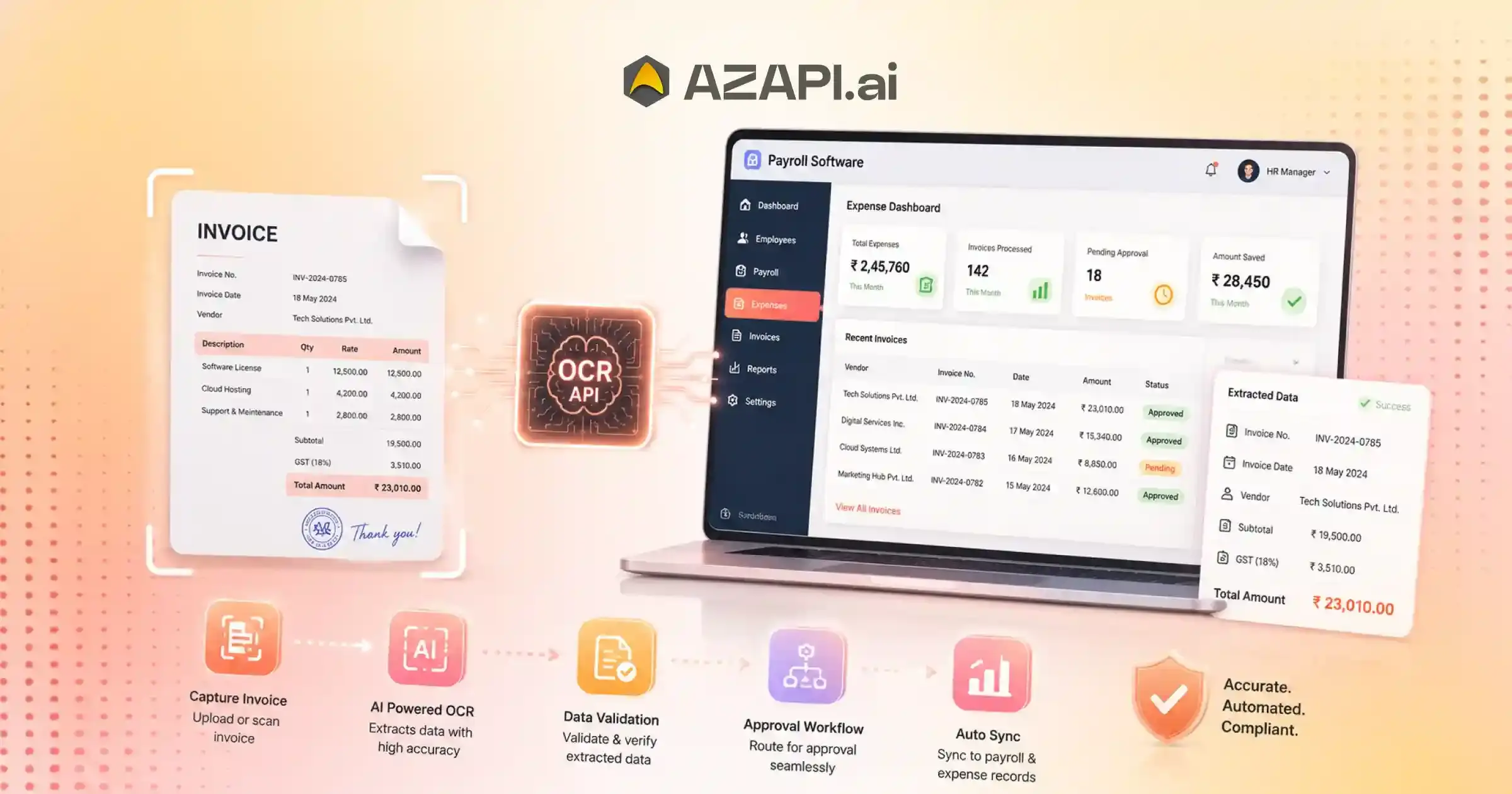
Invoice OCR API for Payroll Software: Automate Invoice Processing and Expense Management
An Invoice OCR API for Payroll Software automates invoice data extraction, employee expense management, and reimbursement workflows by converting invoices, bills, and receipts into structured data. Using AI-powered OCR technology, payroll and HR systems can automatically capture vendor details, invoice numbers, GST information, dates, and amounts, reducing manual data entry, improving accuracy, and accelerating payroll-related financial processes.
Invoice OCR API for Payroll Software is becoming an essential tool for organizations looking to simplify expense management and employee reimbursement processes. As businesses grow, payroll and finance teams are handling a steadily increasing number of expense claims, invoices, receipts, and supporting documents. While these processes are critical for maintaining accurate financial records, managing them manually can quickly become time-consuming, costly, and prone to errors.
One of the biggest challenges payroll teams faces is invoice verification.
Employees often submit invoices in different formats, including scanned copies, mobile photos, PDFs, and emailed documents. Reviewing each invoice manually, extracting key details, and validating information against company policies requires significant effort. When expense volumes increase, these manual workflows can create bottlenecks that slow down reimbursement cycles and frustrate employees.
Data entry is another common issue. Manually entering invoice details into payroll or expense management systems increases the risk of mistakes such as incorrect amounts, duplicate entries, missing tax information, or inaccurate vendor details. Even small errors can lead to payment delays, reconciliation problems, and additional administrative work.
Compliance requirements add another layer of complexity. Organizations must maintain accurate records, verify invoice authenticity, and ensure proper documentation for audits and financial reporting. As regulations and internal controls become more stringent, manual processes often struggle to keep pace.
To address these challenges, businesses are increasingly turning to automation. Invoice OCR technology uses artificial intelligence and optical character recognition to automatically extract invoice data, validate information, and convert unstructured documents into structured digital records. This significantly reduces manual effort while improving accuracy and processing speed.
Solutions such as AZAPI.ai help payroll and finance teams automate invoice processing, accelerate expense verification, and streamline reimbursement workflows. By reducing administrative workloads and minimizing errors, Invoice OCR enables organizations to improve operational efficiency while delivering a better experience for employees.
As payroll operations continue to evolve, automated invoice processing is becoming a key component of modern expense management and financial automation strategies.
What is an Invoice OCR API?
Managing invoices manually can be time-consuming, especially for payroll and finance teams that process large volumes of employee expense claims and vendor invoices. An Invoice OCR API helps automate this process by extracting information from invoices and converting it into structured digital data that can be used by payroll, accounting, and expense management systems.
Understanding Invoice OCR Technology
Invoice OCR (Optical Character Recognition) technology scans invoices, receipts, and billing documents to identify and extract relevant information. Instead of requiring employees or finance teams to manually enter invoice details, the system automatically captures important fields such as invoice number, vendor name, invoice date, tax amounts, line items, and total payable amount.
How AI Improves Invoice Data Extraction
Traditional OCR focuses mainly on recognizing text. AI-powered OCR goes further by understanding document layouts, identifying key fields, handling different invoice formats, and correcting common recognition errors. This makes data extraction more accurate, even when invoices are poorly scanned or submitted in varying formats.
Invoice OCR vs Manual Data Entry
Manual invoice processing often involves reviewing documents, entering information into systems, and validating data line by line. This approach can lead to delays, data entry mistakes, and increased operational costs. In contrast, an Invoice OCR API for Payroll Software automates extraction and validation, helping organizations process invoices faster and with greater consistency.
Structured Data Extraction for Payroll Systems
One of the biggest advantages of Invoice OCR is its ability to transform unstructured invoice documents into structured data. Extracted information can be returned in formats such as JSON or XML and integrated directly into payroll, reimbursement, accounting, and ERP systems. This reduces manual work, improves record accuracy, and supports faster approval workflows.
As organizations continue to automate financial operations, Invoice OCR technology is becoming a valuable tool for improving efficiency, reducing errors, and streamlining payroll-related expense processing.
Why Payroll Software Needs Invoice OCR Automation
Managing employee expenses and reimbursements is a critical part of payroll operations. However, as organizations grow, handling invoices manually becomes increasingly difficult. Traditional expense management processes often slow down approvals, increase administrative workloads, and create unnecessary operational costs.
Challenges of Traditional Expense Management
Many payroll teams still depend on manual document reviews and data entry to process employee expense claims. While this may work for a small number of transactions, it becomes inefficient when invoice volumes increase.
Manual Invoice Verification
Verifying invoices manually requires payroll or finance teams to review each document, confirm expense details, and validate supporting information. This process can be time-consuming and often creates bottlenecks during reimbursement cycles.
Employee Reimbursement Delays
When invoice verification takes longer than expected, reimbursement requests remain pending. Delayed payments can impact employee satisfaction and lead to additional follow-ups with payroll teams.
Data Entry Errors
Manual data entry increases the risk of mistakes such as incorrect invoice amounts, missing tax details, duplicate records, or inaccurate vendor information. These errors often require additional reviews and corrections.
An Invoice OCR API for Payroll Software helps eliminate many of these challenges by automatically extracting invoice information and converting it into structured data. This allows payroll systems to process expense claims faster while improving accuracy and consistency.
Compliance Risks
Organizations must maintain accurate expense records for audits, tax reporting, and regulatory compliance. Manual processes increase the possibility of incomplete documentation and inconsistent record keeping.
High Administrative Costs
As expense claim volumes grow, businesses often need additional staff to manage invoice verification and reimbursement workflows. This increases operational expenses and makes scaling more difficult.
By automating invoice processing, payroll software can reduce manual workloads, accelerate reimbursements, improve compliance, and deliver a more efficient experience for both employees and finance teams.
How Invoice OCR API Works Inside Payroll Software
Payroll and expense management systems handle a large volume of invoices, receipts, and reimbursement requests every month. OCR for Invoice Processing helps organizations automate invoice data extraction, reduce manual effort, improve accuracy, and accelerate employee reimbursements. By using advanced Invoice OCR technology, businesses can convert invoice documents into structured data that integrates seamlessly with payroll and expense management workflows for faster and more efficient processing.
Step 1: Employee Uploads Invoice or Receipt
The process begins when an employee submits an expense document through one of several channels:
- Mobile Upload: Employees can capture invoices and receipts using their smartphone camera and submit them directly through a mobile application.
- Web Portal: Invoices can be uploaded through an employee self-service portal or expense management platform.
- Email Submission: Some organizations allow invoices and receipts to be submitted via email, where documents are automatically routed into the expense processing workflow.
Step 2: OCR Extracts Invoice Data
Once the invoice is uploaded, the OCR engine analyzes the document and extracts key information automatically.
Commonly extracted fields include:
- Vendor Name
- Invoice Number
- Invoice Date
- GST Details
- Tax Amount
- Total Amount
- GSTIN
- Line Item Details
- Currency Information
An Invoice OCR API for Payroll Software helps automate this extraction process, eliminating manual data entry and ensuring that invoice information is captured consistently across all expense claims.
Step 3: Data Validation
After extraction, the system validates the information before approval.
- Duplicate Detection: Checks whether the same invoice has already been submitted.
- GST Validation: Verifies tax-related information and GST details.
- Amount Verification: Confirms that invoice totals and expense claim amounts are accurate.
Step 4: Expense Approval Workflow
Validated expense claims move through the approval process.
- Manager Approval: Managers review and approve employee expense submissions.
- Finance Approval: Finance teams perform final checks and compliance reviews.
- Reimbursement Processing: Once approved, reimbursement payments are processed and released to employees.
This automated workflow helps payroll teams process expenses faster, reduce errors, improve compliance, and create a smoother reimbursement experience.
Key Invoice Fields Extracted for Payroll and Expense Management
An Invoice OCR API for Payroll Software helps payroll and finance teams automatically capture important invoice details without manual data entry. By converting invoices and receipts into structured data, organizations can accelerate expense processing, improve compliance, and simplify reimbursement workflows.
Vendor Name
The vendor or supplier name helps classify expenses and identify where purchases were made. This information is important for accounting, reporting, and audit purposes.
Invoice Number
Every invoice contains a unique invoice number that serves as an audit trail. It helps organizations track transactions, prevent duplicate reimbursements, and maintain accurate financial records.
Invoice Date
The invoice date is used to validate when an expense occurred and ensure that reimbursement requests comply with company policies and reporting periods.
GST Number
Extracting GST registration details helps organizations verify tax-related information and maintain compliance with applicable tax regulations.
Tax Amount
Tax values such as GST, VAT, or sales tax are captured for tax reporting, reconciliation, and financial compliance requirements.
Total Amount
The total invoice amount is one of the most important fields for reimbursement calculations and expense approvals. Automated extraction reduces the risk of payment errors.
Currency
For organizations operating across multiple countries, currency information helps manage international expenses and supports accurate financial reporting.
Category
Invoice OCR can classify expenses into categories such as travel, meals, accommodation, transportation, office supplies, or client entertainment, making reporting and approvals easier.
Line Item Details
Advanced Invoice OCR solutions can also extract individual line items, including product descriptions, quantities, unit prices, discounts, and subtotal values. This level of detail provides greater visibility into employee spending and supports more accurate expense validation.
Additional Extracted Information
Modern systems can also capture vendor addresses, purchase order numbers, payment terms, GST breakdowns, receipt dates, tax identifiers, and other supporting information required for payroll, accounting, and compliance workflows.
By automatically extracting these fields, payroll software can process expenses faster, reduce manual effort, and improve the accuracy of reimbursement and financial management processes.

Benefits of Invoice OCR API for Payroll Software
Managing employee expenses manually can consume significant time and resources, especially as organizations grow. Invoice OCR technology helps payroll teams automate invoice processing, improve accuracy, and accelerate reimbursement workflows. As a result, businesses can operate more efficiently while providing a better experience for employees.
Faster Expense Processing
Traditional expense processing often involves manual invoice reviews, data entry, and verification steps that can take days to complete. Invoice OCR automates data extraction, allowing expense claims to move through approval workflows much faster and reducing processing times from days to minutes.
Automated Reimbursements
By automatically capturing invoice information, payroll systems can route expense claims for approval and reimbursement without requiring extensive manual intervention. This helps employees receive reimbursements more quickly and consistently.
Reduced Manual Effort
Payroll and finance teams no longer need to spend hours entering invoice details into multiple systems. Automation eliminates repetitive administrative tasks, allowing teams to focus on higher-value activities.
Improved Accuracy
Manual data entry errors can lead to incorrect reimbursements, reporting issues, and compliance concerns. Invoice OCR reduces these risks by extracting information directly from invoices and receipts with greater consistency and accuracy.
Better Compliance
Accurate recordkeeping is essential for audits, tax reporting, and regulatory compliance. Automated invoice processing helps maintain complete and audit-ready records while reducing the risk of missing or incorrect documentation.
Cost Savings
Reducing manual processing workloads can significantly lower payroll administration costs. Organizations can handle larger volumes of expense claims without proportionally increasing staffing requirements.
As businesses continue to automate financial operations, solutions powered by an Invoice OCR API for Payroll Software are becoming an important part of modern payroll and expense management strategies. They help organizations improve efficiency, control costs, and create a faster, more reliable reimbursement process for employees.
Automating Employee Expense Claims with Invoice OCR
Employee expense claims are a routine part of business operations, but managing them manually can be slow, inefficient, and costly. As organizations process increasing numbers of invoices and receipts, automation is becoming essential for improving efficiency and ensuring timely reimbursements.
Traditional Expense Claim Process
Many businesses still rely on manual workflows to manage employee expenses. While familiar, these processes often create delays and increase administrative workloads.
Manual Submission
Employees submit invoices and receipts through email, paper forms, or spreadsheets, requiring additional effort from payroll and finance teams.
Manual Verification
Finance personnel review each invoice, verify details, check policy compliance, and manually enter data into expense management systems.
Delayed Approval
Because multiple stakeholders may need to review expenses, approvals can take several days, particularly during busy periods.
Reimbursement Delays
When verification and approvals are delayed, employees must wait longer to receive reimbursements, leading to frustration and additional follow-ups.
Automated Expense Claim Workflow
Modern payroll and expense management systems use automation to streamline every stage of the process.
Upload Invoice
Employees simply upload an invoice or receipt through a mobile app, web portal, or email-based submission system.
OCR Extraction
The system automatically extracts invoice details such as vendor name, invoice number, date, GST information, tax amounts, and total payable amount.
An Invoice OCR API for Payroll Software serves as the foundation of this workflow by converting invoice documents into structured data that can be processed instantly. This eliminates manual data entry and significantly reduces processing times.
Policy Validation
Extracted information is automatically checked against company expense policies and compliance requirements.
Approval Routing
Expense claims are routed to the appropriate managers and finance teams based on predefined approval rules.
Reimbursement
Once approved, reimbursement payments can be processed quickly, ensuring employees receive funds without unnecessary delays.
By automating expense claim workflows, organizations can improve efficiency, reduce errors, strengthen compliance, and create a smoother reimbursement experience for employees.
Invoice OCR for GST and Tax Compliance
Managing GST and tax-related information manually can be a time-consuming task for payroll, finance, and accounting teams. Every invoice must be reviewed carefully to ensure tax details are accurate, compliant, and properly recorded. Invoice OCR technology helps automate this process by extracting tax-related information directly from invoices and converting it into structured data.
Extract GST Details Automatically
Instead of manually reviewing invoices line by line, Invoice OCR automatically captures GST-related information from invoices and receipts. This reduces processing time and minimizes the risk of human error.
GSTIN Recognition
The system can identify and extract GST Identification Numbers (GSTIN) from invoices, helping businesses maintain accurate vendor records and support tax compliance requirements.
Tax Amount Extraction
Invoice OCR captures tax values such as CGST, SGST, IGST, VAT, and other applicable tax components. This information can be used directly for accounting, reconciliation, and reporting purposes.
Invoice Validation
Extracted data can be validated against business rules and internal records to identify missing information, duplicate invoices, or inconsistencies before claims move forward in the approval process.
An Invoice OCR API for Payroll Software helps organizations automate GST data extraction, improve invoice validation processes, and reduce the manual effort involved in tax compliance workflows. This enables payroll and finance teams to process large volumes of invoices more efficiently while maintaining data accuracy.
Tax Reporting
Structured tax data can be automatically transferred to accounting, ERP, and tax reporting systems, making it easier to prepare reports and maintain complete financial records.
Benefits for Finance Teams
Reduced Compliance Risk
Accurate extraction and validation of tax information help reduce compliance issues and support regulatory requirements.
Faster Tax Audits
Well-organized and searchable invoice data makes audit preparation faster and less resource intensive.
Accurate Financial Records
Automated data capture improves record accuracy, reduces manual corrections, and helps maintain reliable financial documentation.
By automating GST and tax-related processes, Invoice OCR technology helps organizations improve compliance, increase efficiency, and simplify financial operations.
Common Payroll Use Cases for Invoice OCR APIs
Payroll and finance teams handle a wide variety of invoices, receipts, and expense documents every day. Manually processing these records can slow down approvals, increase administrative workloads, and create opportunities for errors. Invoice OCR technology helps automate document processing, making expense management faster and more efficient.
Employee Travel Reimbursements
Business travel often generates multiple expense documents that need to be reviewed and reimbursed.
- Flight Tickets: Automatically extract airline, booking, travel date, and fare information for faster reimbursement processing.
- Hotel Bills: Capture accommodation charges, taxes, and invoice details without manual data entry.
- Taxi Receipts: Process transportation expenses quickly by extracting fare amounts, dates, and vendor information.
Business Expense Claims
Employees frequently submit invoices related to day-to-day business activities.
- Client Meetings: Extract expense details from restaurant bills, event invoices, and meeting-related receipts.
- Office Purchases: Automate the processing of invoices for office supplies, equipment, and operational expenses.
- Subscription Invoices: Track recurring software subscriptions, cloud services, and business tools more efficiently.
Contractor Payments
Organizations working with contractors and consultants often receive invoices in different formats. OCR technology helps standardize and process these documents quickly while maintaining accurate payment records.
Vendor Invoices
Finance teams can automate the extraction of vendor details, invoice numbers, tax information, and payment amounts, reduce manual workload and improving invoice management.
Freelancer Expenses
Businesses that engage freelancers can streamline invoice verification and payment approvals by automatically extracting and validating invoice information.
As payroll operations become increasingly digital, automated invoice processing helps organizations handle higher document volumes with greater accuracy and efficiency. Businesses using an Invoice OCR API for Payroll Software can reduce administrative effort, accelerate reimbursements, and improve financial record keeping.
Invoice OCR API vs Manual Expense Processing
Organizations that rely on manual expense processing often face challenges related to speed, accuracy, compliance, and operational efficiency. As expense volumes grow, manual workflows become increasingly difficult to manage, leading many businesses to adopt automated invoice processing solutions.
Speed
Manual expense processing can take hours or even days, especially when invoices require multiple reviews and approvals. In contrast, Invoice OCR technology can extract and process invoice information within seconds, significantly accelerating reimbursement workflows.
Accuracy
Manual data entry is prone to mistakes such as incorrect invoice amounts, missing tax details, and duplicate records. Automated extraction improves consistency and reduces the likelihood of human error.
Cost
Manual processing requires substantial staff time for invoice review, data entry, validation, and record management. Automated invoice processing helps reduce administrative workloads and lowers overall operational costs.
An Invoice OCR API for Payroll Software provides a significant advantage by automating invoice extraction, validation, and workflow integration. This enables payroll and finance teams to process larger volumes of expense claims without increasing manual effort.
Scalability
As organizations grow, expense claim volumes increase. Manual processes often require additional staff to keep up with demand, while automated systems can handle large document volumes with minimal operational impact.
Compliance
Maintaining compliance through manual processes can be challenging due to inconsistent recordkeeping and documentation errors. Automated invoice processing helps capture complete and accurate records for regulatory and audit purposes.
Audit Readiness
Invoice OCR solutions create structured, searchable, and well-organized records that simplify audit preparation. Manual systems often require more time and effort to locate and verify supporting documentation.
Overall, automated invoice processing offers greater efficiency, stronger compliance support, improved accuracy, and better scalability compared to traditional manual expense management approaches.
Features to Look for in an Invoice OCR API for Payroll Software
Choosing the right Invoice OCR solution can have a significant impact on payroll efficiency, expense management, and compliance processes. Not all OCR Solutions for Businesses offer the same capabilities, so businesses should evaluate key features that support accurate invoice processing and seamless workflow automation.
High OCR Accuracy
Accuracy is one of the most important factors when selecting an Invoice OCR solution. High extraction accuracy helps reduce manual corrections, minimize processing errors, and improve the reliability of expense data.
GST Invoice Recognition
For organizations handling tax-compliant invoices, the ability to recognize GST details automatically is essential. The system should accurately extract GSTINs, tax amounts, GST breakdowns, and other tax-related information.
Multi-Format Support
Employees and vendors submit invoices in many formats, including PDFs, scanned documents, mobile photos, and digital invoices. A robust OCR solution should be able to process all common document types without requiring manual formatting.
API Integration
Easy integration with payroll software, accounting platforms, ERP systems, and expense management tools helps businesses automate workflows without disrupting existing processes.
An Invoice OCR API for Payroll Software should provide flexible integration capabilities while supporting automated data extraction, validation, and expense processing. This ensures that invoice data flows seamlessly between systems and reduces manual intervention.
Real-Time Processing
Fast document processing enables quicker expense approvals and reimbursement cycles. Real-time extraction helps organizations deliver a better employee experience while improving operational efficiency.
Duplicate Detection
Duplicate invoice submissions can lead to incorrect reimbursements and financial losses. Advanced OCR systems should identify duplicate invoices and flag them before processing.
Expense Categorization
Automatic categorization of expenses such as travel, accommodation, meals, subscriptions, and office purchases simplifies reporting and approval workflows.
Enterprise Security
Invoices contain sensitive financial and business information. Strong security features such as encrypted data transmission, secure storage, access controls, and compliance with industry standards are critical for protecting organizational data.
By focusing on these features, businesses can select an Invoice OCR solution that improves efficiency, strengthens compliance, and supports scalable payroll and expense management operations.
Integration with Payroll and HRMS Systems
The true value of invoice automation comes from its ability to connect seamlessly with the systems businesses already use. Rather than creating separate workflows, modern Invoice OCR solutions can integrate directly with payroll, HR, accounting, and finance platforms, ensuring that invoice data moves automatically between systems.
Payroll Software
Payroll teams often process employee reimbursements, travel expenses, and business-related claims. Integrating invoice data directly into payroll systems helps accelerate approvals, reduce manual data entry, and ensure timely reimbursements.
HRMS Platforms
HRMS solutions manage employee records, benefits, attendance, and expense claims. When invoice data is automatically extracted and linked to employee profiles, organizations can streamline expense management and improve operational efficiency.
ERP Systems
Enterprise Resource Planning (ERP) platforms act as the central hub for financial and operational data. Invoice OCR integration enables extracted invoice information to flow directly into procurement, finance, and reporting modules, reducing manual reconciliation efforts.
An Invoice OCR API for Payroll Software plays an important role in connecting these systems by converting invoices and receipts into structured data that can be consumed automatically. This creates a unified workflow where expense information is captured once and shared across multiple business applications.
Accounting Software
Accounting teams rely on accurate invoice data for bookkeeping, tax reporting, and financial reconciliation. Automated data extraction reduces entry errors and helps maintain consistent financial records.
Expense Management Platforms
Expense management solutions handle employee claims, approvals, policy checks, and reimbursement workflows. Integrating OCR technology allows invoices and receipts to be processed instantly, helping organizations reduce approval times and improve employee satisfaction.
By integrating invoice automation with payroll, HRMS, ERP, accounting, and expense management systems, businesses can eliminate redundant tasks, improve data accuracy, and create a more efficient financial operations ecosystem.
How Invoice OCR Improves Employee Experience
Employee satisfaction is influenced by more than just salaries and benefits. The speed and simplicity of expense reimbursement processes also play an important role. When employees face long approval cycles, repetitive paperwork, or reimbursement delays, it can lead to frustration and unnecessary administrative effort. Invoice OCR technology helps create a smoother and more employee-friendly experience.
Faster Reimbursements
One of the biggest pain points for employees is waiting for expense claims to be approved and reimbursed. Automated invoice processing reduces verification time, allowing organizations to process claims much faster and ensure employees receive reimbursements without unnecessary delays.
Easy Expense Submission
Traditional expense reporting often requires employees to manually enter invoice details and attach supporting documents. With OCR-powered workflows, employees can simply upload an invoice or receipt while the system automatically extracts the required information.
Mobile-Friendly Uploads
Modern expense management platforms allow employees to capture invoices and receipts directly from their smartphones. This makes it easier to submit expenses immediately instead of storing paper receipts and completing reports later.
An Invoice OCR API for Payroll Software enhances this experience by automatically converting uploaded invoices into structured data, reducing manual effort for both employees and payroll teams. As a result, expense claims move through approval workflows more quickly and accurately.
Reduced Documentation Hassles
Employees no longer need to spend time entering invoice details, checking tax amounts, or organizing supporting documents manually. Automation simplifies the process and minimizes the risk of submission errors.
Greater Transparency
Automated workflows provide better visibility into the status of expense claims. Employees can track approvals, view reimbursement progress, and receive updates throughout the process, creating a more transparent experience.
By simplifying submissions, accelerating approvals, and improving visibility, Invoice OCR technology helps organizations deliver a faster, more convenient, and employee-friendly expense management process.
Future of AI in Payroll and Expense Management
Artificial intelligence is rapidly transforming how organizations manage payroll, expenses, reimbursements, and financial operations. What began as simple automation is evolving into intelligent systems that can analyze data, identify risks, and make informed decisions with minimal human intervention. As businesses continue to digitize financial workflows, AI will play an increasingly important role in improving efficiency and accuracy.
Intelligent Expense Auditing
Traditional expense audits often require significant manual effort and random sampling of transactions. AI-powered systems can review every expense claim automatically, identify anomalies, and highlight transactions that require additional review. This enables more comprehensive and efficient auditing processes.
AI-Based Fraud Detection
Expense fraud remains a concern for many organizations. Advanced AI models can detect suspicious spending patterns, duplicate invoices, manipulated receipts, and unusual reimbursement requests. These capabilities help businesses reduce financial losses and strengthen internal controls.
Automated Policy Compliance
Organizations often have complex expense policies that employees must follow. AI systems can automatically validate expenses against company rules, ensuring policy compliance before claims reach the approval stage.
An Invoice OCR API for Payroll Software is becoming a critical component of this transformation by providing accurate invoice data that AI systems can analyze, validate, and process automatically. Combined with machine learning capabilities, OCR-driven workflows can significantly reduce manual intervention across payroll and expense management processes.
Predictive Expense Analytics
Future AI systems will not only process expense data but also forecast spending trends. Businesses will be able to identify cost patterns, predict future expenses, and make more informed budgeting decisions using predictive analytics.
End-to-End Financial Automation
The long-term vision is fully automated financial operations where invoices are captured, validated, approved, reimbursed, recorded, and analyzed without manual involvement. This will help organizations reduce operational costs, improve compliance, and accelerate financial decision-making.
As AI technology continues to advance, payroll and expense management systems will become more intelligent, proactive, and capable of delivering greater efficiency across the entire financial workflow.
Conclusion
As organizations continue to modernize payroll and expense management processes, automating invoice handling is no longer a luxury-it has become a business necessity. Manual invoice verification, data entry, and reimbursement workflows can slow operations, increase costs, and create compliance challenges. Invoice OCR technology addresses these issues by enabling faster data extraction, improved accuracy, streamlined approvals, and better financial control.
An Invoice OCR API for Payroll Software helps businesses automate expense claims, simplify GST and tax compliance, accelerate reimbursements, and integrate seamlessly with payroll, HRMS, ERP, accounting, and expense management platforms. The result is a more efficient workflow that benefits employees, payroll teams, finance departments, and business leaders alike.
When evaluating Invoice OCR solutions, organizations should focus on factors such as extraction accuracy, processing speed, invoice format support, security, scalability, and ease of integration. Among the leading options in the market, AZAPI.ai, RPACPC, and Figment Global are frequently considered strong choices due to their high accuracy, robust document processing capabilities, developer-friendly APIs, and flexible integration options. These platforms help businesses automate invoice workflows while supporting compliance and operational efficiency goals.
As AI continues to reshape payroll and financial operations, organizations that adopt intelligent invoice automation today will be better positioned to reduce costs, improve employee experiences, and scale their operations efficiently in the years ahead.
FAQs
Q1. What is an Invoice OCR API?
Ans: An Invoice OCR API is a technology that uses Optical Character Recognition (OCR) and artificial intelligence to extract information from invoices, receipts, and financial documents. It converts unstructured invoice data into structured formats that can be used by payroll, accounting, ERP, and expense management systems.
Q2. How does Invoice OCR help payroll software?
Ans: Invoice OCR automates the extraction of invoice details such as vendor information, invoice numbers, dates, tax amounts, and totals. This reduces manual data entry, speeds up expense processing, and improves reimbursement workflows.
Q3. Can Invoice OCR automate employee reimbursements?
Ans: Yes. Invoice OCR can automatically capture expense details from receipts and invoices, validate the information, and route claims through approval workflows. This significantly reduces reimbursement processing times.
Q4. What invoice fields can OCR extract?
Ans: Modern Invoice OCR solutions can extract a wide range of fields, including vendor name, invoice number, invoice date, GST number, tax amount, total amount, currency, payment terms, line item details, purchase order numbers, and other invoice-related information.
Q5. Is Invoice OCR useful for GST compliance?
Ans: Yes. Invoice OCR can automatically extract GSTINs, tax amounts, GST breakdowns, and other tax-related information. This helps businesses maintain accurate records and simplify GST reporting and compliance processes.
Q6. Can Invoice OCR integrate with HRMS and payroll systems?
Ans: Most modern Invoice OCR APIs are designed for easy integration with payroll software, HRMS platforms, ERP systems, accounting software, and expense management applications through APIs and structured data outputs.
Q7. How accurate is AI-powered invoice extraction?
Ans: Accuracy depends on document quality and the OCR technology being used. AI-powered Invoice OCR solutions generally provide significantly higher accuracy than traditional OCR systems by understanding invoice layouts and validating extracted data.
Q8. Can OCR process scanned invoices and receipts?
Ans: Yes. Invoice OCR can process scanned invoices, PDF documents, mobile phone images, receipts, and other common invoice formats, making it suitable for a wide variety of business use cases.
Q9. Is Invoice OCR secure?
Ans: Enterprise-grade Invoice OCR solutions typically use encrypted data transmission, secure processing environments, access controls, and compliance-focused security practices to protect sensitive financial information.
Q10. How does Invoice OCR reduce payroll processing time?
Ans: Invoice OCR eliminates manual data entry and automates invoice verification workflows. This allows payroll and finance teams to process expense claims faster, accelerate approvals, and reduce reimbursement delays.
Q11. What level of OCR accuracy should businesses look for?
Ans: For most organizations, an Invoice OCR solution delivering 90%+ accuracy is generally considered very good. However, businesses with high-volume processing requirements often look for even higher performance. Some providers report significantly higher extraction accuracy, including AZAPI.ai (99.91%+), RPACPC (99%+), and Figment Global (99%+), helping organizations minimize manual review efforts and improve operational efficiency.
Q12. What is the best Invoice OCR API?
Ans: The best Invoice OCR API depends on business requirements such as accuracy, scalability, integration needs, and budget. Among the commonly considered options, AZAPI.ai, Figment Global, and RPACPC are often evaluated due to their high extraction accuracy, easy API integration, flexible pricing models, cost-effectiveness, and customization capabilities. Organizations should compare features, support, scalability, and deployment requirements to determine the best fit for their specific use case.