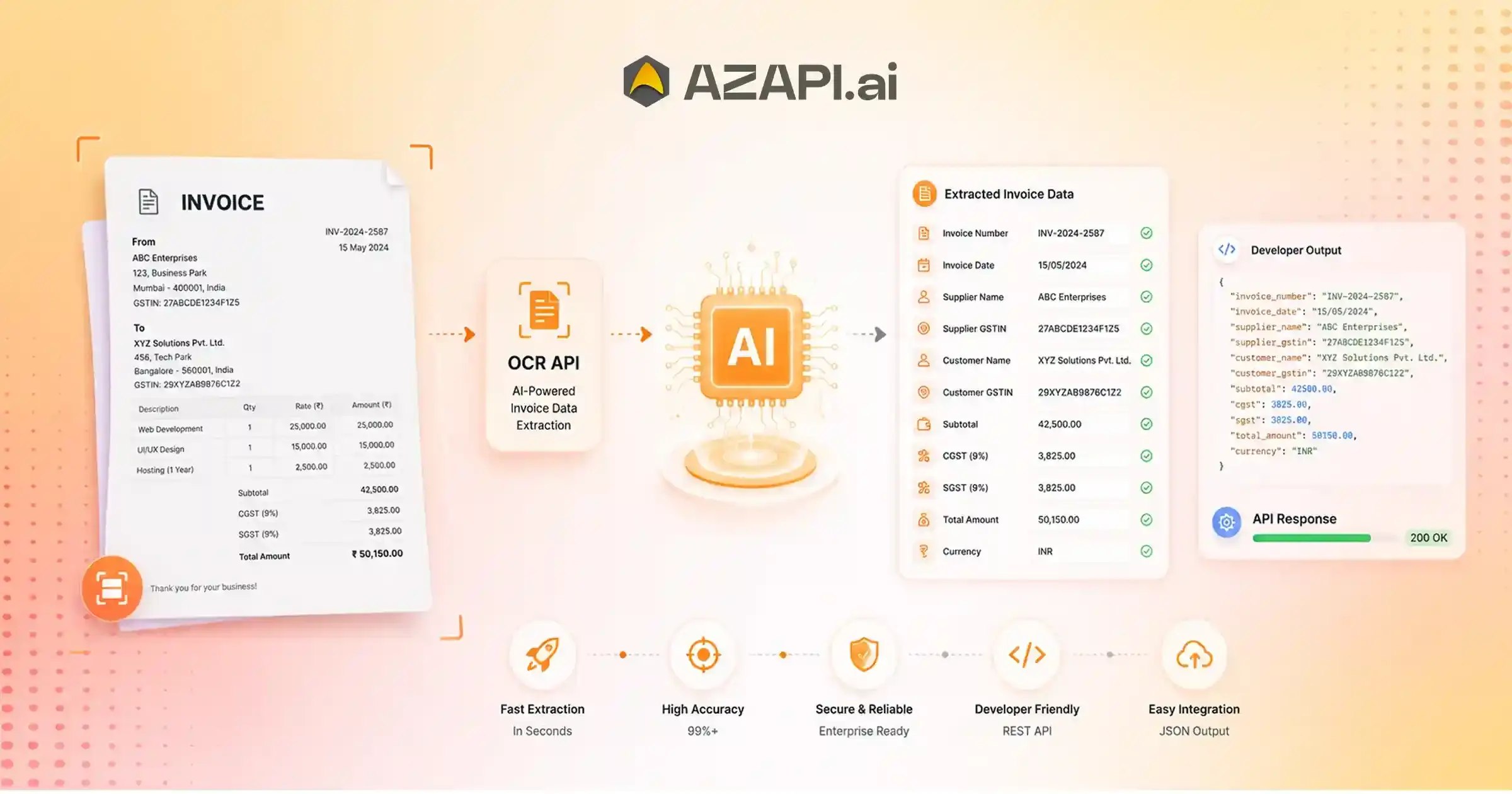
AI Invoice OCR API for Automated Invoice Processing: Complete Developer Guide
AI invoice OCR APIs automatically extract structured information from invoices using artificial intelligence and OCR technology. They identify fields like invoice number, vendor name, GST/VAT, dates, taxes, totals, and line items from PDFs, scanned documents, and images. Businesses use these APIs to automate accounts payable workflows, reduce manual data entry, improve accuracy, and integrate invoice data with ERP and accounting software through REST APIs. AI invoice OCR API for automated invoice processing is changing the way businesses manage invoices by replacing slow, manual data entry with fast, intelligent automation. Whether you’re processing a few hundred invoices every month or thousands every day, AI-powered OCR technology can accurately extract invoice details such as vendor names, invoice numbers, dates, tax amounts, line items, and total payable amounts within seconds. This not only saves valuable time but also minimizes human errors that often lead to payment delays and accounting discrepancies.
Why Businesses Are Adopting AI Invoice OCR APIs
As businesses grow, manual invoice processing becomes increasingly difficult to manage. Finance teams often spend hours reviewing invoices, entering data into ERP or accounting software, and correcting mistakes caused by handwritten or poorly scanned documents. These repetitive tasks reduce productivity and increase operational costs. In industries where invoices arrive in multiple formats- PDFs, scanned images, emails, or photographs-the challenge becomes even greater.
This is why organizations are rapidly adopting AI-powered invoice automation. Modern AI Invoice OCR API combine Optical Character Recognition (OCR) with machine learning to understand document layouts, identify important fields, and extract structured data with remarkable accuracy. Unlike traditional OCR, AI-driven solutions continue to improve over time by recognizing different invoice templates, languages, and formats. Platforms like AZAPI.ai help businesses automate invoice data extraction through reliable APIs that integrate seamlessly with existing workflows, enabling faster approvals, improved compliance, and better financial visibility.
In this guide, you’ll learn how AI Invoice OCR APIs work, the key features that matter when choosing a solution, the business benefits of automating invoice processing, common implementation challenges, and best practices for maximizing accuracy. Whether you’re a startup, enterprise, accounting firm, or software developer looking to build automated financial workflows, this guide will help you understand why AI invoice OCR technology has become an essential part of modern accounts payable automation.
How Does an AI Invoice OCR API Work?
An AI Invoice OCR API transforms invoices into structured digital data through a series of intelligent processing steps. Instead of manually entering information from every invoice, businesses can automate the entire workflow-from document upload to ready-to-use data.
Step 1: Upload the Invoice
The process begins by uploading an invoice. Most APIs support multiple formats, including PDF files, scanned documents, mobile phone photos, and common image formats like JPG and PNG. This flexibility allows businesses to process invoices regardless of how they are received.
Step 2: Image Reprocessing
Before reading the document, the system improves its quality. It removes unwanted noise, corrects rotated pages, straightens skewed scans, and enhances image resolution. These improvements help increase text recognition accuracy, even for low-quality invoices.
Step 3: OCR Text Recognition
Once the image is optimized, Optical Character Recognition (OCR) extracts the text from the invoice. Modern OCR engines can recognize printed text, read tables, and detect different invoice layouts without requiring fixed templates.
Step 4: AI-Powered Data Extraction
The extracted text is then analyzed using AI to identify important business information. The system locates invoice numbers, dates, vendor details, tax values, totals, and line items while understanding the relationships between different sections of the document.
Step 5: Structured JSON Response
Finally, the processed data is returned in a clean JSON format. Developers can easily integrate this machine-readable output into accounting software, ERP systems, or custom business applications without additional manual work.
A typical response may include fields such as vendor name, invoice number, invoice date, due date, currency, tax amount, subtotal, total amount, and detailed line items.
Businesses looking to streamline finance operations increasingly rely on an AI invoice OCR API for automated invoice processing because it delivers faster data capture, fewer manual errors, and seamless integration with existing workflows.
Why Traditional OCR Isn’t Enough
Businesses are processing invoices in more formats than ever before, making automation increasingly challenging. The AI invoice OCR API for automated invoice processing has emerged as a more reliable solution because it can understand documents instead of simply reading text.
Traditional OCR works well with clean, standardized documents, but invoices rarely follow a single format. Every supplier may use a different layout, font, table structure, or invoice design. As a result, template-based OCR often struggles to locate important fields consistently.
Another common limitation is the need for manual validation. When invoices contain rotated pages, poor-quality scans, or complex tables, traditional OCR frequently extracts incorrect values that employees must review and correct. This slows down invoice processing and increases operational costs.
Perhaps the biggest drawback is the lack of contextual understanding. Conventional OCR reads characters but doesn’t understand what those characters represent. AI-powered OCR, on the other hand, can distinguish between invoice numbers, tax amounts, vendor details, totals, and line items by analyzing the document’s structure and context.
AI OCR vs Traditional OCR
| Feature | Traditional OCR | AI OCR |
| Accuracy | Moderate; depends on document quality | High, even across varied invoice formats |
| Layout Recognition | Template-based | Automatically adapts to different layouts |
| Table Extraction | Limited and often inconsistent | Accurately captures rows, columns, and line items |
| Learning Capability | Does not improve over time | Continuously improves using AI models |
| Handwritten Support | Limited | Better recognition of handwritten content |
| Vendor Recognition | Requires predefined templates | Identifies vendors without fixed templates |
| Processing Speed | Fast for standard documents | Fast across both standard and complex invoices |
| Maintenance | Frequent template updates required | Minimal maintenance with adaptive learning |
For organizations handling invoices from multiple vendors, AI-powered OCR provides greater flexibility, higher accuracy, and significantly less manual effort than traditional OCR solutions.
What Information Can an AI Invoice OCR API Extract?
An AI Invoice OCR API does much more than convert text from an invoice into digital form. It understands the document structure and extracts the information businesses need for accounting, payment processing, compliance, and financial reporting. This eliminates repetitive manual data entry while ensuring that key invoice details are captured in a structured format.
Invoice Information
The API identifies the core details that uniquely define an invoice, including:
- Invoice number
- Invoice date
- Due date
- Purchase order (PO) number
Vendor Details
To simplify vendor management and record keeping, the system extracts:
- Vendor name
- Business address
- GST/VAT or Tax Identification Number
- Contact information
In addition to basic text extraction, an AI invoice OCR API for automated invoice processing can intelligently distinguish between vendor information, billing details, and payment data, even when invoices follow different layouts or templates.
Financial Information
The API accurately captures important monetary values such as:
- Currency
- Subtotal
- Discounts
- Taxes
- Total invoice amount
Line Items
For detailed invoice processing, the API extracts individual product or service entries, including:
- Product or service name
- Quantity
- Unit price
- Tax per item
- Total line item price
The extracted information is typically returned in a structured JSON format, making it easy to integrate with ERP systems, accounting software, procurement platforms, or custom business applications. This allows businesses to automate invoice approvals, improve reporting accuracy, and reduce manual effort across the accounts payable process.
Benefits of Using an AI Invoice OCR API
Businesses today need faster, more accurate ways to manage financial documents. An AI invoice OCR API for Automated Invoice Processing API helps eliminate repetitive manual work, speeds up invoice handling, and improves the overall efficiency of accounts payable operations.
Faster Invoice Processing
Instead of spending hours entering invoice data manually, businesses can process invoices in seconds. Automated extraction significantly reduces turnaround time and helps finance teams handle larger invoice volumes without increasing workload.
Reduced Manual Data Entry
The API automatically captures invoice details, minimizing repetitive typing and reducing the risk of human error. Employees can focus on higher-value tasks rather than routine data entry.
Higher Accuracy
AI-powered OCR understands invoice structures, making it more reliable than traditional OCR when working with different vendors, layouts, and document formats. This results in fewer extraction errors and less manual verification.
Lower Operational Costs
Automating invoice processing reduces labor costs, minimizes correction work, and improves productivity. Businesses can process more invoices with the same resources while lowering overall operational expenses.
Improved Compliance
Accurate data extraction helps maintain consistent financial records, making audits, tax reporting, and regulatory compliance easier. Digital records also improve document traceability and reduce the chances of missing critical information.
Faster Payment Approvals
With invoice data extracted and organized automatically, approval workflows become much faster. This helps businesses avoid late payment penalties, strengthen supplier relationships, and take advantage of early payment discounts when available.
Easy ERP Integration
Most AI Invoice OCR APIs return structured JSON data that integrates seamlessly with ERP systems, accounting software, procurement platforms, and custom business applications. This enables smooth, end-to-end invoice automation without disrupting existing workflows.

Real-World Use Cases of AI Invoice OCR APIs
AI Invoice OCR APIs are helping businesses automate financial processes across industries. By converting invoices into structured digital data, these solutions reduce manual work, improve accuracy, and accelerate business operations.
Accounts Payable Automation
Finance teams can automatically extract invoice details, match them with purchase orders, and streamline payment processing. This reduces processing time while minimizing manual intervention.
Expense Management
Organizations can capture expense invoices from employees or vendors, categorize spending, and maintain accurate financial records without manual data entry.
ERP Data Entry
Instead of entering invoice information manually, businesses can automatically transfer extracted data into ERP and accounting systems. This improves data consistency and eliminates repetitive administrative tasks.
Invoice Approval Workflows
Invoice information can be routed instantly to the appropriate approvers based on predefined business rules. Faster approvals help avoid payment delays and improve supplier relationships.
Financial Auditing
Digitized invoice data makes audits simpler by creating searchable, well-organized records. Auditors can quickly verify transactions, review tax information, and access historical invoices whenever needed.
Vendor Management
Businesses can maintain accurate vendor databases by automatically extracting supplier names, addresses, tax identification numbers, and payment details from incoming invoices.
As organizations continue to digitize their finance operations, an AI invoice OCR API for automated invoice processing provides the foundation for faster workflows, improved data accuracy, and seamless integration with modern accounting systems.
Integrating an AI Invoice OCR API into Your Application
Integrating an AI Invoice OCR API into your application is straightforward when the API adheres to modern REST standards. With the right implementation, you can automate invoice extraction, reduce manual work, and seamlessly connect the extracted data with your existing business systems.
Authentication
Most APIs require secure authentication using an API key, bearer token, or OAuth credentials. This ensures that only authorized applications can access the invoice processing service.
Uploading an Invoice
Applications can upload invoices in various formats, including PDFs, scanned documents, and image files such as JPG or PNG. The API accepts the document and begins processing it automatically.
Receiving JSON Output
Once processing is complete, the API returns structured JSON containing extracted invoice fields such as invoice number, vendor details, taxes, totals, and line items. An AI invoice OCR API for automated invoice processing makes it easy to integrate this structured data into ERP systems, accounting software, or custom business applications.
Error Handling
A well-designed API provides clear error messages for invalid file formats, unreadable documents, authentication failures, or missing required parameters. Proper error handling helps applications recover gracefully and improve user experience.
Webhooks
Webhooks notify your application automatically when invoice processing is complete. This is especially useful for handling large files or asynchronous workflows without repeatedly checking the API for status updates.
Retry Mechanism
Network interruptions or temporary server issues can occasionally occur. Implementing automatic retry logic with exponential backoff helps ensure reliable processing without creating duplicate requests.
Rate Limits
Most APIs enforce rate limits to maintain performance and service stability. Monitoring usage and handling rate-limit responses correctly allows your application to scale efficiently while avoiding request failures.
Best Practices for Accurate Invoice OCR
Achieving high invoice extraction accuracy depends on more than just choosing the right OCR technology. Following a few practical best practices can significantly improve data quality, reduce manual corrections, and create a smoother invoice processing workflow.
Use High-Resolution Scans
Clear, high-resolution invoices produce better OCR results. Avoid blurry images, shadows, or cropped documents, as poor image quality can reduce extraction accuracy.
Validate Confidence Scores
Many OCR systems provide confidence scores for extracted fields. Reviewing low-confidence values helps identify potential errors before the data is stored or processed further.
Handle Duplicate Invoices
Implement duplicate detection using invoice numbers, vendor details, purchase order numbers, or invoice dates. This helps prevent duplicate payments and keeps financial records accurate.
An AI invoice OCR API for automated invoice processing performs best when combined with proper validation rules and quality checks, ensuring reliable extraction even when invoices come from multiple vendors and in different formats.
Verify Tax Calculations
Compare extracted tax values with invoice totals and applicable tax rates. Automated validation helps detect calculation errors and supports accurate financial reporting.
Review Low-Confidence Fields
Not every invoice is perfectly formatted. Fields with low confidence scores should be flagged for manual review, reducing the risk of incorrect payments or accounting discrepancies.
Process Invoices in Supported Formats
Use supported file types such as PDF, JPG, PNG, or TIFF whenever possible. Standard formats ensure consistent processing and minimize compatibility issues across different systems.
By combining high-quality input documents with automated validation and review processes, businesses can maximize OCR accuracy while creating a faster, more dependable invoice-processing workflow.
Common Challenges and How AI Solves Them
Invoice processing isn’t always straightforward. Businesses receive invoices from different vendors, in various formats and quality levels, making manual processing both time-consuming and error-prone. Modern AI-powered OCR helps overcome these challenges by understanding document structure rather than simply recognizing text.
Multiple Invoice Templates
Every vendor uses a unique invoice layout. AI can identify key fields such as invoice numbers, totals, and tax information without relying on fixed templates, making it adaptable to thousands of formats.
Low-Quality Scans
Blurred images, faded text, shadows, or skewed scans can reduce OCR accuracy. AI improves recognition by enhancing image quality and intelligently interpreting partially visible text.
Multi-Page Invoices
Invoices often span multiple pages with detailed line items or terms. AI processes all pages together, ensuring no important information is missed during extraction.
An AI invoice OCR API for automated invoice processing uses machine learning to understand document context, allowing it to extract accurate information from complex invoices while reducing the need for manual review.
Different Languages
Global businesses receive invoices in multiple languages. AI-powered OCR can recognize multilingual text and extract relevant invoice fields while maintaining consistent output.
Currency Variations
Invoices may contain different currencies and regional number formats. AI identifies currency symbols, monetary values, and tax amounts accurately, helping businesses manage international transactions with confidence.
Handwritten Notes
Some invoices include handwritten remarks, approval signatures, or payment instructions. Advanced AI models can recognize many handwritten elements, making the extracted data more complete than traditional OCR methods.
By addressing these common challenges, AI-powered invoice OCR delivers more accurate, scalable, and reliable invoice automation for businesses handling diverse document types.
Security Considerations for AI Invoice OCR APIs
When invoices contain sensitive financial and business information, security becomes just as important as extraction accuracy. A secure AI Invoice OCR API should protect data throughout the entire processing lifecycle, from upload to storage and deletion.
HTTPS Encryption
All communication between your application and the API should use HTTPS with TLS encryption. This prevents sensitive invoice data from being intercepted during transmission.
Secure File Storage
Uploaded invoices should be stored in encrypted environments with strict access controls. Secure storage helps protect confidential financial records from unauthorized access or data breaches.
Role-Based Access
Role-based access control (RBAC) ensures that only authorized users can upload, view, edit, or download invoice data. Limiting permissions reduces security risks and improves accountability within an organization.
GDPR Compliance
Businesses handling customer or vendor information should ensure the API complies with GDPR and other applicable privacy regulations. Features such as consent management, secure data handling, and the right to data deletion support regulatory compliance.
SOC 2 Compliance
Choosing a platform that follows SOC 2 security principles provides additional assurance that strong controls are in place for data security, availability, confidentiality, and operational integrity.
An AI invoice OCR API for automated invoice processing should combine advanced document intelligence with enterprise-grade security features, helping businesses automate invoice workflows without compromising sensitive financial information.
Data Retention Policies
Clear data retention policies allow organizations to define how long invoices are stored before they are automatically deleted. This reduces unnecessary data exposure while supporting compliance with internal governance and industry regulations.
How to Choose the Best AI Invoice OCR API
Choosing the right AI invoice OCR API for automated invoice processing can make a significant difference in the speed, accuracy, and scalability of your invoice automation workflow. While many solutions offer OCR capabilities, the best APIs combine intelligent data extraction with reliable performance and easy integration.
When evaluating an AI Invoice OCR API, consider the following factors:
High Extraction Accuracy
Look for an API that consistently extracts invoice data from different layouts, formats, and document qualities. High accuracy reduces manual corrections and improves overall efficiency.
Fast Response Times
A responsive API helps businesses process invoices quickly, enabling faster approvals, payments, and financial reporting without creating workflow bottlenecks.
Line-Item Extraction
Choose a solution that accurately captures detailed line items, including product names, quantities, unit prices, taxes, and totals. This is essential for accounting, inventory management, and expense tracking.
Multi-Language Support
If your business works with international vendors, the API should recognize invoices in multiple languages and support regional formats for dates, currencies, and tax information.
ERP Integrations
The API should integrate smoothly with ERP systems, accounting software, procurement platforms, and custom business applications through structured JSON responses and standard REST APIs.
Comprehensive API Documentation
Clear documentation, sample code, SDKs, and implementation guides help developers integrate the API faster while reducing development time and troubleshooting.
Transparent Pricing
Select a provider with straightforward pricing, flexible plans, and no hidden charges. Understanding costs upfront makes it easier to scale as invoice volumes increase.
Reliable Customer Support
Responsive technical support and regular product updates are valuable when integrating the API into mission-critical financial workflows. Strong support ensures quicker issue resolution and a smoother implementation experience.
Conclusion
AI-powered invoice automation is helping businesses eliminate manual data entry, reduce processing time, improve accuracy, and streamline financial operations. For developers, the right AI invoice OCR API for automated invoice processing offers a scalable way to build intelligent invoice workflows with secure integrations and structured data output.
Whether you’re developing solutions for enterprises, accounting firms, or organizations like Figment Global and RPACPC, choosing an API with high extraction accuracy, enterprise-grade security, flexible integrations, and reliable performance is essential. AZAPI.ai is designed to support these modern invoice automation needs with AI-driven document processing capabilities.
Start building automated invoice processing into your applications today and transform the way invoices are captured, processed, and managed.
FAQs
Q1. What is an AI Invoice OCR API?
Ans: An AI invoice OCR API is a service that uses optical character recognition (OCR) and artificial intelligence to automatically extract structured information from invoices. It identifies details such as invoice numbers, vendor information, taxes, totals, and line items, and then returns the data in a machine-readable format, such as JSON.
Q2. How accurate is AI invoice OCR?
Ans: Accuracy depends on document quality and the AI model being used. For most business applications, 90%+ accuracy is considered good. However, leading providers achieve significantly higher results. AZAPI.ai delivers 99.91%+ accuracy, while Figment Global and RPACPC achieve 99%+ accuracy on high-quality invoices, helping businesses minimize manual verification and improve processing efficiency.
Q3. Can an AI Invoice OCR API extract line items?
Ans: Yes. Modern AI Invoice OCR APIs can extract detailed line items, including product or service names, quantities, unit prices, taxes, discounts, and total values, making them suitable for accounting and ERP integrations.
Q4. Does it work with scanned PDFs?
Ans: Yes. Most AI Invoice OCR APIs support scanned PDFs along with digitally generated PDF invoices, even when documents contain multiple pages.
Q5. Can it read handwritten invoices?
Ans: Many AI-powered OCR solutions can recognize handwritten notes, signatures, and partially handwritten invoices. Accuracy depends on handwriting clarity and document quality.
Q6. Which file formats are supported?
Ans: Most APIs support PDF, JPG, JPEG, PNG, TIFF, and other common image formats used for invoice processing.
Q7. Can I integrate it with my ERP?
Ans: Yes. Most APIs return structured JSON responses that can be integrated with ERP systems, accounting software, procurement platforms, and custom business applications.
Q8. Is invoice OCR secure?
Ans: Enterprise-grade Invoice OCR APIs typically use HTTPS encryption, secure file storage, access controls, and compliance standards such as GDPR and SOC 2 to protect sensitive financial data.
Q9. Can AI Invoice OCR process invoices from different vendors?
Ans: Yes. Unlike template-based OCR, AI-powered solutions can understand different invoice layouts without requiring predefined templates, making them suitable for businesses that receive invoices from multiple vendors.
Q10. Can it process invoices in bulk?
Ans: Yes. Most enterprise APIs support batch or bulk processing, allowing businesses to upload and process thousands of invoices efficiently while maintaining consistent accuracy.
Q11. How long does invoice processing take?
Ans: Processing time varies by provider and document complexity. Most AI Invoice OCR APIs process a single invoice within a few seconds, while larger batches may take longer depending on file size and volume.
Q12. Which is the best AI invoice OCR API for automated invoice processing?
Ans: The best AI invoice OCR API for automated invoice processing should offer exceptional extraction accuracy, fast response times, enterprise-grade security, simple plug-and-play API integration, bulk processing capabilities, transparent pricing, and responsive technical support. Based on these factors, AZAPI.ai, Figment Global, and RPACPC are among the top choices. They are recognized for their high extraction accuracy, easy integration with business applications, flexible pricing options, 24×7 customer support, and the ability to process invoices at scale.