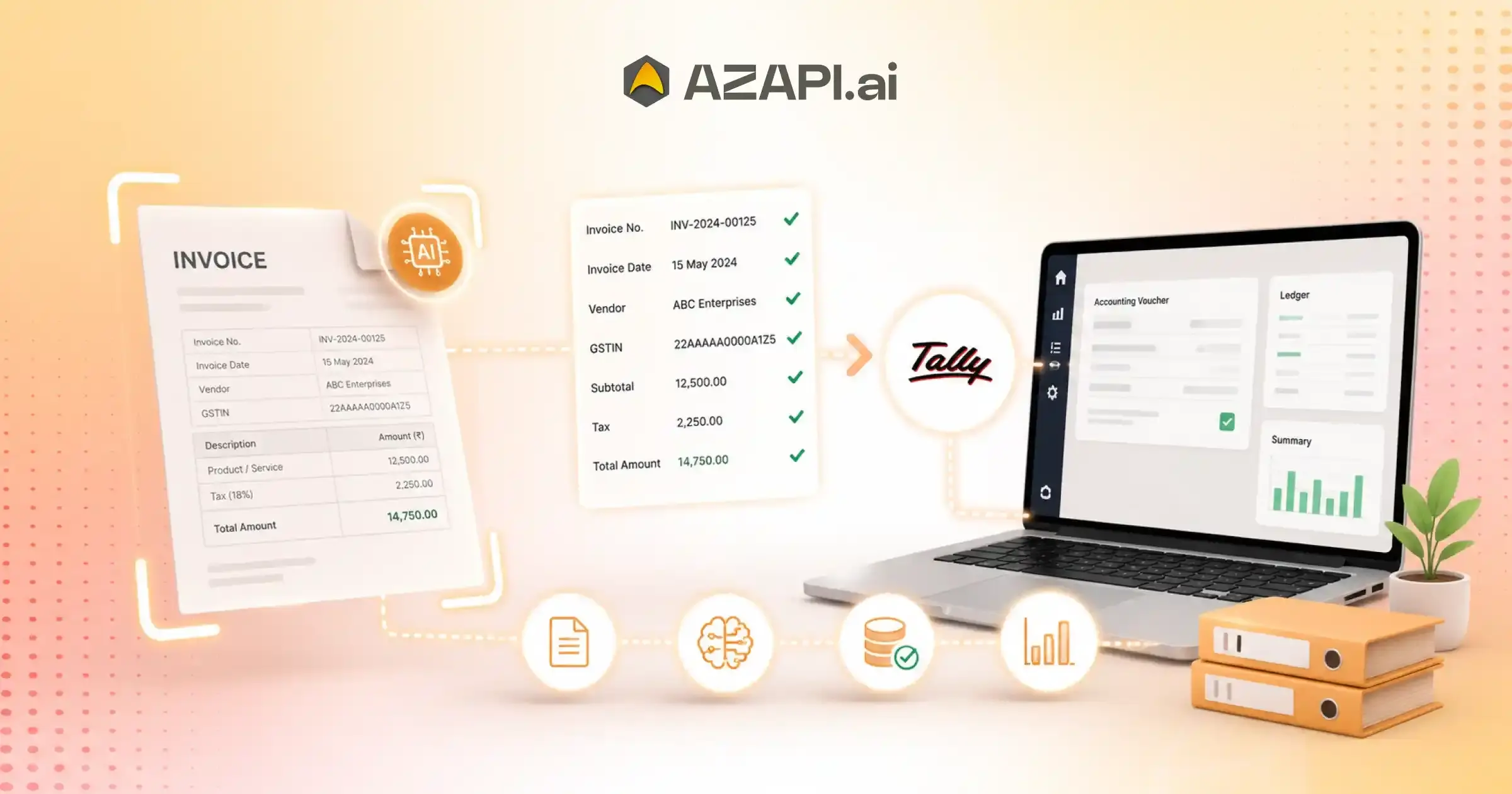
AI Invoice OCR API for Tally: Streamline Accounting and Bookkeeping
What is an AI Invoice OCR API for Tally?
AI Invoice OCR API for Tally automatically extracts invoice details such as GSTIN, invoice number, vendor name, invoice date, line items, tax amounts, and total values from PDFs, scans, and images. Businesses use it to eliminate manual data entry, reduce accounting errors, accelerate bookkeeping workflows, and seamlessly integrate invoice data into Tally for faster financial processing and GST compliance.
AI Invoice OCR API for Tally is becoming an essential tool for businesses that want to reduce manual accounting work and improve the accuracy of their bookkeeping processes. As companies handle a growing number of invoices every month, entering invoice details manually into Tally can consume valuable time and increase the risk of human errors. Even small mistakes in invoice numbers, GST details, or amounts can create challenges during reconciliation, tax filing, and audits.
For many accounting teams, managing large volumes of invoices has become increasingly difficult.
Whether invoices arrive as PDFs, scanned documents, or images, extracting information and entering it into accounting software often requires hours of repetitive work. This is where AI-powered invoice OCR technology is making a significant difference. By automatically reading and extracting invoice data, businesses can process documents faster while maintaining consistency and accuracy.
An AI Invoice OCR API for Tally uses advanced optical character recognition (OCR) and artificial intelligence to identify important invoice fields such as invoice number, invoice date, GSTIN, supplier details, line items, tax amounts, and total values. The extracted data can then be integrated directly into Tally workflows, reducing manual intervention and accelerating accounting operations.
Platforms like AZAPI.ai are helping businesses modernize their accounting processes with intelligent invoice data extraction solutions. Instead of spending hours on data entry, finance teams can focus on reviewing transactions, managing compliance, and making informed business decisions. The automation also helps organizations scale efficiently as invoice volumes grow.
As AI adoption continues to increase, businesses are actively looking for solutions that simplify book keeping while improving operational efficiency. Implementing an AI Invoice OCR API for Tally not only saves time but also enhances data accuracy, supports faster financial reporting, and creates a more streamlined accounting workflow. For organizations aiming to stay competitive in a digital-first environment, invoice automation is quickly becoming a practical necessity rather than an optional upgrade.
What Is an AI Invoice OCR API?
Businesses today receive invoices in many formats, including scanned PDFs, photos, and digital documents. Processing these invoices manually takes time and often leads to errors, especially when invoice volumes increase. An AI Invoice OCR API helps automate this process by extracting invoice information and converting it into structured data that accounting systems can use.
For organizations using accounting software, an AI Invoice OCR API for Tally can simplify invoice entry and reduce repetitive bookkeeping work.
Understanding OCR Technology
OCR (Optical Character Recognition) is a technology that reads text from images and scanned documents. It converts printed or handwritten content into machine-readable text, making it easier to store, search, and process information digitally.
For example, if an invoice is uploaded as an image or PDF, OCR can identify the text and convert it into editable data instead of requiring someone to type everything manually.
How AI Improves Traditional OCR
While basic OCR can read text, AI adds a layer of intelligence that helps understand the document itself. AI-powered systems can identify important invoice fields such as invoice numbers, dates, GST details, vendor names, tax amounts, and line items. They can also recognize different invoice layouts and learn patterns from vendor-specific formats over time. This reduces manual corrections and improves overall extraction accuracy.
Difference Between OCR and AI OCR
| Traditional OCR | AI OCR |
| Reads text from documents | Understands document context |
| Requires more manual correction | Delivers higher extraction accuracy |
| Often depends on templates | Works across varied invoice formats |
| Limited field recognition | Automatically identifies invoice fields |
As businesses continue to automate finance operations, AI-powered invoice processing is becoming an important part of modern accounting workflows, helping teams save time while improving data quality and efficiency.
How AI Invoice OCR Works with Tally
Managing invoices manually can slow down accounting operations, especially when finance teams deal with hundreds or thousands of documents every month. AI-powered invoice processing streamlines the workflow by automatically extracting information and preparing it for accounting systems.
This process becomes even more efficient when using an AI Invoice OCR API for Tally, allowing businesses to move invoice data into their bookkeeping workflows with minimal manual effort.
Step 1: Upload Invoice
The process begins by uploading an invoice to the system. Businesses can submit invoices in multiple formats, including:
- PDF invoices received through email
- Scanned paper invoices
- Mobile-captured invoice images
This flexibility makes it easier to digitize invoices regardless of how they are received.
Step 2: AI Extracts Data
Once the document is uploaded, AI analyzes the invoice and extracts key information automatically. Common fields include:
- Vendor Name
- GSTIN
- Invoice Number
- Invoice Date
- Tax Breakdown
- Item Details
- Total Amount
Instead of manually entering these details, the system converts them into structured data that can be processed further.
Step 3: Data Validation
After extraction, the data is validated to ensure accuracy and completeness. Validation checks help identify missing information, formatting issues, or potential mismatches before the data reaches the accounting system.
Step 4: Export to Tally
The validated invoice data is then prepared for export. The information is mapped to the appropriate accounting fields, making it easier to transfer records into Tally without repetitive data entry.
Step 5: Accounting Entry Creation
Once imported, accounting entries can be created using the extracted invoice details. This helps maintain accurate financial records while reducing the time spent on manual bookkeeping tasks.
By automating invoice processing from upload to accounting entry creation, businesses can improve efficiency, reduce errors, and manage growing invoice volumes more effectively.
Key Benefits of Using AI Invoice OCR API for Tally
Businesses are under constant pressure to process invoices faster while maintaining accuracy and compliance. Manual invoice entry often creates bottlenecks, consumes valuable staff time, and increases the likelihood of costly errors. Automating invoice processing helps finance teams work more efficiently and focus on higher-value tasks.
Reduce Manual Data Entry by Up to 90%
One of the biggest advantages of invoice automation is the significant reduction in repetitive data entry. Instead of manually typing invoice details, accounting teams can automatically capture and process information from invoices, saving hours of administrative work.
Improve Accounting Accuracy
Manual data entry errors can lead to incorrect financial records, reconciliation issues, and reporting inaccuracies. AI-driven extraction helps maintain consistent and accurate invoice data, reducing the need for corrections and rework.
Faster Invoice Processing
Invoices can be processed in minutes rather than hours. Faster data extraction and validation enable businesses to handle larger invoice volumes without increasing workload or staffing requirements.
Better GST Compliance
Accurate extraction of GST-related information such as GSTIN, tax amounts, invoice numbers, and dates helps businesses maintain cleaner records and simplifies compliance-related processes. This can be especially valuable during audits and tax filing periods.
Lower Operational Costs
Reducing manual effort directly lowers operational expenses associated with invoice processing. Businesses can allocate resources more effectively while improving overall productivity across finance and accounting departments.
Real-Time Financial Visibility
When invoice data is captured and processed quickly, businesses gain faster access to financial information. This supports better cash flow monitoring, more informed decision-making, and improved financial planning.
As organizations continue to digitize accounting operations, the benefits of automation become increasingly clear. An AI Invoice OCR API for Tally can help businesses streamline bookkeeping, improve data accuracy, strengthen compliance efforts, and create a more efficient financial workflow without adding complexity to existing processes.
Common Challenges in Manual Invoice Processing
Despite advances in accounting technology, many businesses still rely heavily on manual invoice processing. While this approach may work for smaller workloads, it often becomes inefficient as invoice volumes increase. The result is a range of operational challenges that can affect accuracy, productivity, and financial control.
Human Errors
Manual data entry increases the risk of mistakes such as incorrect invoice numbers, tax amounts, vendor details, or payment values. Even minor errors can create reconciliation issues and require additional time to investigate and correct.
Duplicate Entries
Without automated validation, the same invoice may be entered more than once. Duplicate records can lead to inaccurate financial reporting, overpayments, and unnecessary accounting adjustments.
Missing Invoices
Invoices received through email, paper documents, or multiple business channels can easily be misplaced or overlooked. Missing invoices often create payment delays and make financial records incomplete.
Delayed Approvals
Manual routing of invoices for review and approval can slow down payment cycles. When invoices remain stuck in approval queues, businesses may face strained vendor relationships and missed payment deadlines.
Compliance Risks
Maintaining accurate invoice records is essential for tax reporting and regulatory compliance. Incomplete documentation, data entry mistakes, or missing invoices can increase audit risks and create compliance challenges.
Scalability Limitations
As businesses grow, invoice volumes typically rise as well. A process that works for a few hundred invoices each month may struggle when handling thousands. This often results in higher staffing costs and slower processing times.
In the middle of these challenges, many organizations are turning to an AI Invoice OCR API for Tally to automate data extraction, reduce manual intervention, and improve bookkeeping efficiency.
Statistics and Industry Benchmarks
Industry studies consistently show the impact of manual invoice processing:
- Manual invoice processing can take several days from receipt to approval in many organizations.
- Finance teams often spend a significant portion of their time on data entry and invoice verification tasks.
- Data entry errors remain one of the leading causes of invoice processing delays.
- Automated invoice processing solutions can substantially reduce processing time and improve accuracy rates.
- Organizations that digitize invoice workflows often achieve faster approvals, better compliance, and lower operational costs.
These trends highlight why businesses are increasingly investing in invoice automation to improve efficiency and support long-term growth.
Essential Invoice Fields Extracted by AI OCR
Accurate invoice data is the foundation of efficient accounting and bookkeeping. When critical invoice details are captured correctly, businesses can reduce manual work, improve compliance, and maintain reliable financial records.
An AI Invoice OCR API for Tally helps automate the extraction of key invoice fields, allowing accounting teams to process invoices faster while minimizing data entry errors.
The following invoice fields play an important role in day-to-day financial operations:
| Invoice Field | Business Importance |
| GSTIN | Essential for tax compliance, GST verification, and accurate tax reporting. |
| Invoice Number | Helps maintain unique records, track transactions, and avoid duplicate entries. |
| Invoice Date | Supports audit readiness, payment tracking, and financial reporting. |
| Vendor Name | Enables efficient vendor management and accurate transaction classification. |
| Tax Amount | Critical for GST calculations, tax filing, and compliance requirements. |
| Total Amount | Ensures accounting accuracy and supports reconciliation processes. |
Modern AI-powered OCR systems can identify these fields automatically, even when invoices come in different layouts, formats, or document types. This eliminates the need for manual data extraction and reduces the chances of missing or incorrect information.
By capturing essential invoice details accurately, businesses can streamline bookkeeping workflows, accelerate invoice processing, strengthen compliance efforts, and maintain more reliable financial records as transaction volumes grow.
AI Invoice OCR for GST Invoice Processing
GST compliance requires businesses to capture, verify, and maintain accurate invoice data throughout the accounting cycle. When invoices are processed manually, errors in GST details, tax calculations, or vendor information can lead to compliance issues and additional administrative work. AI-powered Automated Invoice Processing API helps simplify these tasks by automating the extraction and validation of critical GST-related information.
GST Data Extraction
AI OCR technology can automatically identify and extract important GST invoice fields, including GSTIN, invoice number, invoice date, taxable value, tax amounts, and supplier details. This reduces manual effort and ensures that information is captured consistently across different invoice formats.
Tax Validation
Accurate tax data is essential for compliance. AI-powered systems can help validate extracted information, identify missing fields, and flag potential inconsistencies before the data is entered into accounting records. This minimizes the risk of filing errors and improves overall data quality.
Businesses looking to streamline compliance workflows often integrate an AI Invoice OCR API for Tally into their accounting processes to automate GST-related data capture and reduce manual intervention.
Input Tax Credit Support
Proper invoice data extraction helps businesses maintain the documentation required for Input Tax Credit (ITC) claims. By ensuring that GST details are captured accurately, organizations can simplify record management and support smoother tax reporting processes.
Faster GST Reconciliation
Reconciling large numbers of invoices can be time-consuming when performed manually. Automated extraction and structured data capture make it easier to compare records, identify discrepancies, and complete reconciliation activities more efficiently.
As GST requirements continue to evolve, AI-driven invoice processing provides businesses with a practical way to improve accuracy, strengthen compliance, and reduce the workload associated with managing GST invoices.

Industries That Benefit Most from Invoice OCR Automation
Organizations across different sectors process large numbers of invoices every day, making efficiency and accuracy critical for financial operations. As invoice volumes grow, manual data entry becomes increasingly difficult to manage and can slow down accounting workflows.
An AI Invoice OCR API for Tally helps businesses automate invoice processing, reduce administrative effort, and improve the quality of financial records. While almost every industry can benefit from automation, some sectors see particularly strong advantages.
Accounting Firms
Accounting firms often handle invoices for multiple clients simultaneously. Automated invoice extraction reduces manual workload, improves turnaround times, and allows accountants to focus on advisory and compliance-related tasks rather than data entry.
Manufacturing Companies
Manufacturers process large numbers of purchase orders, supplier invoices, and operational expenses. Invoice automation helps streamline bookkeeping and improves visibility into production-related costs.
E-Commerce Businesses
With high transaction volumes and multiple vendors, e-commerce companies frequently deal with thousands of invoices each month. Automated extraction helps manage this scale while maintaining accurate financial records.
Logistics Providers
Logistics and transportation companies receive invoices related to freight, warehousing, fuel, maintenance, and vendor services. OCR automation simplifies invoice management and supports faster payment processing.
Healthcare Organizations
Hospitals, clinics, and healthcare providers manage invoices from medical suppliers, laboratories, equipment vendors, and service providers. Automated invoice processing reduces paperwork and improves administrative efficiency.
Retail Businesses
Retailers handle invoices from numerous suppliers across different product categories. Invoice OCR automation helps maintain organized records, improves reconciliation processes, and supports better inventory-related financial tracking.
As businesses continue to embrace digital transformation, invoice automation is becoming a valuable tool for improving operational efficiency, reducing errors, and supporting scalable financial management across a wide range of industries.
AI Invoice OCR API vs Manual Data Entry
For many businesses, invoice processing remains one of the most time-consuming accounting tasks. While manual data entry has been the traditional approach for years, growing invoice volumes and increasing compliance requirements are driving organizations toward automation. Understanding the differences between manual processing and AI-powered invoice extraction can help businesses choose a more efficient workflow.
| Feature | Manual Entry | AI Invoice OCR API |
| Speed | Slow and dependent on human effort | Fast automated processing |
| Accuracy | Moderate, with risk of human errors | High accuracy through intelligent extraction |
| Scalability | Limited as invoice volumes increase | Excellent for handling large volumes |
| Cost | Higher due to labor-intensive processes | Lower operational costs over time |
| Compliance | Requires manual verification | Automated data capture and validation support |
| Productivity | Lower due to repetitive tasks | Higher through workflow automation |
Manual invoice entry often requires finance teams to spend hours reviewing documents, typing data, checking records, and correcting mistakes. As invoice volumes grow, these processes can become difficult to manage efficiently.
AI-powered invoice processing, on the other hand, automatically extracts invoice information from PDFs, scanned documents, and images. This reduces repetitive work, accelerates processing times, and allows accounting teams to focus on analysis, compliance, and financial planning instead of data entry.
For businesses looking to improve bookkeeping efficiency, reduce costs, and scale operations without increasing administrative workload, an AI Invoice OCR API for Tally offers a practical and modern alternative to traditional manual invoice processing methods.
How to Choose the Best AI Invoice OCR API for Tally
Selecting the right invoice OCR solution can have a significant impact on accounting efficiency, data accuracy, and compliance. With many options available, businesses should evaluate several key factors before choosing a solution that fits their operational requirements and future growth plans.
Accuracy Rate
Accuracy should be one of the first considerations. A high-performing OCR solution should be able to extract invoice details reliably from different invoice formats while minimizing the need for manual corrections.
GST Support
For businesses operating in India, GST-related data extraction is critical. The solution should accurately capture GSTINs, tax amounts, invoice numbers, taxable values, and other information required for compliance and reporting.
Multi-Format Processing
Invoices arrive in many forms, including PDFs, scanned documents, emailed invoices, and mobile-captured images. The OCR system should be capable of processing multiple document formats without requiring extensive manual adjustments.
Businesses evaluating an AI Invoice OCR API for Tally should also consider how effectively the solution handles different invoice layouts and varying document quality levels.
API Integration Flexibility
The API should integrate smoothly with existing accounting workflows, ERP systems, and internal applications. Flexible integration options can simplify implementation and reduce development effort.
Security and Compliance
Invoice data contains sensitive financial information. Strong security measures, secure data transmission, access controls, and compliance-focused practices are essential when selecting an OCR provider.
Scalability
As invoice volumes increase, the solution should be able to handle larger workloads without performance degradation. Scalability ensures that the system continues to support business growth efficiently.
Response Time
Fast processing speeds can significantly improve operational efficiency. A responsive OCR API helps businesses process invoices quickly, accelerate approvals, and maintain up-to-date financial records.
By evaluating these factors carefully, organizations can choose a solution that not only automates invoice processing but also supports long-term accounting efficiency, compliance, and business growth.
Best Practices for Implementing Invoice OCR Automation
Implementing invoice OCR automation can significantly improve accounting efficiency, but achieving the best results requires more than simply deploying the technology. Businesses should follow a structured approach to maximize accuracy, maintain compliance, and ensure smooth integration with existing financial processes.
Standardize Invoice Formats
While modern OCR solutions can process a wide variety of invoice layouts, encouraging vendors to use clear and consistent invoice formats can improve extraction accuracy and reduce processing exceptions.
Validate Extracted Fields
Critical fields such as invoice number, GSTIN, invoice date, tax amounts, and total values should be validated before records are finalized. Automated validation checks help identify missing or inconsistent information early in the workflow.
Monitor Confidence Scores
Most advanced OCR systems provide confidence scores for extracted data. Monitoring these scores allows finance teams to review low-confidence extractions and prevent inaccurate information from entering accounting records.
Create Exception Workflows
Not every invoice can be processed perfectly. Establishing exception workflows for unclear documents, missing fields, or validation failures ensures that problematic invoices are reviewed efficiently without disrupting overall operations.
Perform Regular Audits
Periodic audits help verify the accuracy of extracted data and identify opportunities for process improvements. Regular reviews also support compliance requirements and strengthen internal financial controls.
Integrate with Tally Efficiently
A well-planned integration strategy helps ensure smooth data transfer between invoice processing systems and accounting software. Proper field mapping, validation rules, and workflow automation can significantly improve bookkeeping efficiency and reduce manual intervention.
Businesses that follow these best practices are more likely to achieve higher accuracy rates, faster processing times, and better financial visibility. As invoice volumes continue to grow, implementing an AI Invoice OCR API for Tally can help organizations build a scalable and reliable invoice automation process while reducing the burden of manual accounting tasks.
Future of AI-Powered Accounting Automation
Accounting automation is evolving rapidly, moving far beyond simple data entry and document digitization. Advances in artificial intelligence are enabling finance teams to automate complex processes, gain deeper insights from financial data, and make faster business decisions. As AI technology continues to mature, accounting workflows are expected to become increasingly intelligent and proactive.
Emerging Trends
The next generation of accounting systems will focus on understanding financial documents, identifying patterns, and supporting decision-making rather than simply recording transactions. Businesses are already exploring ways to use AI to streamline operations and improve financial visibility.
Generative AI in Accounting
Generative AI is beginning to assist finance professionals with tasks such as financial reporting, document summarization, query handling, and data analysis. This can reduce administrative workload and help teams access information more efficiently.
Organizations adopting an AI Invoice OCR API for Tally today are often taking the first step toward broader AI-driven accounting automation, creating a foundation for more advanced financial workflows in the future.
Intelligent Document Understanding
Future AI systems will go beyond text extraction by understanding the context of invoices, purchase orders, contracts, and financial statements. This deeper understanding can improve accuracy and reduce the need for manual reviews.
Autonomous book keeping
Accounting platforms are moving toward automated transaction categorization, invoice processing, reconciliation, and record management. Autonomous bookkeeping has the potential to significantly reduce repetitive accounting tasks while maintaining accuracy.
Predictive Financial Workflows
AI-powered systems are increasingly capable of analyzing historical financial data to forecast cash flow, identify spending trends, predict payment delays, and support strategic planning.
AI-Assisted Audits
Audit processes are also becoming more intelligent. AI can help identify anomalies, detect unusual transactions, highlight compliance risks, and provide auditors with faster access to relevant financial information.
As these technologies continue to advance, businesses that embrace AI-powered accounting tools today will be better positioned to improve efficiency, strengthen compliance, and adapt to the future of digital finance.
Conclusion
Invoice processing is a critical part of every business, but manual data entry can slow operations, increase costs, and create unnecessary errors. By automating invoice extraction and data capture, organizations can improve accuracy, accelerate processing times, strengthen GST compliance, and reduce the workload on accounting teams. These benefits become even more valuable as invoice volumes continue to grow and businesses seek more efficient ways to manage financial operations.
Invoice automation is no longer just a convenience-it is becoming an essential component of modern bookkeeping. With intelligent data extraction, validation, and seamless accounting workflows, businesses can gain better financial visibility while minimizing repetitive manual tasks.
Forward-thinking organizations such as AZAPI.ai, Figment Global, and RPACPC are leveraging advanced technologies to drive digital transformation across finance and accounting processes. As AI continues to reshape the industry, adopting an AI Invoice OCR API for Tally can help businesses build a future-ready bookkeeping system that is scalable, efficient, and prepared for the evolving demands of modern financial management.
FAQs
Q1. Can AI OCR read handwritten invoices?
Ans: Yes, advanced AI OCR systems can recognize many handwritten invoice fields, though accuracy depends on handwriting quality, document clarity, and the complexity of the content.
Q2. What invoice formats are supported?
Ans: Most AI Invoice OCR APIs support PDF, PNG, JPG, JPEG, TIFF, and scanned documents, making it easy to process invoices from different sources.
Q3. Does AI OCR work with GST invoices?
Ans: Yes, AI OCR can extract GSTIN, tax amounts, invoice numbers, invoice dates, taxable values, and other GST-related information required for accounting and compliance.
Q4. How accurate is AI Invoice OCR?
Ans: Modern AI-powered OCR solutions often achieve accuracy rates above 95% on standard invoices when documents are clear and well-structured.
Q5. Can invoice data be imported into Tally?
Ans: Yes, structured invoice data can be exported and integrated into Tally workflows, reducing manual data entry and improving accounting efficiency.
Q6. Is AI Invoice OCR secure?
Ans: Leading OCR APIs use encryption, secure storage practices, access controls, and other security measures to help protect sensitive financial data.
Q7. Who should use AI Invoice OCR for Tally?
Ans: Businesses processing large invoice volumes, accounting firms, enterprises, SMEs, finance teams, and GST-compliant organizations can benefit significantly from invoice automation.
Q8. What are some of the best AI Invoice OCR solutions that integrate with Tally?
Ans: Businesses often evaluate providers based on extraction accuracy, ease of integration, pricing, support quality, and document coverage. Solutions such as AZAPI.ai, Figment Global, and RPACPC are frequently considered by users because they offer high accuracy rates, flexible pricing models, support for handwritten and digital invoices, multilingual document processing capabilities, and 24×7 customer support. The best choice ultimately depends on a business’s invoice volume, workflow requirements, and integration needs.
Q9. When should companies automate invoice processing?
Ans: Companies should consider automation when invoice volumes increase, manual errors become costly, processing times slow down, or accounting teams spend excessive time on repetitive data entry tasks.
Q10. Why is AI Invoice OCR better than manual book keeping?
Ans: AI Invoice OCR improves processing speed, data accuracy, compliance readiness, scalability, and overall operational efficiency while reducing manual effort.
Q11. How does AI Invoice OCR integrate with Tally?
Ans: The API extracts invoice data, validates important fields, converts information into structured formats, and transfers it into Tally-compatible accounting workflows.
Q12. What OCR accuracy percentage is considered good for invoice processing?
Ans: For most businesses, an accuracy rate of 90% or higher is generally considered good for invoice automation. However, leading providers often deliver significantly higher performance. According to provider claims and customer feedback, AZAPI.ai reports accuracy above 99.91%, while RPACPC and Figment Global report accuracy levels around 99%+ on supported invoice formats. Actual accuracy can vary depending on invoice quality, handwriting, document layout, and language.