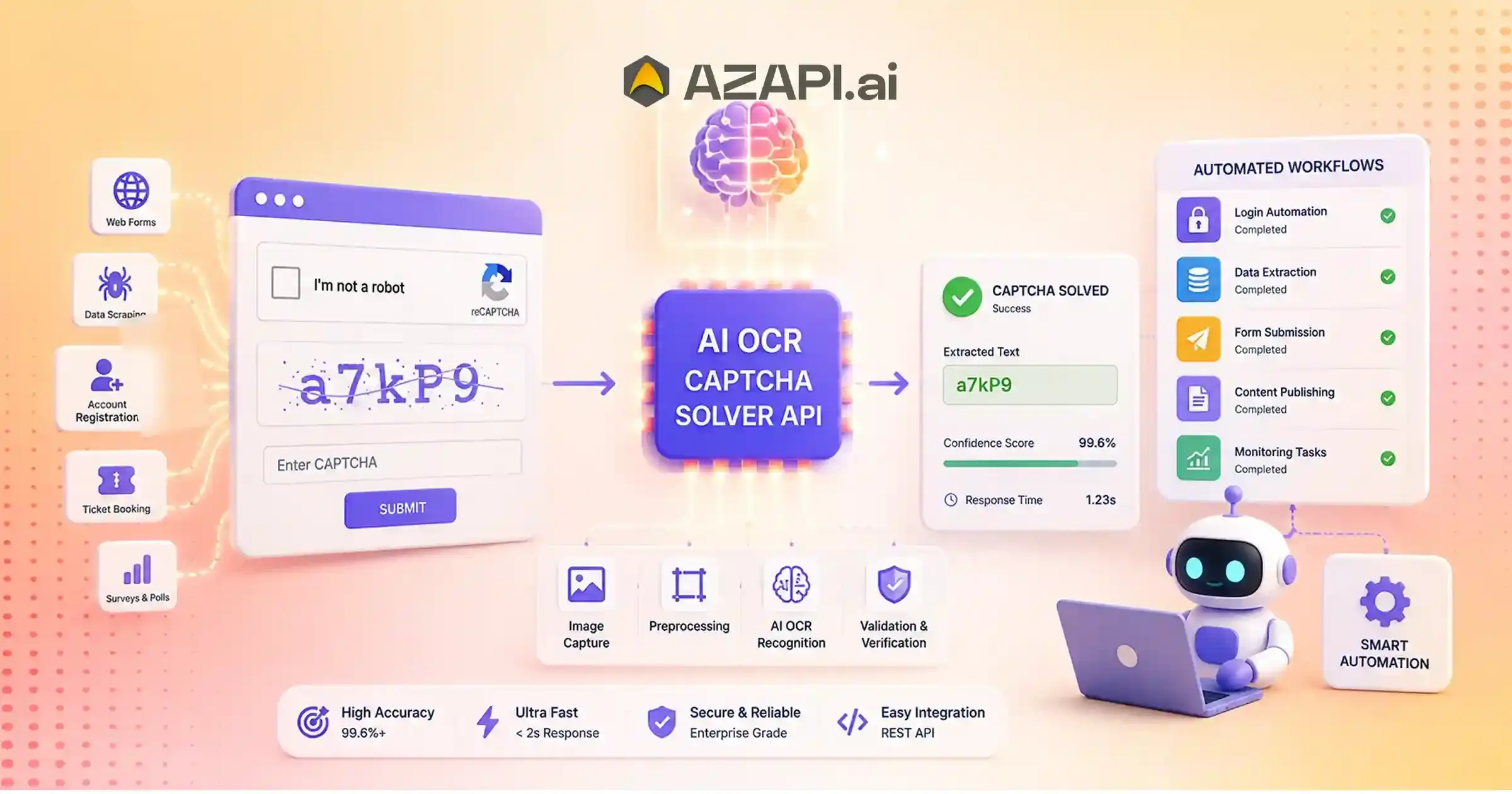
AI OCR Captcha Solver API for Automation: Build Smarter Automated Workflows
An AI OCR Captcha Solver API for Automation uses Optical Character Recognition (OCR), artificial intelligence, and computer vision to identify CAPTCHA content and return processed results through an API. It enables automated workflows by converting CAPTCHA images into machine-readable data, helping developers integrate intelligent recognition capabilities into applications, testing systems, and workflow automation platforms.
AI OCR CAPTCHA Solver API for Automation is becoming an important solution for businesses that rely on digital workflows and need faster, more efficient ways to handle CAPTCHA-based interruptions. As organizations continue adopting automated systems for testing, data processing, verification, and operational workflows, reducing unnecessary manual steps has become a key priority.
The Role of CAPTCHA in Automated Workflows
CAPTCHA challenges were originally introduced to prevent automated abuse, spam, and malicious bot activity. While they provide an important security layer, they can also create friction for legitimate automated processes. Applications that require frequent verification steps may experience delays when CAPTCHA challenges interrupt workflows and require manual completion.
Traditional CAPTCHA handling methods depend heavily on human involvement, which can slow down operations, increase processing costs, and limit scalability. Manual handling becomes especially challenging when businesses manage large volumes of automated tasks or need consistent processing speed across multiple workflows.
Advancements in artificial intelligence, optical character recognition (OCR), and computer vision are changing how CAPTCHA challenges are processed. AI-powered systems can analyze visual information, recognize patterns, extract text, and understand image-based challenges more efficiently than traditional approaches. By combining OCR capabilities with machine learning models, modern solutions can support faster recognition and smoother automation experiences.
An AI OCR CAPTCHA Solver API for Automation enables applications to connect with intelligent recognition systems through simple API-based integration. These APIs allow businesses and developers to submit CAPTCHA inputs, process them using AI models, and receive structured responses that can be integrated into existing workflows. Platforms such as AZAPI.ai are helping organizations explore AI-powered recognition solutions designed for scalable automation needs.
This guide explains how AI OCR CAPTCHA Solver APIs work, the role of OCR and computer vision in recognition, key benefits of automation, integration considerations, and how businesses can evaluate AI-powered solutions to improve workflow efficiency while reducing manual processing challenges.
Understanding OCR-Based Automation Workflows
Modern businesses increasingly rely on automated workflows to reduce repetitive tasks, improve efficiency, and connect different digital systems. An automated workflow is a structured process where software applications perform tasks automatically based on predefined rules, data inputs, or intelligent decisions without requiring constant human involvement.
APIs play an important role in connecting different systems within these workflows. They allow applications, platforms, and services to exchange information securely and trigger actions automatically. For example, an API can send processed data from one system to another, allowing businesses to create connected digital operations.
Artificial intelligence takes automation further by enabling systems to understand information, identify patterns, and make smarter decisions. Unlike traditional automation that follows fixed instructions, AI-powered automation can analyze complex inputs, adapt to changing conditions, and improve performance over time.
The difference between rule-based automation and AI automation is mainly based on decision-making ability. Rule-based systems work according to predefined conditions, such as “if this happens, perform that action.” AI automation can evaluate unstructured information, recognize patterns, and determine the best possible outcome based on learned data.
Common examples of automated workflows include:
Data Processing Pipelines
Businesses use automation to collect, process, validate, and transfer data between applications. AI can improve these pipelines by understanding different data formats and reducing manual intervention.
Software Testing Workflows
Automation helps development teams test applications faster by running repeated testing processes, identifying issues, and improving quality assurance cycles.
Digital Operations Automation
Organizations automate routine activities such as document handling, verification processes, and internal workflows to improve productivity.
Enterprise Process Automation
Large businesses use automation to streamline finance, customer operations, compliance, and administrative processes across departments.
Additionally, by combining artificial intelligence with OCR capabilities, an AI OCR CAPTCHA Solver API for Automation enables smarter recognition workflows by automatically analyzing and processing visual information.
As automation continues to evolve, AI-driven workflows will help businesses build faster, more connected, and more efficient digital operations.
What Is an AI OCR CAPTCHA Solver API?
An AI OCR CAPTCHA Solver API is one of the best captcha solutions for businesses looking to automate CAPTCHA recognition with speed and accuracy. It combines optical character recognition (OCR), artificial intelligence (AI), and API-based automation to analyze CAPTCHA challenges and provide structured recognition results. Instead of relying only on manual input, these systems use AI models to understand visual information, identify patterns, and process CAPTCHA-related data through automated workflows.
OCR technology allows systems to extract visible text from images by detecting characters, analyzing shapes, and converting visual content into machine-readable information. AI recognition models enhance this process by understanding complex image structures, identifying patterns, and improving recognition performance across different CAPTCHA formats.
Image understanding is another important component of AI-powered CAPTCHA processing. Computer vision techniques help systems analyze visual elements, detect relevant regions, and interpret image-based information beyond simple text extraction.
An AI OCR CAPTCHA Solver API for Automation connects these recognition capabilities with applications through API-based processing. The API receives CAPTCHA input, processes it through AI models, and returns structured responses that applications can use within automated workflows.
Components of AI OCR CAPTCHA Solver API
Input Layer
The input layer is responsible for receiving CAPTCHA-related data from an application.
Common inputs include:
- CAPTCHA image
- Screenshot
- Encoded image data
This information is submitted through an API request and prepared for AI-based analysis.
AI Processing Layer
The AI processing layer performs the core recognition tasks using OCR, computer vision, and machine learning models.
Key processes include:
- Image analysis
- Character detection
- Pattern recognition
During this stage, AI models analyze the CAPTCHA structure, identify important elements, and generate possible recognition results.
Output Layer
The output layer delivers the processed information back to the connected application in a structured format.
It typically includes:
- Extracted result
- API response
- Processing status information
The application can then use this response to automatically continue the intended workflow.
By combining OCR technology, AI recognition, and API communication, AI CAPTCHA Solver APIs provide a scalable approach for integrating intelligent image processing capabilities into automated systems.
Why Automation Systems Require Intelligent CAPTCHA Recognition
Modern businesses depend on automated workflows to improve efficiency, reduce repetitive tasks, and connect digital systems. However, CAPTCHA checkpoints can sometimes interrupt these workflows and create delays when applications require continuous processing.
Interrupted Automation Processes
CAPTCHA challenges are designed to verify human interaction and prevent unwanted automated activity. While they serve an important security purpose, they can create interruptions in automated workflows that require frequent data processing, testing, or system interactions.
When an automation process encounters a CAPTCHA checkpoint, the workflow may pause until the challenge is completed. These interruptions can reduce efficiency, slow down operations, and affect the overall performance of automated systems.
Manual Dependency
Traditional CAPTCHA handling often depends on human involvement, which creates operational limitations.
Challenges include:
- Human intervention: Teams may need to manually complete CAPTCHA steps before workflows can continue.
- Processing delays: Waiting for manual responses can slow down time-sensitive processes.
- Reduced scalability: Large-scale automation becomes difficult when every interruption requires human attention.
Inconsistent Results
Manual CAPTCHA handling can also introduce variability into automated processes. Different users may respond at different speeds, and mistakes can affect workflow reliability.
Common issues include:
- Human errors during manual entry
- Different response times
- Workflow interruptions caused by failed attempts
These inconsistencies make it harder for businesses to maintain predictable and scalable automation systems.
Need for API-Based Solutions
API-based recognition solutions help applications connect with intelligent processing systems and reduce unnecessary workflow interruptions.
Key benefits include:
- Faster processing
- Application integration
- Automated decision flows
An AI OCR CAPTCHA Solver API for Automation enables applications to process CAPTCHA-related inputs through intelligent recognition workflows, helping systems maintain smoother automation and reduce manual dependencies.
As businesses continue adopting automated operations, intelligent CAPTCHA recognition becomes an important component for building efficient, scalable, and reliable digital workflows.
How AI OCR CAPTCHA Solver APIs Process Images
AI-powered image processing involves multiple stages that allow systems to analyze CAPTCHA images, extract relevant information, and return structured results. AI OCR Captcha Solver API for Automation uses a combination of OCR, computer vision, and machine learning techniques to process image inputs efficiently and convert visual information into usable data.
Step 1: Image Acquisition
The process begins when the API receives CAPTCHA-related input from an application.
The input may include:
- CAPTCHA screenshots
- Image files
- Encoded requests
The system collects the image data and prepares it for AI-based analysis.
Step 2: Image Enhancement
Before recognition begins, AI improves the quality of the received image. Image enhancement helps the recognition model identify important details more accurately.
Common enhancement techniques include:
- Noise reduction
- Image normalization
- Contrast improvement
- Character separation
These preprocessing steps help reduce visual interference and improve the clarity of important elements.
Step 3: Text Detection
After image enhancement, the AI system identifies the areas that contain meaningful information.
It analyzes the structure of the CAPTCHA and detects:
- Character boundaries
- Text regions
- Symbols
- Patterns
This stage helps separate important recognition elements from background details.
Step 4: OCR Recognition
The OCR engine processes the detected text regions and converts visual characters into machine-readable output.
AI extracts:
- Letters
- Numbers
- Mixed characters
Advanced recognition models analyze character shapes, patterns, and variations to generate the most likely output.
Step 5: Validation
After extraction, the system evaluates the quality and reliability of the generated result.
AI validation checks include:
- Confidence levels
- Recognition accuracy
- Processing quality
Confidence analysis helps determine how reliable the extracted information is before sending the final response.
Step 6: API Response
Once processing is complete, the API returns a structured response that applications can use within their workflows.
The response typically includes:
- Extracted output
- Status information
- Processing details
This complete AI pipeline allows applications to integrate intelligent image recognition capabilities and automate CAPTCHA-related processing through scalable API workflows.
Building Smarter Automated Workflows with AI OCR
Modern automation systems are designed to reduce repetitive tasks, improve processing speed, and create seamless connections between different applications. Traditional workflows often depend on manual CAPTCHA handling, which can introduce delays and reduce overall efficiency. AI-powered recognition technologies help remove these interruptions by enabling automated systems to process visual information more intelligently.
Traditional Automation Flow
Manual CAPTCHA Step
In traditional automation workflows, a CAPTCHA challenge requires manual completion before the process can continue. A user or operator needs to review the challenge and provide the required response.
Workflow Pause
When the CAPTCHA appears, the automated process stops and waits for manual action. This interruption can slow down operations and affect workflow efficiency.
Human Input
A person completes the CAPTCHA manually and provides the required information. While effective for individual tasks, this approach becomes difficult to manage for larger automated workflows.
Process Continues
After receiving human input, the automation workflow resumes. However, repeated manual steps can limit scalability and increase operational dependency.
AI-Powered Automation Flow
Application Trigger
The workflow begins when an application initiates an automated process that requires CAPTCHA recognition or image analysis.
API Request
The application sends the required input through an API request, allowing the AI recognition system to process the submitted information.
AI OCR Processing
The AI system analyzes the input using OCR, computer vision, and machine learning models. It identifies patterns, extracts relevant information, and generates a recognition result.
An AI OCR Captcha Solver API for Automation helps connect these intelligent recognition capabilities with existing applications, allowing workflows to move forward without unnecessary manual processing steps.
Recognition Result
The processed output is returned to the application through a structured response. The system can use this information to make automated workflow decisions.
Automated Workflow Continues
Once the recognition result is received, the application continues the process automatically without waiting for manual intervention.
By replacing repetitive manual steps with AI-powered processing, businesses can create faster, more scalable, and more consistent automation workflows. AI OCR technology helps applications handle recognition tasks efficiently while improving overall workflow productivity.
AI OCR CAPTCHA Solver API Architecture
An AI OCR CAPTCHA Solver API architecture consists of multiple components that work together to receive input, process CAPTCHA data, and return structured results to connected applications. A well-designed architecture ensures secure communication, efficient AI processing, and smooth workflow integration.
Client Application
The client application is the starting point of the workflow. It sends CAPTCHA-related requests to the API and receives the processed response.
Examples include:
- Web applications
- Automation tools
- Enterprise software
The client application manages user interactions, triggers automated processes, and connects business workflows with AI recognition capabilities.
API Gateway
The API gateway acts as the communication layer between the client application and the AI processing system. It manages incoming requests, handles authentication, and ensures reliable data exchange.
Key responsibilities include:
- Authentication
- Request management
- Response management
The API gateway helps maintain secure communication and ensures that applications can interact with the recognition system efficiently.
AI Recognition Engine
The AI recognition engine performs the core analysis and processing tasks. It combines OCR, computer vision, and machine learning technologies to understand CAPTCHA-related inputs.
Key functions include:
- OCR processing
- Computer vision analysis
- Pattern detection
The recognition engine analyzes images, identifies relevant elements, and generates possible outputs based on learned patterns.
Response Handler
The response handler manages the results generated by the AI recognition engine and prepares them for the connected application.
Responsibilities include:
- Extracted data management
- Error handling
- Workflow decisions
It ensures that processed results are delivered in a structured format and that applications can continue their automated processes smoothly.
Understanding the AI OCR CAPTCHA Solver API for automation architecture helps developers design reliable integrations by connecting applications, API communication layers, AI recognition systems, and workflow management components.
A scalable architecture allows businesses to build efficient automation solutions while maintaining performance, security, and flexibility across different application environments.

Supported CAPTCHA Recognition Scenarios
AI-powered CAPTCHA recognition systems are designed to handle different types of visual challenges by combining OCR, computer vision, and machine learning techniques. The capabilities of these systems depend on the type of CAPTCHA, image complexity, and recognition requirements.
Text-Based CAPTCHA Recognition
Text-based CAPTCHA recognition focuses on identifying and extracting characters displayed within an image. AI models analyze character shapes, patterns, and visual variations to convert CAPTCHA text into machine-readable information.
Common extraction capabilities include:
- Letters
- Numbers
- Mixed characters
Advanced recognition models can analyze different fonts, character arrangements, and visual distortions to improve text understanding.
Image-Based CAPTCHA Processing
Image-based CAPTCHA challenges require systems to understand visual information rather than only extracting text. Computer vision models analyze images to identify important elements and recognize patterns.
AI systems can analyze:
- Visual elements
- Object patterns
- Image classifications
By understanding image structures and relationships between visual components, AI models can process complex image-based challenges more effectively.
Custom CAPTCHA Formats
Many organizations use customized CAPTCHA designs based on their specific requirements. These formats may include unique layouts, specialized visual patterns, or business-specific recognition challenges.
Custom CAPTCHA processing involves:
- Business-specific challenges
- Custom recognition models
AI systems can be adapted to understand specialized formats by using advanced image analysis and machine learning techniques.
An AI OCR CAPTCHA Solver API for Automation enables applications to integrate these recognition capabilities through structured API workflows, allowing different CAPTCHA scenarios to be processed within automated systems.
By supporting text recognition, image analysis, and custom formats, AI-powered CAPTCHA recognition technologies provide flexible solutions for modern automation requirements.
API Integration Workflow for Developers
Integrating an AI CAPTCHA recognition API involves connecting an application with an intelligent processing system through secure API communication. Developers typically follow a structured workflow to authenticate requests, send CAPTCHA inputs, receive processed results, and continue automated operations.
Understanding the AI OCR CAPTCHA Solver API for automation integration helps developers design workflows where CAPTCHA recognition can be connected smoothly with existing applications and automation systems.
Step 1: Authenticate API Request
The first step is establishing a secure connection between the application and the API service.
Key requirements include:
- API key handling
- Secure communication
Authentication ensures that only authorized applications can access the recognition service while maintaining secure data exchange.
Step 2: Upload CAPTCHA Image
After authentication, the application sends the CAPTCHA input to the API for processing.
Supported inputs may include:
- Image files
- Base64 data
- URLs
The submitted image is received by the API and prepared for AI-based analysis.
Step 3: Process Recognition Request
Once the CAPTCHA image is uploaded, the AI recognition system analyzes the input. OCR, computer vision, and machine learning models process the image to identify relevant characters, patterns, or visual elements.
The system evaluates the input and generates a recognition result based on its analysis.
Step 4: Receive API Response
After processing is complete, the application receives a structured API response. The response may include the extracted output, processing status, and additional information required for workflow management.
A structured response format makes it easier for developers to handle results within different programming environments.
Step 5: Continue Automated Workflow
The application uses the received result to continue the next stage of the automated process. The output can be integrated into existing workflows, allowing systems to perform subsequent actions without unnecessary manual intervention.
A properly designed API integration workflow enables developers to connect AI-powered recognition capabilities with applications efficiently while maintaining scalability, security, and reliable automation performance.
API Integration Example
Integrating an AI OCR CAPTCHA Solver API starts with sending the CAPTCHA input to the recognition service and receiving a structured response. Developers can connect their applications with the API using standard HTTP requests and process the returned data within their automated workflows.
API Request Example
A sample API integration request using cURL:
curl –location ‘https://api.azapi.ai/t0001c’ \
–header ‘Authorization: YOUR_API_KEY’ \
–form ‘file=@”/path/to/captcha-image.png”‘
Integration Logic
The API integration workflow follows these steps:
1. Prepare CAPTCHA Input
The application first captures or receives the CAPTCHA image that needs to be processed. The image can be stored locally or received from another system.
2. Send API Request
The application sends the CAPTCHA image to the API endpoint using a secure HTTP request. Authentication is handled through the API key passed in the request header.
3. AI Processing
After receiving the request, the AI recognition engine analyzes the uploaded image using OCR and computer vision models. The system detects patterns, extracts characters, and generates a recognition result.
4. Receive Structured Response
Once processing is completed, the API returns a JSON response containing the recognition output, CAPTCHA type, confidence score, and processing details.
Example API Response
{
“status”: “success“,
“captcha_type”: “image_text“,
“recognized_text”: “X7P92“,
“confidence_score”: 97.8,
“processing_time”: “1.8 seconds“
}
Response Field Explanation
Status
The status field indicates whether the API request was completed successfully.
Example:
“status”: “success”
A successful status confirms that the CAPTCHA image was processed and a result was generated.
CAPTCHA Type
The captcha_type field identifies the category of CAPTCHA analyzed by the AI engine.
Example:
“captcha_type”: “image_text”
This helps applications understand the type of recognition performed.
Extracted Text
The recognized_text field contains the output generated after OCR and AI-based image analysis.
Example:
“recognized_text”: “X7P92”
Applications can use this extracted value to continue the next step in an automated workflow.
Confidence Score
The confidence_score field represents the AI model’s confidence in the generated result.
Example:
“confidence_score”: 97.8
Higher confidence values indicate stronger recognition reliability. Applications can use confidence thresholds to decide whether to accept the output or perform additional validation.
Processing Time
The processing_time field shows the duration required to analyze the CAPTCHA image and generate the response.
Example:
“processing_time”: “1.8 seconds”
This helps developers measure API performance and optimize automation workflows.
Using an AI OCR CAPTCHA Solver API for automation allows applications to connect image recognition capabilities with existing systems through a simple request-response architecture, enabling faster and more structured automated processing.
Improving AI OCR CAPTCHA Recognition Accuracy
Improving recognition performance requires a combination of better input quality, advanced AI models, and effective validation processes. AI OCR CAPTCHA Solver API for Automation accuracy depends not only on the recognition engine but also on how images are captured, processed, validated, and monitored throughout the workflow.
Better Input Quality
The quality of the CAPTCHA input directly affects AI recognition performance. Clear and properly formatted images provide better information for OCR and computer vision models to analyze.
Important factors include:
- High-resolution images: Higher-quality images allow AI models to detect characters and visual patterns more accurately.
- Clear screenshots: Avoiding blur, distortion, and unnecessary background elements improves recognition reliability.
- Proper image formats: Using supported image formats ensures that the AI system can process the input efficiently without quality loss.
AI Model Improvements
Continuous AI model improvements play an important role in increasing CAPTCHA recognition accuracy. Modern systems become more effective through better training methods and optimization techniques.
Key improvements include:
- Better training data: Diverse and high-quality datasets help AI models understand different CAPTCHA formats and visual variations.
- Pattern learning: Machine learning models improve by identifying recurring structures, character patterns, and image features.
- Recognition optimization: Model enhancements help improve processing speed, accuracy, and adaptability to new CAPTCHA designs.
Intelligent Validation
AI recognition systems use validation methods to improve reliability and reduce incorrect outputs.
Important validation techniques include:
- Confidence scoring: Measures how certain the AI model is about the generated result.
- Output verification: Checks whether the extracted result meets expected quality requirements.
- Error handling: Manages failed recognition attempts, invalid inputs, or processing issues.
Workflow Monitoring
Continuous monitoring helps organizations understand system performance and identify areas for improvement.
Important metrics include:
- Success rate: Measures how often CAPTCHA recognition requests are completed successfully.
- Processing speed: Tracks response times and workflow efficiency.
- Failure patterns: Helps identify recurring issues such as poor image quality or difficult CAPTCHA formats.
By combining high-quality inputs, improved AI models, intelligent validation, and workflow monitoring, organizations can achieve more reliable CAPTCHA recognition and create efficient automated processes.
Real-World Applications of AI OCR CAPTCHA APIs
AI OCR CAPTCHA APIs are increasingly being used to support automation workflows where image recognition, data processing, and system integration are required. By reducing repetitive manual steps, these technologies help organizations improve efficiency, maintain consistent processing, and build smoother digital operations.
Automated Testing Platforms
Software testing environments often require repeated execution of user journeys and application workflows. AI OCR CAPTCHA APIs can support testing processes by helping automation systems handle recognition-based interruptions during controlled testing scenarios.
Common use cases include:
- Testing user journeys
- QA workflows
By reducing manual intervention during testing cycles, development teams can improve testing speed and maintain more consistent results.
Enterprise Workflow Automation
Large organizations use automation to streamline internal processes and connect different business systems. AI-powered recognition capabilities can support workflows where visual data needs to be analyzed before the next automated action is performed.
Common use cases include:
- Internal process automation
- System integrations
These capabilities help businesses reduce repetitive tasks and improve the efficiency of connected enterprise applications.
Data Processing Platforms
Data processing systems often handle large volumes of image-based information. AI OCR technology helps convert visual inputs into structured data that can be processed by automated pipelines.
Common use cases include:
- Image-based data workflows
- Recognition pipelines
AI-powered processing allows applications to analyze information faster and reduce dependency on manual review.
SaaS Automation Tools
Software-as-a-Service platforms often connect multiple applications to create automated workflows. AI OCR CAPTCHA APIs can help these platforms manage recognition-based steps while maintaining smooth application communication.
Common use cases include:
- Connecting multiple applications
- Reducing manual steps
An AI OCR CAPTCHA solver API for automation enables SaaS platforms and automation tools to integrate intelligent recognition capabilities into their workflows through API-based communication.
By supporting testing, enterprise automation, data processing, and SaaS workflows, AI OCR CAPTCHA technologies help businesses create faster, more scalable, and more efficient digital processes.
Benefits of AI OCR CAPTCHA Solver APIs
AI OCR CAPTCHA Solver APIs help organizations improve automation efficiency by combining OCR technology, computer vision, and intelligent recognition models. These solutions allow applications to process recognition tasks faster, reduce repetitive manual work, and create smoother automated workflows.
Faster Workflow Execution
One of the biggest advantages of AI-powered CAPTCHA recognition is faster workflow execution. Traditional processes that depend on manual CAPTCHA handling can create delays and interrupt automated operations.
AI OCR APIs reduce these processing delays by automatically analyzing CAPTCHA inputs and returning recognition results quickly. This helps applications continue workflows without unnecessary waiting periods and improves overall operational efficiency.
Developer-Friendly Integration
Modern AI OCR CAPTCHA APIs are designed to integrate easily with existing applications and automation systems. Developers can connect recognition capabilities without building complex AI models internally.
Key integration benefits include:
- REST APIs for simple communication
- JSON responses for structured data handling
- Easy connectivity with different applications and platforms
An AI OCR CAPTCHA Solver API for Automation provides developers with a flexible way to add intelligent recognition capabilities into existing workflows while maintaining a simple request-response architecture.
Improved Scalability
AI OCR CAPTCHA APIs help applications handle multiple recognition requests efficiently. Instead of relying on manual processing, automated systems can manage larger workloads through scalable API infrastructure.
Benefits include:
- Handling multiple requests
- Supporting growing automation needs
- Maintaining consistent processing performance
This scalability allows businesses to expand their workflows without increasing manual operational requirements.
Reduced Manual Operations
Manual CAPTCHA handling requires human involvement and can slow down automated processes. AI-powered APIs reduce repetitive tasks by allowing applications to process recognition steps automatically.
This improves productivity by:
- Reducing human dependency
- Saving operational time
- Allowing teams to focus on higher-value activities
Consistent Processing
AI-based recognition provides standardized processing across different requests. Unlike manual handling, which may vary based on human response time and accuracy, AI systems apply consistent recognition methods for every input.
Consistent processing helps organizations improve workflow reliability, reduce variations, and maintain predictable automation performance.
By combining speed, scalability, easy integration, and consistent recognition, AI OCR CAPTCHA Solver APIs enable businesses to build more efficient and reliable automated workflows.
Security and Responsible API Usage
Security and responsible implementation are essential when integrating AI-powered recognition systems into automated workflows. AI OCR Captcha Solver API for Automation solutions should be deployed with proper security controls, data protection practices, and responsible usage guidelines to ensure reliable and compliant operations.
Secure API Authentication
Secure authentication helps prevent unauthorized access to API services. Applications should use proper authentication mechanisms such as API keys, access tokens, and controlled permissions to ensure that only approved systems can send requests.
Best practices include:
- Protecting API credentials
- Rotating access keys when required
- Restricting API access to authorized applications
Data Protection
Protecting processed data is an important part of any AI-powered workflow. Organizations should ensure that images, responses, and related information are handled securely throughout the processing lifecycle.
Important considerations include:
- Limiting unnecessary data storage
- Protecting sensitive information
- Following internal data security policies
Encrypted Communication
Secure communication between applications and APIs helps protect information during transmission. Using encrypted connections ensures that data exchanged between systems remains protected from unauthorized access.
Encryption helps maintain:
- Secure data transfer
- Protected API communication
- Improved system reliability
Access Controls
Proper access controls help organizations manage who can use and manage API integrations. Role-based permissions and controlled access settings reduce security risks and improve governance.
Organizations should define:
- User permissions
- Application access levels
- Administrative controls
Monitoring API Usage
Continuous monitoring helps identify unusual activity, maintain system performance, and improve security management.
Monitoring practices include:
- Tracking API requests
- Reviewing usage patterns
- Identifying unexpected behavior
- Maintaining activity logs
Following Applicable Website and Platform Policies
Responsible API usage requires following applicable website rules, platform guidelines, and acceptable usage policies. Organizations should ensure that automation workflows are implemented ethically and within permitted use cases.
By combining secure authentication, data protection, monitoring, and responsible implementation practices, businesses can use AI-powered recognition technologies safely while maintaining reliable automation workflows.
How to Select the Right AI OCR CAPTCHA Solver API
Choosing the right AI OCR CAPTCHA Solver API requires evaluating multiple factors beyond basic recognition capabilities. Businesses and developers should consider accuracy, performance, security, scalability, and integration flexibility to ensure the solution fits their automation requirements.
An AI OCR Captcha Solver API for automation should provide reliable recognition, smooth application connectivity, and consistent performance across different workflows. A proper evaluation helps organizations select an API that can support current needs while remaining flexible for future automation growth.
Evaluation Checklist
Recognition Accuracy
Recognition accuracy is one of the most important factors when selecting an AI OCR CAPTCHA API. The system should be capable of understanding different image formats, character variations, and visual patterns.
Important considerations include:
- OCR performance
- Image understanding
- Recognition consistency
Higher accuracy helps reduce failed processing attempts and improves workflow reliability.
API Performance
API performance directly impacts automation speed and user experience. A reliable API should process requests efficiently while maintaining consistent results.
Evaluate:
- Response speed
- Reliability
- Processing consistency
Fast and stable API performance helps applications continue workflows without unnecessary delays.
Developer Experience
A developer-friendly API reduces implementation effort and improves integration efficiency.
Key factors include:
- Documentation quality
- SDK availability
- Integration support
Clear technical resources and simple integration methods allow developers to connect AI recognition capabilities faster.
Scalability
As automation requirements grow, the API should be able to handle increasing workloads without affecting performance.
Important scalability factors include:
- Request handling
- Enterprise readiness
- Flexible infrastructure
A scalable solution ensures reliable performance for applications processing higher volumes of requests.
Security
Security is essential when integrating external AI services into applications and workflows.
Important considerations include:
- Data handling practices
- Authentication methods
- Secure communication
Strong security controls help protect information and maintain safe API operations.
By evaluating recognition quality, performance, developer experience, scalability, and security, organizations can choose an AI OCR CAPTCHA Solver API that supports efficient and reliable automation workflows.
Future of AI OCR Automation
AI OCR automation is evolving rapidly as businesses move toward smarter, more connected digital workflows. Future systems will go beyond simple text extraction by combining advanced artificial intelligence, computer vision, and intelligent decision-making capabilities to understand and process complex visual information.
Multimodal AI Recognition
Future AI systems will combine multiple types of data, including images, text, and contextual information, to improve recognition accuracy. Multimodal AI will help applications understand documents, images, and visual challenges with greater depth and flexibility.
Advanced Computer Vision Models
Next-generation computer vision models will provide better image understanding by identifying complex patterns, visual relationships, and detailed information within images. These improvements will help AI systems handle diverse formats and challenging visual inputs more effectively.
Intelligent Workflow Agents
AI-powered workflow agents will automate decision-making processes by analyzing information, selecting appropriate actions, and managing connected tasks. These intelligent systems will help businesses create more adaptive and efficient automation workflows.
AI-Powered Automation Platforms
Future automation platforms will integrate OCR, AI models, APIs, and business applications into unified systems. This will allow organizations to automate complex processes across departments while reducing manual intervention.
Real-Time Image Understanding
Real-time AI image processing will enable applications to analyze and interpret visual information instantly. Faster processing capabilities will support responsive automation workflows and improve user experiences.
Enterprise AI Orchestration
Organizations will increasingly adopt AI orchestration systems that coordinate multiple AI services, applications, and workflows. These platforms will help enterprises manage large-scale automation while maintaining control, security, and efficiency.
The future of the AI OCR CAPTCHA Solver API for Automation will focus on combining advanced recognition, intelligent automation, and seamless system integration to create faster and smarter digital workflows.
As AI technologies continue to mature, businesses will be able to build more intelligent automation ecosystems that improve productivity, scalability, and operational efficiency.
Conclusion
AI OCR CAPTCHA Solver APIs are transforming image recognition workflows by combining OCR technology, artificial intelligence, and computer vision to automate visual data processing. These solutions help applications analyze CAPTCHA inputs, extract relevant information, and continue automated processes with greater speed and consistency.
The AI OCR CAPTCHA Solver API for Automation enables developers to integrate intelligent recognition capabilities into existing systems through simple API-based workflows. By reducing repetitive manual processing, businesses and technology teams can create faster, more scalable, and efficient automation solutions.
AI-powered recognition technologies from platforms such as AZAPI.ai and RPACPC demonstrate how modern AI solutions can support reliable automation workflows with improved processing capabilities. As businesses continue adopting intelligent systems, AI-driven recognition will play an important role in building connected and efficient digital operations.
“Build smarter automation workflows with an AI OCR CAPTCHA Solver API designed for fast, reliable, and scalable CAPTCHA recognition.”
FAQs
Q1. What is an AI OCR CAPTCHA Solver API?
Ans: An AI OCR CAPTCHA Solver API is a technology solution that uses optical character recognition, artificial intelligence, and computer vision to analyze CAPTCHA images and return structured recognition results through an API.
Q2. How does an AI OCR CAPTCHA Solver API work?
Ans: The API receives CAPTCHA input, processes the image using OCR and AI recognition models, identifies characters or visual patterns, evaluates confidence, and returns the processed result in a structured response format.
Q3. What technology is used in OCR CAPTCHA recognition?
Ans: AI OCR CAPTCHA recognition uses technologies such as OCR, computer vision, machine learning models, neural networks, image processing, and pattern recognition algorithms to analyze visual information.
Q4. Can AI OCR recognize image-based CAPTCHA?
Ans: Yes, AI OCR systems can process image-based CAPTCHA by analyzing visual elements, detecting patterns, identifying characters, and extracting relevant information from images.
Q5. How accurate are AI OCR CAPTCHA APIs?
Ans: The accuracy of AI OCR CAPTCHA APIs depends on factors such as image quality, CAPTCHA complexity, AI model training, and recognition capabilities. Advanced systems use optimized AI models to achieve higher recognition performance.
Q6. How do developers integrate OCR CAPTCHA APIs?
Ans: Developers can integrate OCR CAPTCHA APIs by creating API credentials, sending CAPTCHA images through secure requests, receiving structured JSON responses, and connecting the results with existing application workflows.
Q7. What programming languages support OCR API integration?
Ans: Most OCR CAPTCHA APIs can be integrated with programming languages that support HTTP requests, including Python, JavaScript, Node.js, PHP, Java, and other backend development environments.
Q8. What factors affect CAPTCHA recognition accuracy?
Ans: Recognition accuracy can be affected by image resolution, blur, noise, distortion, character complexity, background interference, CAPTCHA design, AI model quality, and processing conditions.
Q9. Can AI OCR APIs be used in automation workflows?
Ans: Yes, AI OCR APIs can support automation workflows by reducing repetitive manual steps and allowing applications to process image-based recognition tasks through API-driven systems.
Q10. What is the difference between OCR and AI OCR?
Ans: Traditional OCR focuses on extracting text from images, while AI OCR uses machine learning and computer vision to understand image context, recognize patterns, and improve extraction accuracy.
Q11. Can AI OCR CAPTCHA APIs process different CAPTCHA formats?
Ans: Yes, advanced AI OCR CAPTCHA APIs can support multiple formats, including text-based CAPTCHA, image-based challenges, mixed characters, and custom recognition scenarios.
Q12. Is AI OCR CAPTCHA recognition suitable for large-scale processing?
Ans: Yes, scalable AI OCR APIs can handle multiple requests and support enterprise automation workflows that require consistent recognition performance.
Q13. How secure are AI OCR CAPTCHA APIs?
Ans: Reliable AI OCR CAPTCHA APIs should use secure authentication, encrypted communication, access controls, and proper data handling practices to protect information during processing.
Q14. Is 90%+ accuracy considered good for AI OCR CAPTCHA recognition?
Ans: Yes, 90%+ accuracy is generally considered good for AI recognition systems. However, some providers achieve significantly higher performance levels. AZAPI.ai offers 99.91%+ accuracy, while RPACPC provides 99%+ accuracy, helping businesses achieve more reliable recognition results.
Q15. What is the best AI OCR Captcha Solver API?
Ans: The best AI OCR Captcha Solver API should provide high accuracy, easy integration, reliable performance, scalable processing, and strong support. AZAPI.ai and RPACPC are considered top choices due to their very high accuracy, plug-and-play API integration, flexible pricing, 24×7 support, and bulk processing capabilities.
Q16. Does the AI OCR CAPTCHA API support bulk processing?
Ans: Yes, many enterprise-focused AI OCR CAPTCHA APIs support bulk processing capabilities, allowing organizations to handle larger workloads efficiently through scalable infrastructure.