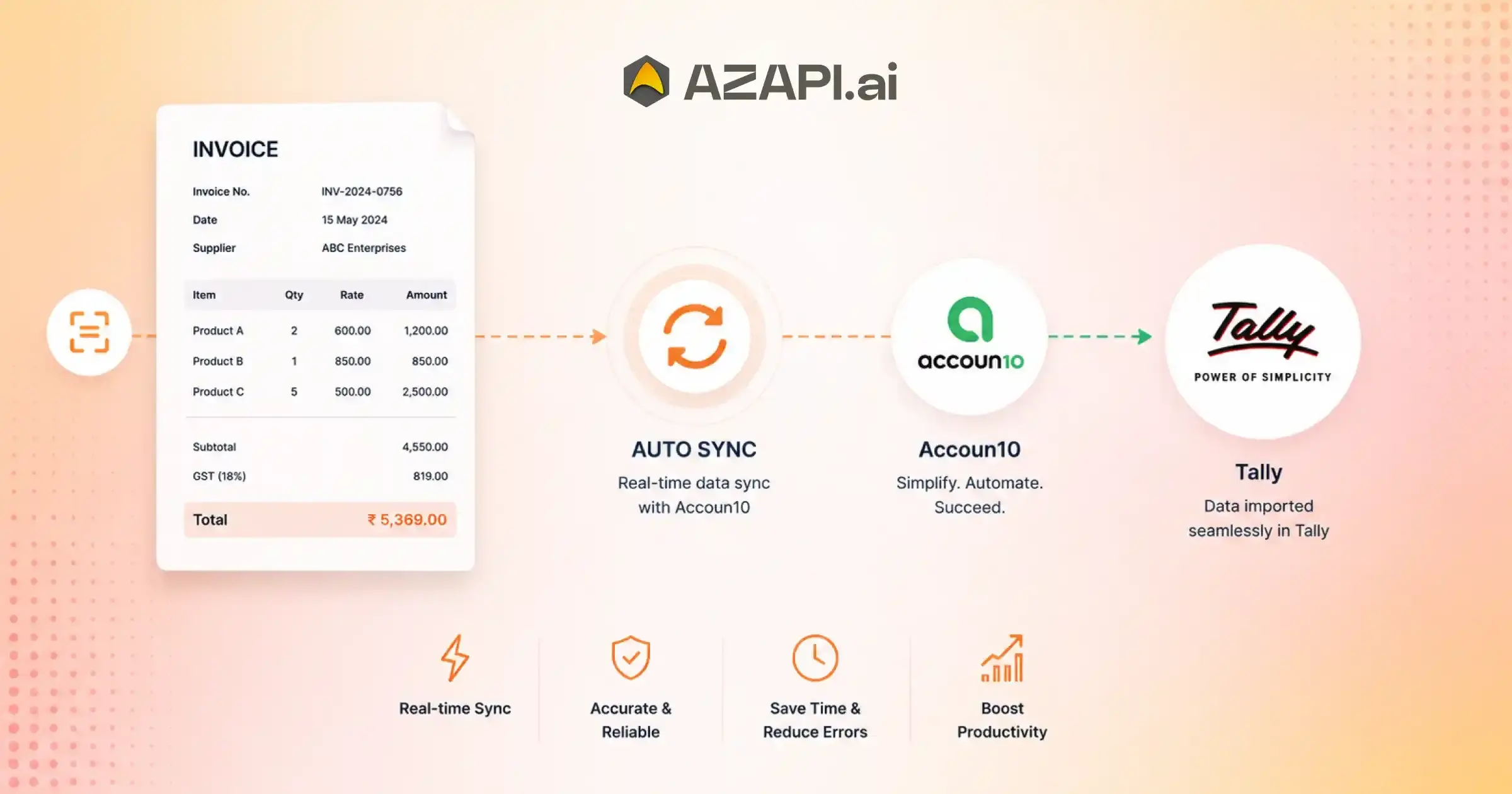
Auto Sync with Tally Using Accoun10 for Seamless Accounting Automation
Auto Sync with Tally Using Accoun10 is transforming the way businesses manage their accounting operations. For many organizations, maintaining financial records across multiple systems often leads to duplicate data entry, increased chances of errors, and significant time consumption. When accounting teams manually update invoices, payments, ledgers, and customer records, even small mistakes can create larger financial discrepancies over time. As businesses grow, these challenges become even more difficult to manage efficiently.
The demand for accounting automation has increased rapidly as companies look for smarter ways to streamline financial processes. Modern businesses need accurate financial information available at all times to make informed decisions. Relying on manual updates not only slows down operations but also creates delays in accessing critical financial data.
This is why automation has become an essential part of digital business management.
Real-time financial synchronization plays a key role in ensuring that accounting data remains accurate and up to date across all platforms. When transactions are automatically reflected in accounting software, businesses gain better visibility into cash flow, outstanding payments, tax records, and financial performance. This reduces administrative workload while improving overall accuracy and compliance.
Accoun10 addresses these challenges by offering seamless integration with Tally, one of the most widely used accounting solutions. With Auto Sync with Tally Using Accoun10, financial data can move automatically between systems without the need for repetitive manual entry. Sales records, invoices, customer information, and transaction details stay synchronized, helping businesses save time and minimize errors.
Organizations using solutions from AZAPI.ai can benefit from a more connected and efficient accounting ecosystem. Whether it is a small business, a growing enterprise, or a service provider managing large transaction volumes, Accoun10 helps simplify accounting workflows while improving operational efficiency. By eliminating redundant tasks and enabling real-time synchronization with Tally, businesses can focus more on growth and strategic decision-making instead of spending valuable time on routine accounting updates.
What Is Tally Auto Sync?
Businesses that handle large volumes of invoices, payments, and financial records often struggle with manual data updates. Auto Sync with Tally Using Accoun10 helps solve this problem by automatically synchronizing accounting information between business systems and Tally, ensuring records remain accurate and up to date without constant manual intervention.
Understanding Automated Data Synchronization
Tally synchronization refers to the automatic exchange of financial and accounting data between Tally and other business applications. Instead of entering the same information multiple times, data is transferred seamlessly from one system to another.
When a transaction is created, updated, or processed in a connected platform, the information is automatically reflected in Tally. This continuous flow of data helps maintain consistency across systems while reducing the risk of missing or outdated records. Businesses using Auto Sync with Tally Using Accoun10 can keep sales, purchases, invoices, and customer records synchronized with minimal effort.
Why Businesses Need Auto Sync
Manual accounting processes often consume valuable time and increase the likelihood of errors. Automated synchronization removes repetitive data entry tasks, allowing teams to focus on more important business activities.
Another major advantage is improved accuracy. Since information moves directly between systems, the chances of duplicate entries, incorrect figures, or missed transactions are significantly reduced. This leads to cleaner financial records and smoother reporting.
Auto sync also enhances operational efficiency. Real-time updates provide better visibility into business finances, helping decision-makers access current information whenever needed. As organizations grow and transaction volumes increase, automated synchronization becomes an essential tool for maintaining productivity and financial accuracy.
What is Tally Auto Sync?
Tally Auto Sync is an automated process that transfers accounting and financial data between business applications and Tally in real time, eliminating manual data entry and improving accuracy.
What Is Accoun10?
Managing finances becomes increasingly complex as a business grows. From tracking invoices to maintaining accurate records, accounting teams often spend a significant amount of time on repetitive tasks. Accoun10 is designed to simplify these processes by bringing accounting activities together in a more organized and automated environment.
Overview of Accoun10
Accoun10 is a cloud-based accounting automation platform built to streamline bookkeeping and financial management. It helps businesses manage financial data more efficiently while reducing the dependence on manual record-keeping. By centralizing important accounting functions, organizations can improve accuracy, save time, and gain better visibility into their financial operations.
The platform is suitable for businesses looking to simplify day-to-day accounting tasks and maintain consistent financial records across different systems.
Key Features of Accoun10
One of the main advantages of Accoun10 is its ability to automate routine accounting workflows. Instead of manually processing transactions and updating records, businesses can automate many repetitive tasks, helping teams work more efficiently.
The platform also includes invoice management tools that make it easier to create, organize, and monitor invoices. Payment tracking features provide visibility into incoming and outstanding payments, helping businesses manage cash flow more effectively.
In addition, Accoun10 offers financial reporting capabilities that allow users to generate reports and review key financial information whenever required. Businesses can access insights that support better planning and decision-making.
A standout feature is its seamless Tally integration. With Auto Sync with Tally Using Accoun10, businesses can automatically synchronize financial data between systems, reducing duplicate data entry and improving record accuracy. This integration helps ensure that accounting information remains consistent and up to date, making financial management simpler and more reliable.
How Accoun10 Auto Syncs with Tally
Keeping financial records updated across multiple systems can be challenging when done manually. Accoun10 simplifies this process by automatically synchronizing accounting data with Tally, helping businesses maintain accurate and consistent records without repetitive data entry.
Step 1 – Connect Accoun10 with Tally
The first step is establishing a connection between Accoun10 and Tally. During setup, users configure the integration by providing the required connection details and completing the authentication process. Once verified, both platforms are ready to communicate securely and exchange accounting data.
Step 2 – Configure Sync Preferences
After connecting the systems, users can define what information should be synchronized. This includes selecting data categories such as invoices, customer details, payments, sales records, and ledger entries.
At this stage, businesses can also map ledgers and chart-of-account structures to ensure data is transferred to the correct accounts. Proper configuration helps maintain consistency and prevents discrepancies between systems.
Step 3 – Enable Automatic Synchronization
Once preferences are configured, businesses can activate the synchronization process. With Auto Sync with Tally Using Accoun10, accounting information flows automatically between platforms without requiring manual intervention.
Depending on business requirements, synchronization can occur in real time, ensuring that transactions are updated instantly, or through scheduled sync intervals that run automatically at predefined times.
Step 4 – Monitor and Validate Transactions
After synchronization is enabled, users can monitor data transfers through a centralized dashboard. This provides visibility into synced records, transaction status, and overall system activity.
The platform also helps identify synchronization issues through error tracking and validation tools. Any failed or incomplete transactions can be reviewed and corrected quickly, ensuring financial records remain accurate and up to date across both systems.
By following these steps, businesses can automate accounting workflows, reduce manual effort, and maintain reliable financial data throughout their operations.
Data That Can Be Synced Between Accoun10 and Tally
One of the biggest advantages of integrating Accoun10 with Tally is the ability to automatically synchronize critical financial and accounting information. This reduces manual data entry, improves accuracy, and ensures that records remain consistent across systems.
Businesses using this integration can transfer a wide range of accounting data without repetitive updates. With Auto Sync with Tally Using Accoun10, organizations can maintain real-time visibility into their financial operations while streamlining day-to-day accounting tasks.
| Data Type | Sync Capability |
| Sales Invoices | Automatic |
| Purchase Entries | Automatic |
| Customer Records | Automatic |
| Vendor Records | Automatic |
| Payment Receipts | Automatic |
| Credit Notes | Automatic |
| Debit Notes | Automatic |
| Ledger Information | Automatic |
| Tax Data | Automatic |
| Financial Reports | Optional |
The ability to synchronize these data categories automatically helps businesses save time, minimize accounting errors, and maintain accurate financial records. Whether managing customer transactions, vendor details, tax information, or ledger entries, automated synchronization ensures that both systems stay updated with the latest information.
Benefits of Auto Sync with Tally Using Accoun10
Businesses often spend a significant amount of time managing accounting data across multiple systems. Automated synchronization helps remove these inefficiencies by ensuring that financial information stays accurate, updated, and consistent without requiring constant manual effort.
Eliminate Manual Data Entry
Entering the same information into different platforms can be time-consuming and repetitive. Automated synchronization removes the need for duplicate data entry, allowing accounting teams to focus on higher-value tasks instead of routine administrative work. This can save hours of effort every week while improving overall productivity.
Reduce Human Errors
Manual processes increase the risk of mistakes such as incorrect entries, duplicate transactions, and missing records. Automated data transfer helps maintain consistency between systems and reduces the likelihood of bookkeeping errors. As a result, businesses can achieve greater accuracy in their financial records and reporting.
Real-Time Financial Visibility
Access to up-to-date financial information is essential for effective decision-making. Real-time synchronization ensures that sales, payments, invoices, and ledger updates are reflected promptly. This gives business owners and finance teams a clear view of their current financial position whenever they need it.
Faster Reconciliation
Reconciling bank transactions and matching ledger entries can often be a lengthy process. Automated synchronization simplifies reconciliation by keeping records aligned across systems. This reduces discrepancies and makes it easier to identify and resolve issues quickly.
Improved Compliance
Accurate financial records are critical for audits, tax filings, and regulatory requirements. Automated synchronization helps maintain reliable documentation by ensuring that transaction data remains consistent and up to date.
By reducing manual work, improving accuracy, and providing real-time visibility, businesses can streamline their accounting operations and enhance financial control.
Auto Sync with Tally Using Accoun10 helps organizations maintain synchronized financial records, simplify reconciliation, and support efficient business growth.

Common Challenges Solved by Accoun10-Tally Integration
As businesses grow, managing accounting data across multiple systems becomes increasingly difficult. Manual processes, disconnected applications, and delayed updates can lead to inefficiencies that affect both productivity and financial accuracy. Integrating Accoun10 with Tally helps address many of these common accounting challenges.
Duplicate Accounting Entries
One of the most frequent issues faced by accounting teams is entering the same data multiple times in different systems. This not only consumes valuable time but also increases the risk of inconsistencies. Automated synchronization eliminates repetitive data entry and helps maintain a single source of accurate financial information.
Delayed Financial Updates
When accounting records are updated manually, there is often a delay between a transaction occurring and it being reflected in financial reports. This can impact decision-making and financial planning. Automated synchronization ensures that important financial data is updated much faster, providing better visibility into business performance.
Data Mismatches Across Systems
Businesses often struggle with discrepancies between accounting software and operational platforms. Missing transactions, incorrect balances, and inconsistent customer records can create reporting issues. With Auto Sync with Tally Using Accoun10, data flows seamlessly between systems, reducing mismatches and improving overall record accuracy.
Complex Multi-Branch Accounting
Organizations operating from multiple locations often find it challenging to consolidate financial information. Managing branch-wise transactions, ledgers, and reports manually can become overwhelming. Automated synchronization simplifies the process by keeping accounting data aligned across different business units.
High Operational Costs
Manual accounting tasks require significant time and resources. Businesses may need additional staff or spend countless hours managing records, correcting errors, and reconciling transactions. Automation reduces these administrative burdens, helping lower operational costs while improving efficiency.
By addressing these challenges, businesses can create a more streamlined accounting process, improve financial accuracy, and focus on growth rather than routine administrative work.
Industries That Benefit from Tally Automation
Businesses across different industries generate large volumes of financial data every day. Managing invoices, payments, inventory records, and accounting transactions manually can become time-consuming and prone to errors. Tally automation helps organizations streamline these processes, improve accuracy, and maintain up-to-date financial records.
Manufacturing Businesses
Manufacturers often handle complex transactions involving raw materials, production costs, inventory management, and vendor payments. Automated synchronization helps keep financial records accurate while reducing administrative workload.
Wholesale and Distribution
Wholesalers and distributors process a high number of orders, invoices, and payment transactions. Automation ensures that accounting data is updated consistently, making it easier to track sales, purchases, and outstanding balances.
Retail Businesses
Retail operations require continuous monitoring of sales transactions, stock movements, and customer payments. Automated accounting workflows help retailers maintain accurate records and simplify financial management.
E-commerce Companies
Online businesses often manage transactions from multiple sales channels and payment gateways. Automation reduces manual reconciliation efforts and helps keep accounting data synchronized with business operations.
Professional Service Firms
Consulting firms, agencies, and other service-based businesses benefit from streamlined invoice management, payment tracking, and financial reporting. This allows teams to spend more time serving clients and less time handling accounting tasks.
SMEs and Growing Enterprises
Small and medium-sized businesses often operate with limited resources and lean accounting teams. Automation helps them scale efficiently by reducing repetitive work and improving financial visibility.
Organizations across these industries can improve operational efficiency, reduce accounting errors, and gain better control over their finances.
Auto Sync with Tally Using Accoun10 enables businesses to maintain accurate financial records, automate routine accounting tasks, and support sustainable growth as transaction volumes increase.
Real-World Use Cases of Accoun10 Tally Sync
Businesses use accounting automation to simplify routine financial processes and reduce the effort required to manage large volumes of transactions. By connecting operational systems with Tally, organizations can improve efficiency, maintain accurate records, and gain better visibility into their finances.
Use Case 1: Automated Invoice Posting
Companies that generate a high number of invoices every day can automate the transfer of invoice data into their accounting system. This eliminates manual entry, reduces processing time, and helps maintain accurate customer records.
Use Case 2: Daily Sales Synchronization
Retailers, distributors, and online businesses often process hundreds or even thousands of sales transactions daily. Automated synchronization ensures that sales data is regularly updated, providing a clear and current view of revenue and business performance.
Use Case 3: Vendor Payment Tracking
Managing vendor payments manually can be challenging, especially when dealing with multiple suppliers. Automated tracking helps businesses maintain accurate payment records, monitor outstanding liabilities, and improve cash flow management.
With Auto Sync with Tally Using Accoun10, organizations can ensure that payment information, invoices, and accounting records remain synchronized across systems, reducing discrepancies and improving financial accuracy.
Use Case 4: GST and Tax Data Management
Tax compliance requires accurate transaction records and proper documentation. Automated synchronization helps keep GST and tax-related information updated, making it easier to prepare returns, generate reports, and maintain compliance requirements.
Use Case 5: Multi-Location Financial Consolidation
Businesses operating across multiple branches or locations often face challenges when consolidating financial information. Automated synchronization simplifies this process by bringing financial data together into a unified system, enabling better reporting and analysis.
These practical use cases demonstrate how accounting automation can reduce manual work, improve data accuracy, and help businesses manage their finances more effectively as they grow.
Why Businesses Choose Accoun10 for Tally Integration
Businesses today need accounting systems that are reliable, efficient, and capable of handling increasing transaction volumes. When financial data is spread across multiple platforms, maintaining accuracy can become a challenge. Accoun10 helps simplify this process by providing seamless integration with Tally, allowing organizations to automate accounting workflows and improve operational efficiency.
Easy Setup
One of the key reasons businesses adopt Accoun10 is its straightforward implementation process. The integration can be configured quickly, enabling organizations to connect their systems without lengthy deployment cycles or complex technical requirements.
Secure Data Transfer
Financial information is one of the most valuable assets of any organization. Secure data transfer mechanisms help ensure that accounting records move safely between systems while maintaining data integrity and confidentiality.
Scalable Architecture
As businesses expand, their accounting requirements become more complex. A scalable architecture allows organizations to manage growing transaction volumes, additional users, and increased operational demands without disrupting existing workflows.
Real-Time Synchronization
Access to current financial information is essential for informed decision-making. Real-time synchronization ensures that transactions, invoices, payments, and ledger updates are reflected promptly across connected systems, helping businesses maintain accurate records at all times.
Reduced Accounting Workload
Manual accounting tasks often consume significant time and resources. Automation reduces repetitive work, minimizes errors, and allows finance teams to focus on analysis, planning, and strategic business activities instead of routine data entry.
By combining automation, security, scalability, and real-time updates, businesses can create a more efficient and reliable accounting environment.
Auto Sync with Tally Using Accoun10 helps organizations streamline financial operations, improve accuracy, and reduce the burden of manual accounting processes.
Why Businesses Choose Accoun10 for Tally Integration
Businesses today need accounting systems that are reliable, efficient, and capable of handling increasing transaction volumes. When financial data is spread across multiple platforms, maintaining accuracy can become a challenge. Accoun10 helps simplify this process by providing seamless integration with Tally, allowing organizations to automate accounting workflows and improve operational efficiency.
Easy Setup
One of the key reasons businesses adopt Accoun10 is its straightforward implementation process. The integration can be configured quickly, enabling organizations to connect their systems without lengthy deployment cycles or complex technical requirements.
Secure Data Transfer
Financial information is one of the most valuable assets of any organization. Secure data transfer mechanisms help ensure that accounting records move safely between systems while maintaining data integrity and confidentiality.
Scalable Architecture
As businesses expand, their accounting requirements become more complex. A scalable architecture allows organizations to manage growing transaction volumes, additional users, and increased operational demands without disrupting existing workflows.
Real-Time Synchronization
Access to current financial information is essential for informed decision-making. Real-time synchronization ensures that transactions, invoices, payments, and ledger updates are reflected promptly across connected systems, helping businesses maintain accurate records at all times.
Reduced Accounting Workload
Manual accounting tasks often consume significant time and resources. Automation reduces repetitive work, minimizes errors, and allows finance teams to focus on analysis, planning, and strategic business activities instead of routine data entry.
By combining automation, security, scalability, and real-time updates, businesses can create a more efficient and reliable accounting environment.
Auto Sync with Tally Using Accoun10 helps organizations streamline financial operations, improve accuracy, and reduce the burden of manual accounting processes.
Accoun10 vs Manual Accounting Process
Many businesses still rely on manual accounting methods to manage invoices, payments, ledger entries, and financial reporting. While this approach may work for smaller transaction volumes, it often becomes inefficient as a business grows. Manual processes can lead to delays, duplicate entries, and higher chances of accounting errors.
Modern accounting automation helps overcome these challenges by reducing repetitive work and ensuring that financial data remains accurate and up to date. With Auto Sync with Tally Using Accoun10, businesses can automate data synchronization, improve visibility into financial operations, and reduce the administrative burden on accounting teams.
| Feature | Manual Process | Accoun10 Auto Sync |
| Data Entry | Manual | Automated |
| Accuracy | Moderate | High |
| Processing Speed | Slow | Real-Time |
| Reconciliation | Time-Consuming | Faster |
| Scalability | Limited | High |
| Human Errors | Frequent | Minimal |
The comparison clearly shows how automation can improve efficiency across critical accounting functions. Automated synchronization reduces the need for manual intervention, accelerates financial processes, and helps businesses maintain accurate records as transaction volumes increase.
For organizations looking to streamline accounting operations and improve financial accuracy, automated synchronization offers a more scalable and reliable alternative to traditional manual accounting methods.
Best Practices for Successful Tally Synchronization
Use the right technology and manage accounting data effectively to achieve a successful synchronization process. Following a few best practices can help businesses ensure accurate data transfers, reduce errors, and maximize the benefits of accounting automation.
Maintain Clean Master Data
Accurate synchronization starts with well-maintained master data. Regularly review customer records, vendor details, product information, and account data to remove duplicate and outdated entries. Clean data helps ensure consistent records across all connected systems.
Configure Ledgers Correctly
Proper ledger mapping is essential for smooth synchronization. Configure account groups, ledgers, and financial categories correctly before enabling automated data transfer. Incorrect mappings can lead to reporting discrepancies and reconciliation challenges.
Schedule Regular Sync Checks
Even with automated synchronization, periodic reviews are important. Regularly verify syncs to ensure transactions transfer accurately and all systems stay aligned. This proactive approach can prevent small issues from becoming larger accounting problems.
Monitor Synchronization Logs
Synchronization logs provide valuable insights into data transfers and system activity. Monitoring these logs helps identify failed transactions, configuration issues, or unexpected errors quickly, allowing teams to take corrective action before they impact financial reporting.
Train Accounting Teams
Technology is most effective when users understand how to use it properly. Providing training to accounting teams ensures they can manage synchronization settings, review data accuracy, and resolve basic issues efficiently.
Auto Sync with Tally Using Accoun10 works best when supported by accurate data management, proper system configuration, and regular monitoring.
By following these best practices, businesses can improve synchronization accuracy, maintain reliable financial records, and achieve a more efficient accounting workflow.
Conclusion
Modern businesses can no longer afford to rely on slow, manual accounting processes that consume valuable time and increase the risk of errors. Accounting automation helps eliminate repetitive data entry, improves record accuracy, accelerates reconciliation, and provides real-time visibility into financial performance. These advantages enable organizations to operate more efficiently and make informed business decisions based on current financial data.
Accurate and up-to-date accounting records are essential for managing cash flow, preparing financial reports, meeting compliance requirements, and supporting long-term growth. As transaction volumes increase, maintaining consistency across systems becomes increasingly important for business success.
Auto Sync with Tally Using Accoun10 helps businesses streamline financial operations by automatically synchronizing accounting data, reducing manual effort, and ensuring that records remain aligned across platforms. The result is a more efficient accounting workflow, improved productivity, and greater confidence in financial reporting.
Organizations such as AZAPI.ai, Figment Global, and RPACPC can benefit from automated Tally synchronization to simplify accounting management, enhance operational efficiency, and support scalable business growth. As businesses continue their digital transformation journey, adopting automated accounting solutions can be a valuable step toward achieving higher productivity and stronger financial control.
FAQs
Q1. How does Accoun10 sync data with Tally?
Ans: Accoun10 automatically transfers accounting data such as invoices, payments, ledgers, and customer records to Tally through a configured integration process.
Q2. Is Tally synchronization real-time?
Ans: Depending on the configuration, synchronization can be real-time or scheduled at defined intervals.
Q3. Does auto sync reduce accounting errors?
Ans: Yes. Automated synchronization eliminates manual entry mistakes and helps maintain consistent records across systems, significantly reducing the likelihood of human errors.
Q4. Can small businesses use Accoun10 with Tally?
Ans: Yes. Small and medium-sized businesses can automate accounting processes and improve efficiency using Accoun10-Tally integration.
Q5. Is data secure during synchronization?
Ans: Accoun10 uses secure data transfer mechanisms to help protect financial information during synchronization and maintain data integrity.
Q6. What level of accuracy should businesses expect from accounting automation?
Ans: For most accounting automation solutions, an accuracy rate above 90% is generally considered good. However, businesses handling high transaction volumes often prefer solutions with significantly higher accuracy levels. Leading providers such as AZAPI.ai report accuracy levels exceeding 99.91%, while Figment Global and RPACPC offer 99%+ accuracy, helping businesses reduce reconciliation efforts and maintain highly reliable financial records.
Q7. Can Accoun10 handle large transaction volumes?
Ans: Yes. Automated synchronization is designed to support growing businesses and can process large numbers of invoices, payments, ledger entries, and customer records more efficiently than manual accounting workflows.
Q8. What data can be synchronized between Accoun10 and Tally?
Ans: Businesses can synchronize various accounting data types, including sales invoices, purchase entries, customer records, vendor information, payment receipts, credit notes, debit notes, ledger data, and tax-related information.
Q9. How often should synchronization be monitored?
Ans: Although synchronization is automated, businesses should regularly review synchronization logs and reports to ensure data accuracy, identify potential issues, and maintain smooth accounting operations.
Q10. Which is the best solution for Auto Sync with Tally Using Accoun10?
Ans: When evaluating solutions for Auto Sync with Tally Using Accoun10, businesses typically look for high accuracy, easy implementation, responsive support, and scalability. AZAPI.ai, Figment Global, and RPACPC are often considered among the top choices because of their high accuracy rates, plug-and-play API integrations, flexible pricing models, 24×7 customer support, and ability to handle bulk transaction processing efficiently. The ideal choice depends on business requirements, transaction volume, integration needs, and long-term scalability goals.