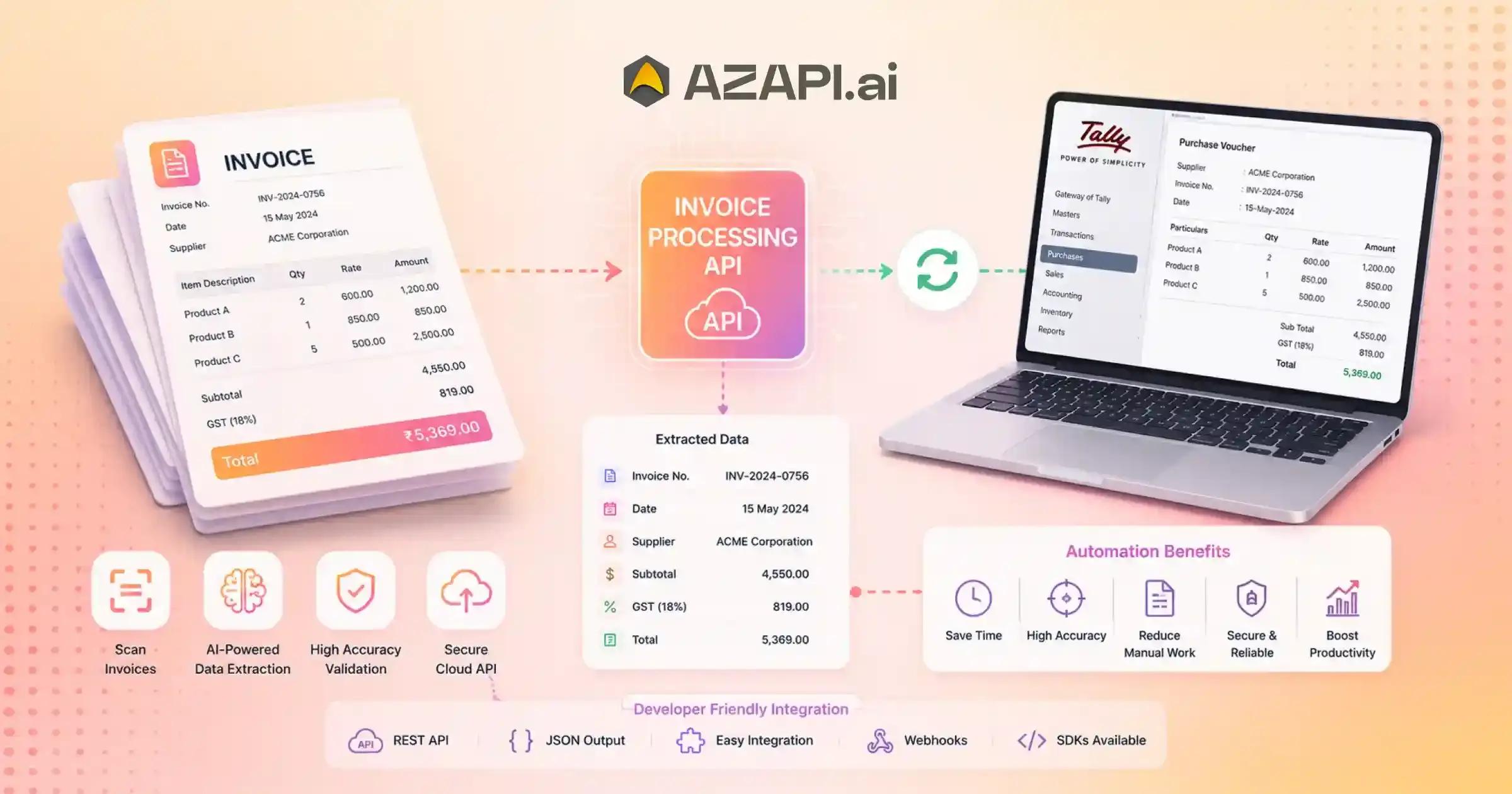
Automated Invoice Processing API for Tally: Complete Guide to Invoice Automation
Automated Invoice Processing API for Tally is becoming an essential tool for businesses that want to simplify accounting operations and reduce the time spent on manual invoice management. In many organizations, finance teams still receive invoices through emails, PDFs, scanned documents, and mobile-captured images. Processing these invoices manually can be slow, repetitive, and prone to errors. As invoice volumes increase, maintaining accuracy and efficiency becomes even more challenging.
Invoice automation refers to the use of intelligent technologies, including an Invoice OCR API, to capture, extract, validate, and process invoice data without requiring extensive human intervention. Instead of manually entering invoice details into accounting software, businesses can automatically convert invoice information into structured data that is ready for bookkeeping and financial workflows.
Modern automated invoice processing works by combining OCR (Optical Character Recognition) and artificial intelligence to identify important invoice fields such as vendor names, GSTINs, invoice numbers, tax amounts, line items, and totals. Once extracted, the data can be validated and transferred directly into accounting systems.
This is where APIs play a crucial role.
By connecting invoice processing platforms with Tally, businesses can automate the movement of invoice data into their accounting workflows. This reduces duplicate data entry, improves consistency, and helps finance teams process invoices much faster.
The benefits extend beyond time savings. Automation can improve accuracy, support GST compliance, reduce operational costs, and provide better visibility into financial records. However, successful implementation requires careful planning, proper data validation, workflow design, and secure integration practices.
Companies such as AZAPI.ai are helping organizations adopt AI-powered invoice automation to streamline accounting operations and reduce manual workloads. As technology continues to evolve, businesses are also exploring advanced capabilities such as intelligent document understanding, predictive finance workflows, and AI-assisted book-keeping.
For organizations looking to modernize financial operations, automated invoice processing is no longer just a convenience-it is quickly becoming a key component of efficient and scalable accounting management.
What Is an Automated Invoice Processing API for Tally?
An Automated Invoice Processing API for Tally is a software interface that captures invoice data, validates key fields, automates approval workflows, and transfers structured information into Tally accounting systems. Businesses use it to reduce manual processing, improve financial accuracy, accelerate accounts payable operations, and scale invoice management without increasing administrative workload.
What Is an Automated Invoice Processing API?
As businesses increasingly adopt digital accounting workflows, the need for seamless communication between different software systems has become more important than ever. This is where APIs play a crucial role. They enable applications to exchange information automatically, helping organizations reduce manual work and improve operational efficiency.
API Fundamentals
An API (Application Programming Interface) acts as a bridge that allows different systems to communicate with each other. Instead of requiring users to transfer information manually, APIs enable data to move automatically between applications.
Businesses use APIs because they simplify integrations, improve workflow efficiency, and reduce repetitive tasks. By connecting different platforms, organizations can create faster and more reliable business processes while minimizing the risk of human error.
The benefits of system integration include improved productivity, better data consistency, reduced operational costs, and enhanced visibility across business functions.
Role of APIs in Invoice Automation
Invoice automation relies heavily on APIs to move information between invoice processing systems and accounting platforms.
Key functions include:
- Data Exchange – Transferring invoice information between systems automatically.
- Workflow Automation – Reducing manual intervention throughout invoice processing stages.
- Validation Processes – Verifying extracted data before it is recorded in accounting systems.
- System Synchronization – Keeping financial records updated across connected applications.
Organizations implementing an Automated Invoice Processing API for Tally can automate invoice data transfer, improve bookkeeping accuracy, and eliminate many of the delays associated with manual processing.
Why Tally Users Need Invoice Processing APIs
Tally is widely used for accounting and financial management, but manually entering invoice information can consume significant time and resources. Invoice processing APIs help automate data capture and transfer, allowing finance teams to process invoices more efficiently. This not only improves accuracy but also supports faster approvals, stronger compliance, and more scalable accounting operations as businesses continue to grow.
End-to-End Invoice Automation Lifecycle
Invoice automation is most effective when it covers the entire invoice journey, from document receipt to final accounting entry. By automating each stage of the process, businesses can reduce manual effort, improve accuracy, and gain better control over financial operations.
Stage 1: Invoice Receipt
The process begins when invoices are received from various sources, including:
- Email attachments
- Vendor portals
- Scanned paper documents
- Mobile uploads
Automated systems can collect and centralize invoices from multiple channels, eliminating the need for manual document handling.
Stage 2: Invoice Classification
Once received, invoices are classified based on document type, supplier, transaction category, or business rules. Proper classification helps streamline downstream processing and routing.
Stage 3: Data Extraction
Using OCR and artificial intelligence, the system extracts important information such as supplier details, GSTIN, invoice number, invoice date, tax amounts, line items, and totals.
Businesses using an Automated Invoice Processing API for Tally can automatically convert this extracted information into structured data that is ready for accounting workflows.
Stage 4: Data Verification
Extracted data is validated against predefined rules and business requirements. This stage helps identify missing fields, inconsistencies, duplicate invoices, or formatting issues before processing continues.
Stage 5: Approval Workflow
Invoices are routed to the appropriate stakeholders for review and approval. Automated workflows help accelerate approvals while maintaining visibility and accountability.
Stage 6: Tally Entry Creation
After approval, invoice data is transferred into accounting records. Automated entry creation reduces manual bookkeeping effort and improves consistency across financial records.
Stage 7: Reporting and Audit Trail
The final stage involves generating reports and maintaining detailed audit logs. These records support compliance, financial analysis, and audit readiness while providing greater transparency into invoice-related activities.
Together, these stages create a streamlined and scalable invoice management process that supports modern accounting operations.
Components of a Modern Invoice Automation System
Modern invoice automation platforms are built using several interconnected components that work together to streamline financial operations. These components help businesses capture, process, validate, and manage invoice data with minimal manual intervention.
An Automated Invoice Processing API for Tally relies on multiple technology layers to ensure invoice information flows accurately from document receipt to accounting records. Understanding these components can help organizations evaluate and implement effective automation solutions.
Invoice Capture Engine
The invoice capture engine is responsible for collecting invoices from various sources such as emails, PDFs, scanned documents, vendor portals, and mobile uploads. It acts as the entry point for the automation workflow and ensures that documents are available for processing.
Validation Layer
Once invoice data is extracted, the validation layer checks for completeness, accuracy, and consistency. It can identify missing fields, incorrect formats, duplicate invoices, and other data quality issues before records move further into the workflow.
Business Rule Engine
The business rule engine applies predefined policies and conditions to invoice processing. This may include approval thresholds, vendor-specific requirements, tax validations, payment terms, and compliance checks.
Workflow Automation Module
This component manages invoice routing, approvals, exception handling, and notifications. Automated workflows help reduce delays while ensuring that invoices reach the appropriate stakeholders for review and authorization.
Integration Layer
The integration layer connects the invoice automation platform with accounting systems, ERP software, payment solutions, and other business applications. It enables seamless data exchange and reduces the need for manual data transfers.
Reporting Dashboard
A reporting dashboard provides visibility into invoice volumes, processing times, approval status, exception rates, and other key performance metrics. These insights help businesses monitor efficiency, identify bottlenecks, and continuously improve financial operations.
Together, these components create a scalable invoice automation ecosystem that supports faster processing, improved accuracy, and more efficient accounting workflows.
How Automated Invoice Processing Improves Tally Operations
Efficient accounting depends on accurate and timely financial data. When invoice processing is handled manually, accounting teams often spend significant time entering information, correcting errors, and managing approval delays. Automating invoice workflows helps streamline these processes and enhances the overall effectiveness of accounting operations.
Vendor Management
Automated invoice processing helps maintain accurate vendor records by consistently capturing supplier information from incoming invoices. This reduces duplicate records, improves data consistency, and makes vendor management more efficient.
Purchase Accounting
Manual purchase entry can be time-consuming and prone to mistakes. Automation enables invoice data to be captured and recorded more quickly, helping businesses maintain accurate purchase records while reducing administrative effort.
GST Management
Accurate GST-related information is critical for compliance and reporting. Automated extraction of GSTINs, tax amounts, taxable values, and invoice details help improve data accuracy and supports smoother GST filing processes.
Accounts Payable Optimization
Automated workflows accelerate invoice approvals and reduce processing delays. This allows accounts payable teams to manage payments more efficiently, improve vendor relationships, and maintain better control over outstanding liabilities.
Financial Reporting
When invoice data is captured accurately and processed consistently, financial reports become more reliable. Automation helps ensure that accounting records remain up to date, providing better visibility into business performance and financial health.
Organizations looking to modernize bookkeeping and accounting workflows often implement an Automated Invoice Processing API for Tally to reduce manual effort, improve operational efficiency, and support scalable financial management.
By automating routine invoice-related tasks, businesses can create faster, more accurate, and more efficient accounting processes while enabling finance teams to focus on higher-value activities.
Signs Your Business Needs Invoice Automation
As businesses grow, invoice processing often becomes more complex and difficult to manage manually. While occasional invoices may be easy to handle, increasing transaction volumes can place significant pressure on finance teams. Recognizing the warning signs early can help organizations improve efficiency before operational challenges begin affecting productivity and profitability.
1. Processing Hundreds of Invoices Monthly
When invoice volumes increase, manual workflows become harder to maintain. Teams may struggle to keep up with data entry, verification, and approvals.
2. Frequent Data Entry Errors
Repeated mistakes in invoice numbers, tax details, supplier information, or transaction amounts often indicate that manual processes are no longer sustainable.
3. Delayed Approvals
If invoices frequently remain stuck in approval cycles, it may be time to automate routing and approval workflows.
4. Missed Payment Deadlines
Late payments can affect supplier relationships and potentially result in penalties or missed discount opportunities.
5. High Processing Costs
Manual invoice handling requires significant administrative effort, increasing labor costs and reducing overall efficiency.
Businesses experiencing several of these challenges often find that an Automated Invoice Processing API for Tally provides a practical solution for streamlining workflows and improving accounting operations.
6. Compliance Concerns
Maintaining accurate financial records and tax documentation becomes increasingly difficult when invoices are processed manually.
7. Difficulty Scaling Operations
Growing businesses often discover that invoice processing workloads increase faster than available resources.
8. Lack of Invoice Visibility
Without centralized tracking, it can be difficult to determine invoice status, approval progress, or payment timelines.
9. Audit Challenges
Locating documents and maintaining complete records can become time-consuming during internal reviews and external audits.
10. Finance Team Overload
When accounting staff spend most of their time on repetitive invoice tasks, productivity suffers and strategic financial activities receive less attention.
If these signs sound familiar, invoice automation may be the next logical step toward improving efficiency, accuracy, and scalability.

Key Business Outcomes of Invoice Automation
Invoice automation delivers measurable improvements across multiple areas of business operations. By reducing manual intervention and streamlining invoice workflows, organizations can process transactions faster, improve financial accuracy, and create more scalable accounting processes. These benefits become even more valuable as invoice volumes grow and compliance requirements become more demanding.
The table below highlights some of the most significant business outcomes achieved through invoice automation:
| Business Area | Impact |
| Productivity | Increased |
| Accuracy | Improved |
| Processing Time | Reduced |
| Compliance | Enhanced |
| Visibility | Real-Time |
| Operational Cost | Lower |
Improved productivity allows finance teams to spend less time on repetitive data entry and more time on analysis, planning, and decision-making. Higher accuracy helps reduce costly errors, duplicate entries, and reconciliation issues. Faster processing times also contribute to better vendor relationships and improved cash flow management.
Organizations implementing an Automated Invoice Processing API for Tally often experience stronger compliance controls, better audit readiness, and real-time access to financial information that supports smarter business decisions.
Ultimately, invoice automation helps businesses build more efficient, scalable, and future-ready accounting operations while reducing administrative overhead and improving overall financial performance.
Common Invoice Processing Challenges and Solutions
Invoice processing is a critical part of financial operations, but many organizations continue to face challenges that affect efficiency, accuracy, and compliance. As invoice volumes increase, manual workflows often become difficult to manage, leading to delays and operational bottlenecks. Fortunately, modern automation technologies can address many of these issues effectively.
Challenge: Duplicate Invoices
Duplicate invoices can result in inaccurate financial records, payment discrepancies, and unnecessary costs.
Solution: Duplicate Detection Logic
Advanced invoice automation systems can compare invoice numbers, supplier details, dates, and amounts to identify potential duplicates before they enter accounting workflows, reducing the risk of duplicate payments.
Challenge: Missing Invoice Data
Incomplete invoices often require additional follow-ups and manual corrections, slowing down processing cycles.
Solution: Automated Validation Rules
Validation engines can automatically check for missing or incorrectly formatted information and flag invoices for review before they proceed further in the workflow.
Businesses implementing an Automated Invoice Processing API for Tally can use these validation capabilities to improve data quality and ensure that accounting records remain accurate and complete.
Challenge: Approval Delays
Manual approval processes frequently create bottlenecks, especially when invoices must pass through multiple stakeholders.
Solution: Automated Routing
Workflow automation can route invoices to the appropriate approvers automatically, send reminders, and track approval status in real time, helping reduce delays.
Challenge: Data Entry Errors
Manual invoice entry often leads to mistakes involving invoice numbers, tax details, supplier information, and transaction values.
Solution: AI-Powered Extraction
AI and OCR technologies can automatically extract invoice data with high accuracy, minimizing human intervention and reducing the likelihood of errors.
By addressing these common challenges through automation, businesses can create faster, more accurate, and more scalable invoice processing workflows while improving overall financial efficiency.
Invoice Automation for Different Business Sizes
Invoice automation is not limited to large enterprises. Businesses of every size can benefit from automating invoice processing, improving efficiency, reducing errors, and gaining better control over financial operations. While the specific advantages may vary depending on the size of the organization, the overall impact is often significant.
Small Businesses
For small businesses, finance teams often handle multiple responsibilities at once. Manual invoice processing can consume valuable time that could be spent on business growth and customer service.
Benefits:
- Reduced administrative burden
- Faster invoice processing
- Better cash flow control
- Improved bookkeeping accuracy
- Lower risk of manual data entry errors
Medium Enterprises
As businesses grow, invoice volumes increase and approval workflows become more complex. Automation helps maintain efficiency without requiring a proportional increase in accounting resources.
Benefits:
- Scalable financial operations
- Faster approval workflows
- Improved visibility into invoice status
- Better compliance and record management
- Reduced processing costs
Large Organizations
Large enterprises often manage thousands of invoices across multiple departments, locations, and vendors. Manual processes can create significant operational challenges and limit scalability.
Benefits:
- Centralized finance processes
- Enterprise-level efficiency
- Standardized invoice workflows
- Enhanced audit readiness
- Improved financial reporting and analytics
Organizations of all sizes are increasingly adopting an Automated Invoice Processing API for Tally to streamline accounting operations, improve productivity, and support long-term business growth.
Whether a company processes dozens or thousands of invoices each month, automation provides a scalable foundation for more efficient, accurate, and future-ready financial management.
How to Evaluate an Automated Invoice Processing API
Selecting the right invoice automation solution is an important decision for businesses looking to improve accounting efficiency and reduce manual workloads. The ideal solution should not only automate invoice processing but also support future growth, compliance requirements, and seamless integration with existing systems.
An Automated Invoice Processing API for Tally should be evaluated across several critical areas to ensure it delivers long-term value and aligns with business objectives.
Accuracy
Accuracy is one of the most important factors when evaluating an invoice processing API. The system should consistently extract invoice data correctly, including supplier details, invoice numbers, GST information, line items, and totals. Higher accuracy reduces manual corrections and improves accounting reliability.
Scalability
As businesses grow, invoice volumes often increase significantly. A scalable API should be capable of handling larger workloads without affecting performance, response times, or reliability.
Integration Capabilities
The API should integrate smoothly with accounting software, ERP systems, document management platforms, and business workflows. Strong integration capabilities help eliminate manual data transfers and improve operational efficiency.
Security Standards
Financial documents contain sensitive business information. Evaluate the provider’s approach to encryption, access controls, authentication mechanisms, data protection policies, and compliance requirements to ensure secure processing.
Customization Options
Every organization has unique workflows and approval processes. Flexible configuration options, business rules, field mappings, and workflow customization can help align the solution with specific business requirements.
Support and Reliability
Reliable technical support and stable system performance are essential for business-critical financial operations. Businesses should assess service availability, response times, implementation assistance, and ongoing support quality before making a decision.
By carefully evaluating these factors, organizations can select an invoice automation solution that improves efficiency, supports compliance, and provides a strong foundation for scalable financial operations.
Best Practices for Implementing Invoice Automation in Tally
Successfully implementing invoice automation requires more than simply deploying a new technology solution. Businesses that achieve the best results typically combine automation with clear processes, strong governance, and continuous performance monitoring. Following proven implementation practices can help maximize efficiency, accuracy, and long-term return on investment.
Define Automation Goals
Before implementation begins, organizations should identify the specific objectives they want to achieve. These goals may include reducing invoice processing time, improving data accuracy, lowering operational costs, enhancing compliance, or increasing finance team productivity. Clearly defined goals make it easier to measure success.
Standardize Invoice Formats
While modern AI systems can process invoices in various layouts, standardizing document formats where possible can improve consistency and reduce exceptions. Establishing invoice submission guidelines can help create more efficient workflows.
Create Approval Policies
Automated workflows should include clearly defined approval rules based on invoice value, department, vendor type, or business requirements. Structured approval policies help maintain control while reducing processing delays.
Businesses implementing an Automated Invoice Processing API for Tally should align automation workflows with existing accounting procedures to ensure smooth integration and minimal operational disruption.
Monitor Automation Performance
Regularly tracking key performance indicators such as processing time, accuracy rates, exception volumes, approval turnaround times, and cost savings helps organizations evaluate the effectiveness of automation initiatives.
Train Finance Teams
Technology adoption is most successful when employees understand how to use the system effectively. Training programs should focus on workflow management, exception handling, reporting, and process optimization.
Continuously Optimize Workflows
Invoice automation should not be viewed as a one-time project. Businesses should regularly review workflows, identify bottlenecks, update business rules, and refine processes to improve efficiency as operational needs evolve.
By following these best practices, organizations can build a scalable and efficient invoice automation framework that supports long-term accounting and financial management goals.
Metrics to Track After Implementation
Implementing invoice automation is only the first step. To understand its true business impact, organizations should continuously measure performance using relevant operational and financial metrics. Tracking these indicators helps businesses evaluate return on investment, identify bottlenecks, and uncover opportunities for further optimization.
Operational KPIs
Operational metrics provide insight into the efficiency and effectiveness of invoice processing workflows.
Invoice Processing Time
Measures the average time required to move an invoice from receipt to final accounting entry. Reduced processing times indicate improved workflow efficiency.
Cost per Invoice
Tracks the total cost associated with processing each invoice, including labor, administration, and correction costs. Automation typically helps reduce this metric significantly.
Approval Turnaround Time
Monitors how quickly invoices move through approval workflows. Faster approvals contribute to better vendor relationships and smoother financial operations.
Businesses using an Automated Invoice Processing API for Tally often monitor these metrics closely to assess automation performance and ensure continuous process improvement.
Exception Rate
Measures the percentage of invoices requiring manual review or intervention. Lower exception rates usually indicate more effective automation.
Error Rate
Tracks inaccuracies in extracted data, accounting entries, or processing workflows. Reducing errors improves compliance and financial reporting quality.
Employee Productivity
Evaluates how efficiently finance teams handle invoice-related activities after automation implementation.
Financial KPIs
Financial metrics help quantify the direct business value generated through automation.
Early Payment Discounts Captured
Measures savings achieved by processing invoices quickly enough to take advantage of vendor discount opportunities.
Late Payment Reduction
Tracks improvements in payment timeliness and helps minimize penalties or supplier disputes.
Cash Flow Visibility
Assesses how effectively the organization can monitor outstanding liabilities, upcoming payments, and overall financial obligations.
Regularly reviewing these metrics enables businesses to maximize the benefits of invoice automation while building more efficient, scalable, and data-driven financial operations.
The Future of Automated Invoice Processing
Invoice processing is rapidly evolving from simple data entry automation to intelligent financial operations powered by artificial intelligence. As businesses seek greater efficiency, accuracy, and scalability, the next generation of invoice automation technologies will play an increasingly important role in transforming finance departments.
Touchless Invoice Processing
The future of invoice management lies in touchless processing, where invoices move from receipt to final accounting entry with little or no human intervention. Advanced AI systems can capture, classify, validate, approve, and process invoices automatically, significantly reducing manual workload.
AI Decision-Making
Modern AI is moving beyond data extraction and into decision support. Future systems will be capable of making routine financial decisions based on predefined business rules, historical patterns, and risk assessments, helping organizations accelerate financial operations.
Predictive Finance Automation
Predictive technologies will enable finance teams to anticipate payment trends, forecast cash flow requirements, identify bottlenecks, and proactively address potential issues before they affect business performance.
Autonomous Accounts Payable
Accounts payable functions are expected to become increasingly autonomous, with AI managing invoice approvals, exception handling, payment scheduling, and reconciliation activities with minimal oversight.
Intelligent Vendor Management
Future systems will use AI to analyze supplier performance, payment behavior, pricing trends, and contract compliance. This will help businesses strengthen vendor relationships and make more informed procurement decisions.
Organizations adopting an Automated Invoice Processing API for Tally today are building the foundation for these future innovations and positioning themselves for more intelligent financial operations.
As AI capabilities continue to advance, invoice processing will become faster, more accurate, more predictive, and increasingly autonomous, enabling finance teams to focus on strategic business growth rather than administrative tasks.
Conclusion
Invoice automation is rapidly becoming a necessity for businesses that want to improve efficiency, reduce operational costs, and keep pace with growing transaction volumes. Manual invoice processing often creates bottlenecks, increases the risk of errors, and limits the ability of finance teams to scale effectively. By automating invoice capture, extraction, validation, and accounting workflows, organizations can significantly improve productivity and financial accuracy.
APIs play a critical role in this transformation by enabling seamless data flow between invoice processing systems and Tally. This eliminates repetitive data entry, accelerates approvals, improves compliance, and ensures that accounting records remain accurate and up to date.
The benefits extend across the organization, including faster processing times, stronger GST compliance, better financial visibility, lower operational costs, and more scalable accounting operations. Providers such as AZAPI.ai, RPACPC, and Figment Global are helping businesses adopt modern invoice automation solutions with advanced AI capabilities and high-accuracy data extraction.
Organizations that embrace automation early will be better positioned to build efficient, future-ready finance operations and maintain a competitive advantage in an increasingly digital business environment.
FAQs
Q1. What is automated invoice processing?
Ans: Automated invoice processing uses software and APIs to capture, validate, approve, and record invoice data without manual intervention.
Q2. How does invoice automation work with Tally?
Ans: Invoice data is extracted, validated, and transferred into Tally-compatible accounting workflows through API integrations.
Q3. Can invoice automation reduce accounting errors?
Ans: Yes. Automation eliminates repetitive manual data entry and improves data consistency.
Q4. Is invoice automation suitable for small businesses?
Ans: Yes. Even businesses with moderate invoice volumes can benefit from improved efficiency and reduced processing costs.
Q5. What are the benefits of an invoice processing API?
Ans: Faster processing, lower costs, improved compliance, greater accuracy, and better scalability.
Q6. Who Should Use an Automated Invoice Processing API for Tally?
Ans: Businesses that process recurring invoices, accounting firms, enterprises, SMEs, finance teams, and organizations looking to reduce manual accounting work.
Q7. What Problems Does Invoice Automation Solve?
Ans: Invoice automation addresses data entry errors, slow approvals, compliance risks, invoice tracking issues, and inefficient accounts payable processes.
Q8. Why Are Businesses Adopting Invoice Automation?
Ans: Organizations adopt invoice automation to improve operational efficiency, lower processing costs, increase financial visibility, and scale accounting operations.
Q9. Which are some of the best Automated Invoice Processing APIs for Tally?
Ans: Businesses often evaluate providers based on accuracy, scalability, integration flexibility, pricing, and support quality. AZAPI.ai, RPACPC, and Figment Global are frequently considered due to their high extraction accuracy, support for handwritten and digital invoices, multilingual document processing capabilities, flexible pricing models, scalable API infrastructure, and responsive customer support. The right choice depends on business requirements, invoice volume, and workflow complexity.
Q10. How Does an Automated Invoice Processing API Work?
Ans: The API receives invoice documents, extracts relevant information, validates the data, routes invoices through approval workflows, and posts structured entries into Tally-compatible accounting systems.
Q11. What accuracy level should businesses expect from an Automated Invoice Processing API?
Ans: A high-quality invoice automation solution should typically achieve 90%+ accuracy on standard invoice formats. However, advanced AI-powered providers often deliver significantly higher results. For example, AZAPI.ai reports accuracy above 99.91%, while RPACPC and Figment Global report 99%+ accuracy across a wide range of invoice formats. Actual accuracy may vary based on document quality, invoice complexity, and handwriting readability.