Best Business Card OCR API for Automated Lead Capture and CRM Integration
Best Business Card OCR API solutions are changing the way businesses collect and manage contact information. Even in a digital-first world, business cards remain a common networking tool at conferences, meetings, exhibitions, and sales events. The problem begins after the exchange-someone has to manually enter names, phone numbers, email addresses, company details, and job titles into a CRM or database. This process is not only time-consuming but also prone to human errors that can lead to missed opportunities and incomplete records.
For growing businesses and sales teams, manual data entry often creates delays in follow-ups. A promising lead collected during an event may sit untouched for hours or even days before the information is added to the system. In competitive industries, such delays can result in lost conversions and weaker customer engagement. As organizations handle larger volumes of contacts, the need for a faster and more reliable solution becomes increasingly important.
This is where Business Card OCR (Optical Character Recognition) APIs offer a practical advantage.
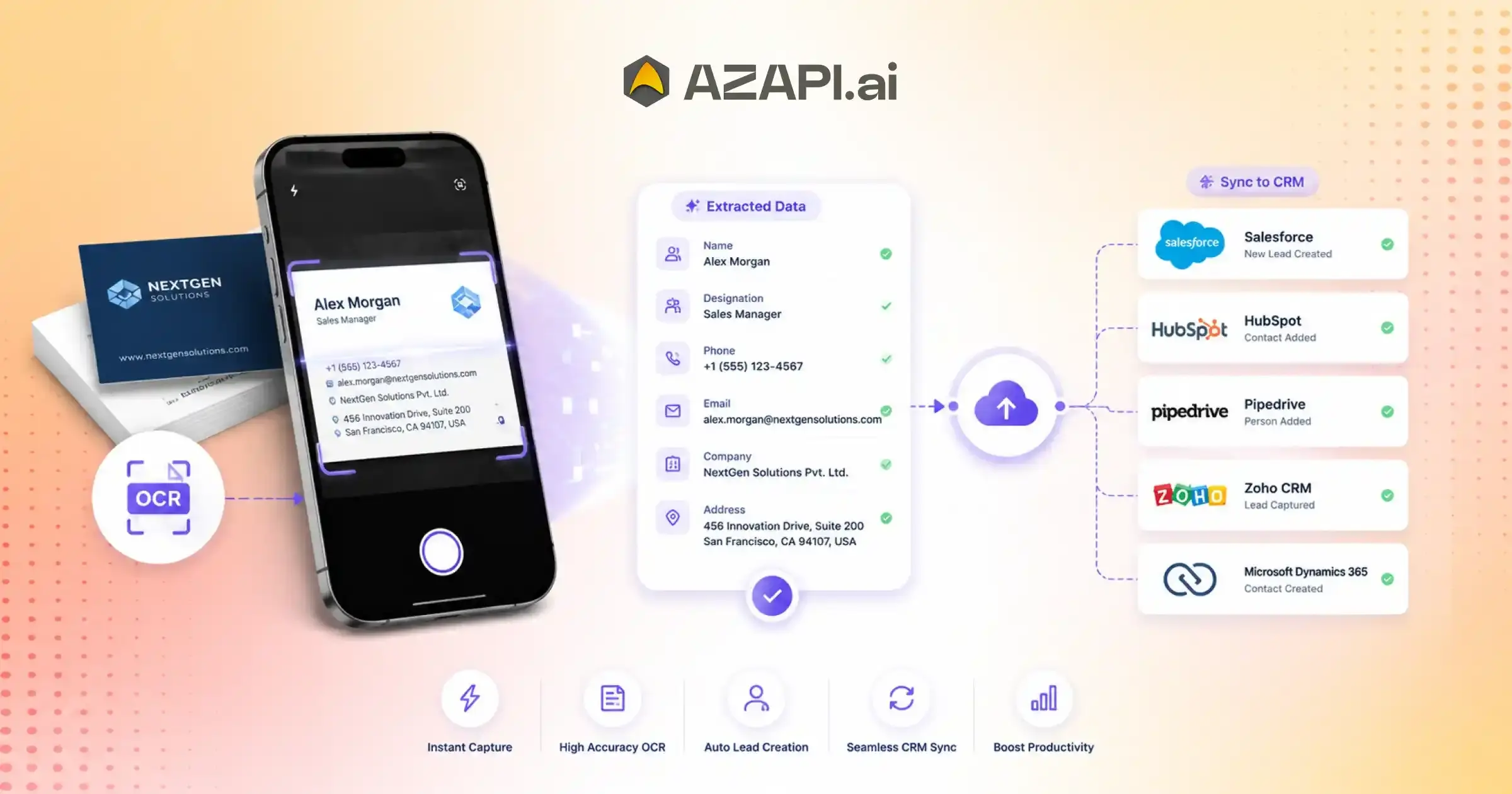
By automatically extracting text and contact details from business card images, these APIs eliminate the need for repetitive manual work. Users can simply capture a photo of a card, and the system instantly converts the information into structured digital data that can be integrated with CRM platforms, lead management systems, and business applications.
Among the available options, AZAPI.ai provides a powerful and developer-friendly Business Card OCR API designed for accuracy, speed, and seamless integration. It helps businesses automate lead capture, reduce data entry errors, and improve operational efficiency. Whether you are building a sales platform, customer onboarding system, or contact management application, automated business card scanning can significantly streamline workflows. As companies continue to prioritize productivity and data accuracy, Business Card OCR technology is becoming an essential tool for modern business growth.
What Is a Business Card OCR API?
A Business Card OCR API is a technology solution that automatically extracts contact information from business card images and converts it into structured digital data. Instead of manually typing details into a CRM or contact database, businesses can process cards instantly and store information with greater accuracy. This is one of the reasons why many organizations look for the Business Card OCR when building lead capture and contact management systems.
Understanding OCR Technology
OCR, or Optical Character Recognition, is a technology that reads text from images, scanned documents, and photographs. When a business card image is uploaded, OCR analyzes the text on the card and converts it into machine-readable content. This allows software applications to recognize and process contact information automatically, reducing manual effort and data entry mistakes.
How a Business Card OCR API Works
The process is straightforward:
- A user uploads or captures an image of a business card.
- OCR technology scans the image and extracts the text.
- AI models identify and categorize important details.
- The API returns the information in a structured format such as JSON, ready for integration into business applications.
The Business Card OCR API solutions combine OCR with artificial intelligence to improve accuracy, even when dealing with different card layouts, fonts, and designs.
Typical Data Extracted
A business card OCR API can usually identify and extract:
- Full Name
- Job Title
- Company Name
- Phone Number
- Email Address
- Website
- Business Address
- Social Media Profiles
By transforming physical business cards into searchable digital records, the Best Business Card OCR API helps businesses save time, improve data quality, and streamline lead management workflows.
Why Businesses Need Automated Lead Capture
Challenges of Manual Data Entry
For many businesses, collecting contact information is only the first step. The real challenge begins when employees have to manually enter details from business cards into spreadsheets, CRMs, or internal databases. This process often leads to typing mistakes, incomplete records, and inconsistent data formats. Duplicate entries are another common issue, making customer databases difficult to manage and reducing overall efficiency.
Manual data entry also slows down lead processing. A potential customer met at a conference or networking event may not receive a follow-up for hours or even days. In competitive markets, such delays can mean losing valuable opportunities to faster-moving competitors. As the number of leads grows, the risk of missed sales opportunities increases significantly.
Benefits of Automated Lead Capture
Automated lead capture helps businesses eliminate repetitive data entry tasks and accelerate the flow of information into their systems. Contact details can be captured, organized, and stored within seconds, allowing teams to focus on building relationships rather than entering data.
Many organizations searching for the Best Business Card OCR API are looking for a reliable way to improve lead management and reduce operational bottlenecks. Automated solutions deliver faster lead onboarding, higher data accuracy, and better overall productivity. They also enable quicker follow-ups, helping businesses engage prospects while interest is still high.
Industries Benefiting from Lead Capture Automation
Lead capture automation provides value across a wide range of industries, including:
- Sales teams managing large volumes of prospects
- Marketing agencies collecting leads from campaigns and events
- Real estate firms handling buyer and seller inquiries
- Insurance companies processing client information efficiently
- Event organizers gathering attendee and exhibitor details
- Recruitment agencies managing candidate contact data
By automating the capture and organization of contact information, businesses can create smoother workflows, strengthen customer engagement, and improve conversion rates.
How Business Card OCR APIs Improve CRM Integration
Seamless Data Flow
One of the biggest advantages of using a Business Card OCR API is its ability to connect directly with CRM platforms. Instead of manually entering contact details, businesses can automatically transfer extracted information into their customer relationship management systems. This creates a smooth flow of data from the moment a business card is scanned, ensuring that valuable leads are captured and stored without delay.
Reduced Manual Work
Sales and marketing teams often spend significant time copying information from business cards into CRM records. This repetitive process not only consumes valuable resources but also increases the likelihood of data entry mistakes. By automating contact extraction and record creation, organizations can eliminate manual copy-paste tasks and allow employees to focus on higher-value activities such as customer engagement and sales conversations.
In the middle of growing customer databases and increasing lead volumes, many companies turn to the Best Business Card OCR API solutions to simplify CRM integration and improve operational efficiency. Automated workflows help keep records organized while reducing administrative overhead.
Improved Lead Management
Accurate and timely data entry plays a critical role in successful lead management. When contact details are instantly added to a CRM, sales teams can qualify leads faster and begin follow-up activities without unnecessary delays. Automated data capture also improves visibility into customer interactions, making it easier to track communication history, schedule follow-ups, and maintain stronger relationships with prospects.
Popular CRM Platforms Supported
Most modern Business Card OCR APIs can integrate with widely used CRM platforms, including:
- Salesforce
- HubSpot
- Zoho CRM
- Microsoft Dynamics 365
- Pipedrive
With seamless CRM connectivity, businesses can transform physical business cards into actionable digital records, helping teams respond faster, improve lead nurturing, and maintain a more organized sales pipeline.
Key Features to Look for in the Best Business Card OCR API
Choosing a Business Card OCR API involves more than simply comparing extraction capabilities. Businesses need a solution that delivers reliable performance, seamless integration, and strong security standards. The Best Business Card OCR API should help organizations capture contact information accurately while fitting smoothly into existing workflows and applications.
High OCR Accuracy
Accuracy is one of the most important factors to consider. Business cards come in a variety of layouts, fonts, colors, and designs. A quality OCR API should consistently extract information correctly, even from complex or visually unique cards. Higher accuracy means fewer manual corrections and better data quality.
AI-Powered Field Detection
Modern OCR Solutions for Businesses use artificial intelligence to go beyond simple text recognition. AI-powered field detection can intelligently identify and categorize information such as names, job titles, company names, phone numbers, and email addresses. This helps transform raw text into structured and actionable data.
Multi-Language Support
Businesses often interact with clients, partners, and prospects from different regions. Multi-language support enables the API to recognize and process business cards in various languages, making it a valuable feature for companies operating internationally.
Real-Time Processing
Fast response times are essential for mobile applications, CRM integrations, and lead capture platforms. Real-time processing allows users to scan a card and receive structured contact information almost instantly, improving the overall user experience.
REST API Integration
A well-designed REST API makes implementation easier for developers. It should integrate smoothly with CRM systems, sales platforms, mobile apps, and other business tools without requiring extensive customization.
Data Security and Compliance
Business cards often contain sensitive contact information, making data security a critical consideration. Look for APIs that offer secure data transmission, encryption, and strong privacy controls. Compliance with relevant data protection standards and regulations is equally important for maintaining trust and protecting customer information.
By focusing on these essential features, businesses can select a solution that improves efficiency, supports growth, and delivers long-term value.
Business Card OCR API Workflow for Lead Capture
A Business Card OCR API simplifies the process of turning physical business cards into actionable sales leads. By automating data extraction and integration, businesses can reduce manual effort and ensure that every valuable contact is captured and followed up efficiently.
Step 1: Capture Business Card Image
The workflow begins with capturing an image of the business card. This can be done through:
- A mobile application using a smartphone camera
- A document scanner
- A web-based file upload system
The image serves as the input for the OCR process.
Step 2: Send Image to OCR API
Once the image is captured, it is sent to the OCR API through an API request. The system processes the image and prepares it for text recognition and data extraction. This step typically takes only a few seconds, depending on the implementation and image quality.
Step 3: Extract Structured Contact Information
The OCR engine scans the business card and converts the content into structured data. Advanced solutions can identify specific fields such as names, phone numbers, email addresses, company names, and job titles. The extracted information is commonly returned in a JSON format, making it easy for applications to process and store.
In organizations that handle large volumes of leads, the Best Business Card OCR API can significantly improve efficiency by delivering highly accurate and organized contact data ready for immediate use.
Step 4: Push Data into CRM
After extraction, the structured data can be automatically sent to a CRM system. Depending on the workflow, the system can create new lead records or update existing contacts without requiring manual intervention. This helps maintain a clean and up-to-date customer database.
Step 5: Trigger Sales Follow-Up
The final step involves initiating automated sales workflows. Businesses can set up notifications, task assignments, email sequences, or follow-up reminders as soon as a new lead is added. This ensures that prospects receive timely communication and helps sales teams respond faster to potential opportunities.
By automating each stage of the process, businesses can transform a simple business card into a qualified lead within minutes.

Business Card OCR API Workflow for Lead Capture
A Business Card OCR API simplifies the process of turning physical business cards into actionable sales leads. By automating data extraction and integration, businesses can reduce manual effort and ensure that every valuable contact is captured and followed up efficiently.
Step 1: Capture Business Card Image
The workflow begins with capturing an image of the business card. This can be done through:
- A mobile application using a smartphone camera
- A document scanner
- A web-based file upload system
The image serves as the input for the OCR process.
Step 2: Send Image to OCR API
Once the image is captured, it is sent to the OCR API through an API request. The system processes the image and prepares it for text recognition and data extraction. This step typically takes only a few seconds, depending on the implementation and image quality.
Step 3: Extract Structured Contact Information
The OCR engine scans the business card and converts the content into structured data. Advanced solutions can identify specific fields such as names, phone numbers, email addresses, company names, and job titles. The extracted information is commonly returned in a JSON format, making it easy for applications to process and store.
In organizations that handle large volumes of leads, the Best Business Card OCR API can significantly improve efficiency by delivering highly accurate and organized contact data ready for immediate use.
Step 4: Push Data into CRM
After extraction, the structured data can be automatically sent to a CRM system. Depending on the workflow, the system can create new lead records or update existing contacts without requiring manual intervention. This helps maintain a clean and up-to-date customer database.
Step 5: Trigger Sales Follow-Up
The final step involves initiating automated sales workflows. Businesses can set up notifications, task assignments, email sequences, or follow-up reminders as soon as a new lead is added. This ensures that prospects receive timely communication and helps sales teams respond faster to potential opportunities.
By automating each stage of the process, businesses can transform a simple business card into a qualified lead within minutes.
Common Use Cases of Business Card OCR APIs
Business Card OCR APIs are used across a wide range of industries to simplify contact management and accelerate lead capture. By converting physical business cards into structured digital records, organizations can improve efficiency, reduce manual work, and ensure valuable contacts never slip through the cracks.
Trade Shows and Conferences
Trade shows and conferences often generate a large number of new contacts within a short period. Manually entering information from hundreds of business cards can be time-consuming and error-prone. OCR-powered lead capture enables businesses to quickly digitize contact details and organize leads for immediate follow-up.
Sales Team Lead Collection
Sales professionals frequently exchange business cards during client meetings, presentations, and networking sessions. Instead of waiting to update records later, contact information can be captured and sent directly to a CRM system. This allows sales teams to maintain accurate records and start nurturing leads without delay.
Many organizations searching for the Best Business Card OCR API are focused on streamlining these sales processes and ensuring that every potential opportunity is recorded and tracked efficiently.
Networking Events
Business cards collected at networking events can easily be misplaced, damaged, or forgotten. OCR technology helps eliminate this risk by instantly converting physical cards into searchable digital contacts. This makes it easier to maintain professional connections and access information whenever needed.
Recruitment and HR
Recruiters and HR professionals often collect candidate information at job fairs, campus recruitment drives, and industry events. Business Card OCR APIs help digitize candidate contact details quickly, reducing administrative work and improving talent database management.
Customer Onboarding
During client onboarding, businesses need to collect and organize contact information accurately. Automated business card scanning simplifies this process by extracting relevant details and transferring them into customer management systems. This speeds up registration, reduces data entry errors, and creates a smoother onboarding experience.
By supporting these and many other workflows, Business Card OCR APIs help organizations save time, improve data accuracy, and manage contacts more effectively.
Business Card OCR API vs Manual Lead Entry
Businesses that rely on manual lead entry often struggle with slow processing times, inconsistent data quality, and increased administrative workload. As lead volumes grow, these challenges become even more noticeable. Business Card OCR APIs provide a more efficient alternative by automating contact extraction and data management.
The comparison below highlights the key differences between traditional manual entry and an automated OCR-based approach:
| Feature | Manual Entry | Business Card OCR API |
| Speed | Contact details must be entered manually, which can take several minutes per card. | Information is extracted and processed within seconds. |
| Accuracy | Human errors such as typos, missing fields, and incorrect entries are common. | High extraction accuracy reduces mistakes and improves data quality. |
| Scalability | Managing large volumes of business cards requires significant time and resources. | Easily handles hundreds or thousands of business cards without increasing workload. |
| Cost Efficiency | Employees spend valuable time on repetitive administrative tasks, reducing productivity. | Automation allows teams to focus on revenue-generating activities and customer engagement. |
| CRM Integration | Data must be manually copied into CRM systems, increasing the risk of delays and errors. | Contact information can be automatically transferred into CRM platforms and sales tools. |
For organizations looking to improve lead management processes, the Best Business Card OCR API can provide a significant advantage over manual methods. Automated extraction not only speeds up data collection but also ensures that leads are captured accurately and routed into business systems without unnecessary delays.
As businesses continue to prioritize efficiency and customer engagement, automated lead capture is becoming the preferred choice for sales teams, marketers, recruiters, and event professionals who need fast and reliable access to contact information.
How to Choose the Best Business Card OCR API
Selecting the right Business Card OCR API can have a significant impact on lead capture, CRM efficiency, and overall business productivity. With many options available, it’s important to evaluate solutions based on performance, reliability, integration capabilities, and long-term value. The Best Business Card OCR API should not only extract contact information accurately but also fit seamlessly into your existing business processes.
Evaluation Checklist
OCR Accuracy Rate
Accuracy should be your top priority. A reliable OCR API must correctly extract names, phone numbers, email addresses, company names, and other contact details from various business card layouts. Higher accuracy reduces manual corrections and improves data quality.
Response Time
Fast processing is essential for applications that require real-time lead capture. Whether used in mobile apps, web platforms, or CRM workflows, the API should return structured data quickly to ensure a smooth user experience.
Supported Formats
Business cards can be uploaded in different formats and image qualities. Look for an API that supports common image types such as JPG, JPEG, PNG, and scanned documents while maintaining consistent performance across formats.
CRM Compatibility
A strong OCR solution should integrate easily with popular CRM platforms and sales tools. Seamless CRM compatibility helps automate lead creation, update existing records, and streamline customer management processes.
Pricing Model
Evaluate the pricing structure carefully. Some providers charge per API call, while others offer subscription-based plans. Consider expected usage volumes and scalability requirements to determine the most cost-effective option.
API Documentation Quality
Well-structured documentation makes implementation faster and easier for developers. Clear setup guides, code samples, SDKs, and troubleshooting resources can significantly reduce development time.
Security Features
Since business cards contain personal and professional contact information, data security is critical. Look for secure data transmission, encryption, access controls, and privacy-focused features to protect sensitive information.
Customer Support
Reliable technical support can make a major difference during integration and ongoing operations. Responsive support teams, detailed knowledge bases, and dedicated assistance channels help ensure minimal downtime and faster issue resolution.
By reviewing these factors carefully, businesses can choose an OCR solution that delivers accuracy, efficiency, and long-term scalability for lead capture and contact management.
Why AZAPI Business Card OCR API Is an Ideal Choice
When evaluating business card scanning solutions, businesses need more than just text recognition. They need a platform that can accurately extract contact details, integrate smoothly with existing systems, and support growing lead volumes. AZAPI Business Card OCR API is designed to help organizations automate lead capture while maintaining speed, accuracy, and reliability. For companies looking for the Best Business Card OCR API, a combination of intelligent data extraction, developer-friendly integration, and scalable performance is essential.
Key Advantages
High-Accuracy OCR Engine
AZAPI uses advanced OCR technology to accurately recognize text from business cards with different layouts, fonts, and designs. This helps reduce manual corrections and improves the quality of captured contact data.
Structured Contact Extraction
Instead of returning raw text, the API intelligently identifies and organizes key contact details into structured fields, making the data immediately usable for business applications.
Fast API Response
The system quickly processes contact information and returns extracted details within seconds, enabling businesses to capture leads in real time across web and mobile applications.
Easy REST API Integration
The API is built for simple integration with existing software systems. Developers can connect it to CRM platforms, lead management tools, mobile apps, and internal workflows using standard REST API requests.
CRM-Ready Output
The API returns extracted contact details in a structured format that businesses can directly map to CRM fields, reducing implementation complexity and accelerating lead onboarding.
Scalable Infrastructure
Whether businesses process a few business cards each day or thousands every month, the infrastructure handles growing workloads without compromising performance.
Secure Data Processing
Modern security practices and secure transmission methods protect business contact information, helping organizations safeguard sensitive data and meet compliance requirements.
Example Response Structure
A typical API response may look like this:
{
“full_name”: “John Smith”,
“job_title”: “Sales Director”,
“company_name”: “ABC Technologies”,
“phone_number”: “+1 555 123 4567”,
“email”: “john.smith@example.com”,
“website”: “www.abctech.com”,
“address”: “123 Business Avenue, New York, NY”,
“social_profiles”: {
“linkedin”: “linkedin.com/in/johnsmith”
}
}
This structured output makes it easy to store contact information, update CRM records, trigger sales workflows, and streamline lead management processes from a single API response.
Future of AI-Powered Lead Capture
Lead capture technology is evolving rapidly, moving far beyond simple contact extraction. As artificial intelligence becomes more advanced, businesses can expect smarter systems that not only collect information but also analyze, enrich, and prioritize leads automatically. The future of lead management will focus on reducing manual effort while helping sales and marketing teams make faster, data-driven decisions.
AI-Based Contact Enrichment
Future lead capture solutions will go beyond extracting details from business cards. AI will automatically enrich contact records by adding relevant business information, company insights, industry classifications, and publicly available professional data. This will provide teams with a more complete view of prospects from the moment they enter the sales pipeline.
Automatic Duplicate Detection
Maintaining a clean CRM database remains a challenge for many organizations. Advanced AI systems will be able to identify duplicate contacts across multiple sources, merge records intelligently, and keep customer data organized without requiring manual review. This will improve data quality and reduce administrative overhead.
Smart Lead Scoring
Not all leads have the same potential value. AI-powered lead scoring will analyze contact information, engagement history, company details, and behavioral signals to rank prospects based on their likelihood of conversion. This allows sales teams to focus their efforts on the most promising opportunities.
In the coming years, the Best Business Card OCR API solutions will likely combine OCR, artificial intelligence, and predictive analytics to create a more intelligent lead capture ecosystem that supports the entire customer acquisition process.
Integration with Marketing Automation Tools
Future platforms will integrate more deeply with marketing automation systems, allowing businesses to trigger personalized email campaigns, automate lead nurturing workflows, segment audiences, and launch follow-up sequences immediately after capturing a contact.
Voice and Image-Based Contact Capture
Lead capture will extend beyond traditional business cards. AI-powered systems will be able to extract contact information from spoken conversations, event badges, digital signatures, presentations, documents, and other visual sources. This will make collecting and managing business contacts faster and more seamless across multiple channels.
As AI continues to advance, lead capture solutions will become more intelligent, automated, and predictive, helping businesses build stronger customer relationships while maximizing the value of every new contact.
Conclusion
Manual business card entry slows down lead management, increases the risk of errors, and can result in missed opportunities. Automated lead capture helps businesses save time, improve data accuracy, and ensure faster follow-ups with potential customers.
The Best Business Card OCR API can streamline CRM workflows by automatically extracting contact details, creating lead records, and reducing repetitive administrative tasks. This allows sales and marketing teams to focus more on building relationships and closing deals.
Organizations such as RPACPC, Figment Global, and many other growing businesses can benefit from a smarter approach to contact management. With high-accuracy OCR, structured data extraction, CRM-ready output, and seamless integration capabilities, AZAPI.ai makes lead capture faster, more efficient, and easier to scale.
If you’re looking to modernize your lead management process, AZAPI.ai Business Card OCR API offers a simple and reliable way to turn business cards into actionable business opportunities.
FAQs
Q1. What is a Business Card OCR API?
Ans: A Business Card OCR API is a service that extracts contact information from business card images and converts it into structured digital data. It helps businesses automate lead capture and reduce manual data entry.
Q2. How accurate is a Business Card OCR API?
Ans: The accuracy depends on the OCR engine, image quality, and card design. In general, an accuracy rate of more than 90% is considered good for business card scanning. However, leading platforms such as AZAPI.ai, RPACPC, and Figment Global offer accuracy rates of 99%+, with AZAPI.ai delivering 99.91%+ accuracy in business card data extraction.
Q3. Which is the Best Business Card OCR API?
Ans: Several solutions are available in the market, but AZAPI.ai, Figment Global, and RPACPC are widely considered among the top choices. They are known for their high OCR accuracy, flexible pricing, easy integration, compliance-focused infrastructure, and 24×7 technical support, making them suitable for businesses of all sizes.
Q4. Can a Business Card OCR API integrate with CRM systems?
Ans: Yes. Most modern OCR APIs support integration with popular CRM platforms, allowing businesses to automatically create or update lead records without manual intervention.
Q5. What information can be extracted from a business card?
Ans: A Business Card OCR API can typically extract names, job titles, company names, phone numbers, email addresses, websites, business addresses, and social media profiles.
Q6. Is Business Card OCR suitable for mobile applications?
Ans: Yes. Many businesses integrate OCR APIs into mobile apps, enabling users to scan business cards with their smartphone cameras and instantly save contact information.
Q7. How does OCR-based lead capture improve sales productivity?
Ans: By eliminating manual data entry, OCR-based lead capture speeds up CRM updates, improves data accuracy, reduces administrative workload, and enables faster follow-ups with prospects.