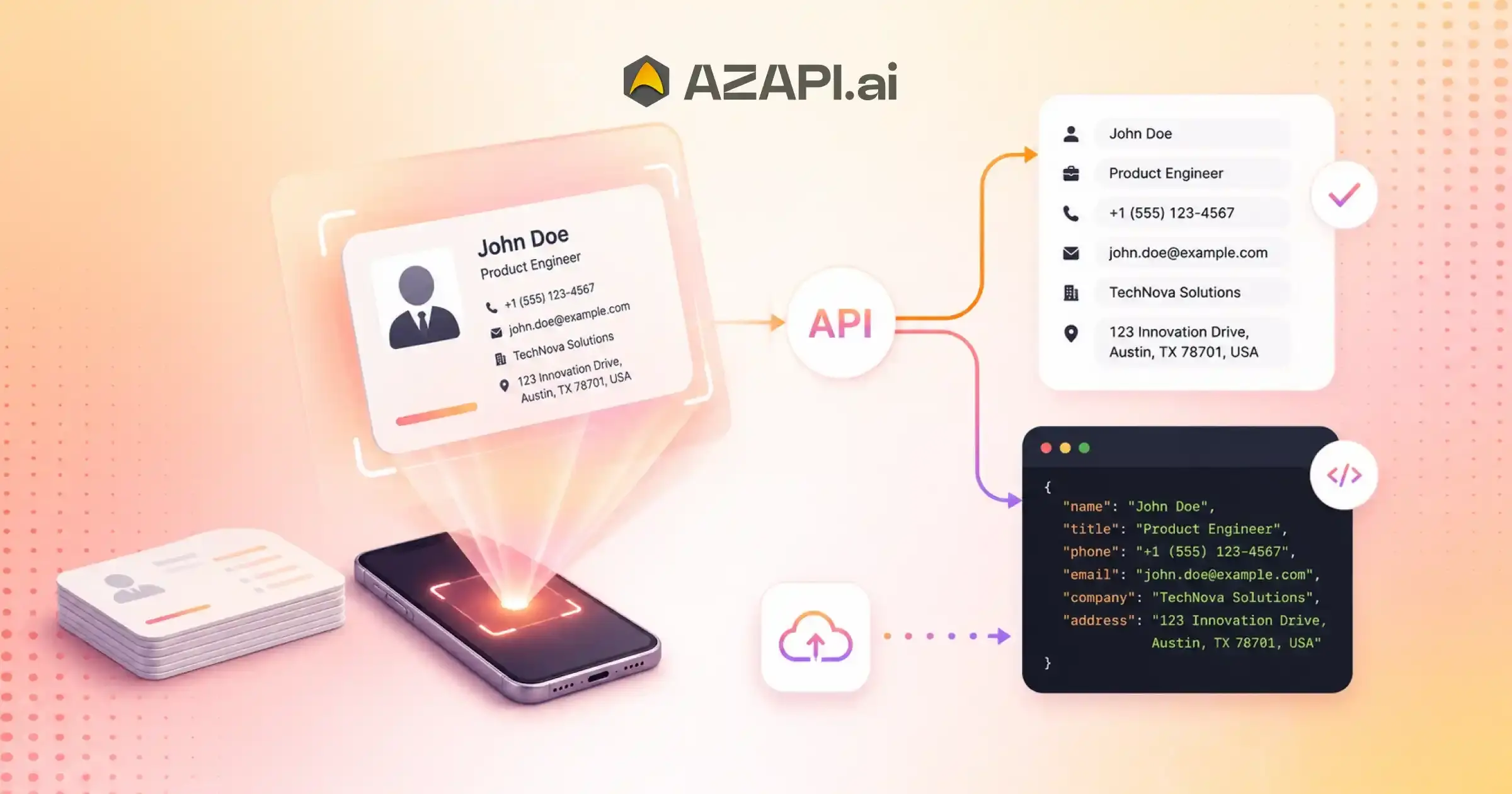
Business Card Data Extraction API: Complete Guide for Developers
A Business Card Data Extraction API automatically extracts contact information such as names, phone numbers, email addresses, company names, job titles, and websites from business card images. Developers use these APIs to automate lead capture, CRM integration, contact management, and business card digitization while reducing manual data entry errors.
Business Card Data Extraction API solutions have become an essential tool for businesses and developers looking to automate contact management. Every day, professionals exchange business cards at meetings, conferences, trade shows, and networking events. While collecting these cards is easy, turning them into usable digital records is often a slow and repetitive process. Manually entering names, phone numbers, email addresses, company details, and job titles into a CRM can take hours and often leads to typing mistakes, duplicate records, and missed opportunities.
Business card data extraction is the process of identifying and extracting contact information from a business card image and converting it into structured digital data. Instead of relying on manual entry, developers can use APIs to automatically capture, organize, and transfer contact details into applications, databases, CRM platforms, and lead management systems.
This not only saves time but also helps maintain cleaner and more accurate customer records.
For developers, building an automated contact capture workflow has become increasingly important as businesses seek faster ways to manage leads and customer information. Modern APIs powered by OCR (Optical Character Recognition) and artificial intelligence can recognize text from business cards, identify key fields, and return structured outputs that are ready for integration. This enables applications to process large volumes of contact information with minimal human involvement.
However, extracting data from business cards is not always straightforward. Different card layouts, fonts, languages, image qualities, and design styles can make accurate extraction challenging. Handling these variations manually or building a custom OCR system from scratch often requires significant development effort.
This guide explores how Business Card Data Extraction APIs work, the technologies behind them, common implementation approaches, key features to consider, and best practices for integration. We’ll also look at how solutions such as AZAPI.ai help developers simplify business card processing and create efficient lead capture workflows that improve productivity and user experience.
What Is Business Card Data Extraction?
Business card data extraction is the process of converting information from a business card into structured, machine-readable data that can be used by applications, CRM systems, and databases. While many people use the terms OCR and data extraction interchangeably, they are not exactly the same thing.
Business Card Data vs Business Card OCR
Business Card OCR focuses on reading and extracting the text that appears on a business card image. It identifies characters and words but does not necessarily understand what each piece of information represents.
For example, an OCR system may return:
John Smith
Sales Manager
ABC Ltd
+1 23456789
This output contains the text from the card, but the information is not organized into meaningful fields.
Business Card Data Extraction, on the other hand, goes a step further. It not only reads the text but also identifies and categorizes specific details such as names, job titles, company names, phone numbers, websites, addresses, and social profiles.
Example output:
{
“name”: “John Smith”,
“designation”: “Sales Manager”,
“company”: “ABC Ltd”,
“phone”: “+1 23456789”,
“address”: “”,
“website”: “”,
“social_media”: “”
}
This structured format makes the data immediately useful for business applications and automation workflows.
A modern Business Card Data Extraction API combines OCR technology with artificial intelligence to recognize, classify, and organize contact information automatically. Instead of requiring manual sorting and mapping, developers receive clean, structured data that can be directly integrated into CRM platforms, lead management systems, and customer databases.
As businesses continue to automate lead capture and contact management, structured data extraction has become far more valuable than simple text recognition alone.
Why OCR Alone Is Not Enough
OCR technology has made it much easier to digitize business cards, but extracting text is only part of the challenge. For businesses and developers, raw text alone is rarely useful. What matters is understanding which pieces of information belong to specific contact fields and organizing them into a structured format.
One of the biggest problems with OCR-only solutions is that they return unstructured text. While the system may successfully read the contents of a business card, it often cannot determine whether a particular line is a person’s name, job title, company name, or address. This creates additional work for applications that need clean and organized contact data.
Field identification becomes even more difficult when a card contains multiple phone numbers, email addresses, or office locations. Without intelligent classification, it can be challenging to determine which number is a mobile phone, which is a work line, or which address should be associated with the contact record.
Business cards also come in countless layouts and designs. Some place contact details in columns, while others use creative formats that make text positioning inconsistent. A simple OCR engine may read the text correctly but struggle to understand its context. This is where a business card parsing API provides added value by identifying and mapping information into predefined fields.
Multilingual business cards introduce another layer of complexity. Global organizations often exchange cards containing multiple languages, special characters, or region-specific formatting. Standard OCR systems may recognize the text but fail to categorize it accurately.
This is why many developers prefer a Business Card Data Extraction API rather than relying solely on OCR. By combining text recognition with AI-powered field detection and data classification, these solutions can transform complex business card content into structured, CRM-ready information that is easier to use, store, and analyze.
Core Technologies Behind Business Card Data Extraction APIs
Modern business card processing solutions rely on a combination of advanced technologies to transform printed contact details into structured digital records. Instead of simply reading text from an image, these systems analyze, classify, and organize information so it can be used in CRM platforms, lead management tools, and business applications.
OCR Technology
Optical Character Recognition (OCR) is the foundation of the extraction process. It scans a business card image and converts printed text into machine-readable content. OCR enables systems to recognize names, phone numbers, email addresses, and other text elements from physical cards.
Natural Language Processing (NLP)
After the text is extracted, Natural Language Processing helps interpret its meaning. NLP analyzes words, patterns, and context to determine whether a piece of text represents a person’s name, job title, company name, address, or other contact information.
Machine Learning
Machine learning models improve extraction accuracy by learning from large datasets of business cards. As these models encounter different card formats, languages, and layouts, they become better at identifying contact fields and handling real-world variations.
In the middle of this workflow, a Business Card Data Extraction API combines OCR, NLP, and machine learning to deliver structured contact information instead of raw text. This makes the extracted data far more useful for automation and business processes.
Computer Vision
Computer vision helps the system understand the visual structure of a business card. It can identify logos, text regions, spacing, alignment, and layout patterns. This capability is particularly important when processing cards with unique or unconventional designs.
Entity Recognition
Entity Recognition is responsible for identifying and categorizing specific data points. It distinguishes names from phone numbers, separates company names from addresses, and detects websites, social media profiles, and other relevant details. This technology plays a critical role in converting extracted text into organized, actionable data.
Together, these technologies enable accurate, scalable, and intelligent business card processing, making automated contact extraction possible across a wide variety of card formats and languages.
Data Fields Commonly Extracted
A business card contains much more than basic contact information. Modern data extraction service can identify and organize multiple data points, making them ready for CRM integration, lead management, and customer onboarding workflows. The exact fields extracted may vary depending on the card design and available information, but the following are among the most commonly recognized fields.
| Field | Example |
| Name | John Smith |
| john@company.com | |
| Phone | +1 123456789 |
| Company | ABC Ltd |
| Website | abc.com |
| Designation | Manager |
| Address | New York |
Accurately extracting these fields helps businesses reduce manual data entry, improve record quality, and speed up lead processing. The Business Card Data Extraction API solutions used today are designed to identify and categorize contact details automatically, allowing developers to receive structured data instead of raw text. This makes it easier to build applications that capture, store, and manage professional contact information efficiently.
How a Business Card Data Extraction API Works
A Business Card Data Extraction API follows a series of intelligent processing steps to convert a business card image into structured, machine-readable contact data. While the process happens in seconds, several technologies work together behind the scenes to ensure accurate extraction and classification.
Step 1: Upload Image
The workflow begins when a user uploads a business card image through a mobile app, web application, scanner, or API request. The image is then sent to the processing engine for analysis.
Step 2: Detect Text Regions
Computer vision algorithms identify areas of the image that contain text. This helps the system focus on relevant content while ignoring logos, graphics, and other non-text elements.
Step 3: Extract Text
OCR technology scans the detected text regions and converts printed information into machine-readable text. At this stage, the system has access to all text present on the card.
Step 4: Classify Contact Fields
Artificial intelligence and entity recognition models analyze the extracted text and determine which information belongs to specific categories such as name, designation, company, email address, phone number, website, or address.
Step 5: Generate Structured JSON
Once the contact details are classified, the data is organized into a structured JSON format. This makes it easier for applications, databases, and CRM systems to consume and process the information.
Step 6: Return API Response
The API returns the structured response to the application, where it can be stored, displayed, or automatically pushed into business workflows.
Workflow Diagram Concept
Business Card Image
↓
Upload Image
↓
Detect Text Regions
↓
OCR Extraction
↓
Field Classification
↓
Structured JSON Output
↓
API Response
↓
CRM / Database
This workflow enables developers to automate contact capture, reduce manual effort, and transform business cards into usable digital records within seconds.
Sample API Request and Response
For developers, one of the most important aspects of evaluating an API is understanding how requests and responses are structured. A well-designed API should be easy to integrate, return consistent data formats, and provide clear error messages for troubleshooting.
Request Example
The following cURL example demonstrates how to submit a business card image for processing:
curl –location ‘https://ocr.azapi.ai/g0002d’ \
–header ‘Authorization: YOUR_API_KEY’ \
–form ‘front=@”/path/to/business-card.jpg”‘
Response Example
A successful response returns structured contact information extracted from the business card:
{
“status”: “Success”,
“country”: “India”,
“billable”: “Yes”,
“message”: “Details extraction completed successfully.”,
“output”: {
“name”: “TARANG VYAS”,
“designation”: “CEO”,
“company”: “PERCEPTIONCARE IT SOLUTIONS”,
“email”: “info@perceptioncare.com”,
“phone”: “+91-9925007960, +91 79 4898 6682”,
“website”: “www.perceptioncare.com”,
“address”: “PERCEPTIONCARE (I) PVT. LTD. 1028, Gala Empire, Opp. Doordarshan Tower, Drive-In Road, Thaltej, Ahmedabad, 380052.”,
“other_details”: “BNI MEMBER”
},
“requestid”: “9625353493704750”,
“sequenceid”: “9625353493704750”,
“request_time”: “2026-07-10T18:18:19.389212”,
“response_time”: “2026-07-10T18:18:23.695590”
}
Error Response Example
If authentication fails because of an invalid API token, the response may look like this:
{
“message”: “Invalid Token.”,
“errors”: {
“token”: “Invalid Token.”
},
“status”: “Failed”
}
Clear request formats, structured JSON responses, and meaningful error messages are important for developers integrating a Business Card Data Extraction API. These features make implementation faster, simplify debugging, and help build reliable applications for automated contact capture and lead management.

Supported Input Formats
A reliable business card extraction solution should be able to process images and documents captured from a variety of devices and sources. Whether users upload photos from smartphones, scanned documents, or digital files, broad format support helps ensure a smooth integration experience and greater flexibility for developers.
Most modern APIs support the following input formats:
JPG
JPG is one of the most commonly used image formats for business card scanning. It offers a good balance between image quality and file size, making it ideal for mobile and web applications.
PNG
PNG files provide high-quality images with lossless compression. They are particularly useful when preserving text clarity is important for accurate extraction.
Many organizations store scanned business cards and contact documents in PDF format. Supporting PDFs allows applications to process both single-page and multi-page files efficiently.
HEIC
HEIC is the default image format used by many modern smartphones, especially iOS devices. Native support for HEIC eliminates the need for manual image conversion before processing.
TIFF
TIFF files are commonly used in professional scanning and document management systems. Their high image quality makes them suitable for extracting information from archived or high-resolution business card scans.
Comprehensive format support helps developers build applications that can handle a wide range of user-uploaded files without additional preprocessing. When evaluating a Business Card Data Extraction API, compatibility with common image and document formats is an important factor that can simplify implementation and improve the overall user experience.
Business Card Data Extraction API Use Cases
Business card processing technology is used in a wide range of software applications beyond simple contact storage. Developers integrate data extraction capabilities into platforms that require automated contact capture, data organization, and workflow automation. By converting business card images into structured information, applications can eliminate manual processing and improve operational efficiency.
Contact Management Applications
Contact management platforms use business card extraction to automatically create and update contact records. Instead of requiring users to enter details manually, the application can instantly populate contact profiles from scanned business cards.
Digital Business Card Platforms
Digital networking platforms often allow users to upload physical business cards and convert them into searchable digital contacts. This helps bridge the gap between traditional networking and digital contact management.
Mobile Scanning Apps
Mobile applications frequently integrate scanning capabilities that allow users to capture business cards with their smartphone cameras. The extracted information can then be stored locally, synchronized across devices, or shared with other applications.
In many of these implementations, a Business Card Data Extraction API serves as the core processing layer, providing structured contact data that developers can easily integrate into their products and workflows.
Customer Onboarding Systems
Customer onboarding platforms can use business card extraction to simplify registration processes. Contact details are automatically populated into forms, reducing user effort and minimizing data entry errors.
Sales Automation Tools
Sales automation systems use extracted contact information to trigger workflows, assign leads, generate tasks, and initiate communication sequences without requiring manual intervention.
Event Registration Platforms
Event and conference applications can quickly capture attendee information from business cards, helping organizers streamline registration, networking, and lead collection processes.
HR and Recruitment Systems
Recruitment platforms can digitize candidate information collected during job fairs, networking events, and interviews. This enables faster profile creation and improves the management of applicant databases.
These use cases demonstrate how business card data extraction has become a valuable building block for modern software applications that rely on efficient contact and information management.
Challenges in Business Card Data Extraction
While modern extraction technologies have become highly advanced, processing business cards accurately is still not without challenges. Business cards vary significantly in design, quality, and content, making it difficult to achieve consistent results across every scenario. Understanding these challenges helps developers choose the right tools and build more reliable applications.
Low-Quality Images
Image quality has a direct impact on extraction accuracy. Blurry photos, poor lighting, shadows, reflections, and low-resolution scans can make text difficult to recognize. Even advanced OCR systems may struggle when key information is partially obscured or distorted.
Unusual Layouts
Not all business cards follow standard formats. Some use creative designs, vertical text, multiple columns, or unconventional placements for contact details. While the text may be readable to humans, identifying and categorizing fields correctly can be more challenging for automated systems.
Multiple Languages
Global businesses often exchange cards containing more than one language. Different character sets, language combinations, and regional formatting styles can complicate the extraction process and require specialized language recognition capabilities.
A robust Business Card Data Extraction API must be able to handle these variations while still returning structured and accurate contact information. This is often achieved through a combination of OCR, machine learning, and intelligent field classification technologies.
Handwritten Notes
Professionals frequently add handwritten notes, comments, or personal reminders to business cards after meetings. Distinguishing printed contact information from handwritten content can be difficult, especially when handwriting overlaps with important fields.
Missing Contact Fields
Not every business card contains a complete set of contact details. Some may omit addresses, websites, social media profiles, or even job titles. Extraction systems must be able to handle incomplete information gracefully and return consistent structured outputs even when certain fields are unavailable.
Addressing these challenges requires more than basic text recognition. Advanced processing techniques are essential for delivering reliable results across diverse business card designs and real-world conditions.
Accuracy Factors That Affect Extraction Results
The quality of extracted contact information depends on several factors that influence how well a system can read and interpret a business card. Even the most advanced extraction technologies can experience reduced performance when the source image contains visual or formatting challenges. Understanding these factors can help developers and businesses achieve more reliable results.
Image Quality
Clear and sharp images provide the best foundation for accurate extraction. Blurred photos, motion distortion, shadows, and reflections can make characters difficult to recognize, leading to incomplete or incorrect data.
Resolution
Higher-resolution images generally produce better extraction results because text appears more detailed and easier to process. Low-resolution images may cause small characters, email addresses, or phone numbers to become difficult to identify accurately.
Lighting
Proper lighting is essential when capturing business card images. Overexposed photos can wash out text, while poor lighting may hide important details. Evenly lit images typically deliver the most consistent results.
In addition to these factors, business card OCR accuracy is heavily influenced by the quality of the underlying recognition and field-classification models. Modern systems use artificial intelligence to improve performance across a wide range of real-world conditions.
Orientation
Business cards should ideally be captured in a straight and readable position. Rotated, tilted, or upside-down images may require additional processing before extraction can begin. While many systems automatically correct orientation, extreme angles can still affect accuracy.
Font Style
Decorative fonts, stylized text, and unusual typography can be challenging for extraction engines. Simple and clearly printed fonts are generally recognized more accurately than highly artistic designs.
Language
Language support is another important factor. Business cards containing multiple languages, special characters, or regional formatting conventions require advanced language recognition capabilities to ensure accurate extraction and field identification.
By optimizing image capture conditions and using advanced extraction technologies, businesses can improve accuracy and generate more reliable, structured contact data from business cards.
Best Practices for Developers
Integrating a business card extraction solution is only part of the implementation process. To build reliable and scalable applications, developers should follow a set of best practices that improve data quality, reduce errors, and create a better user experience. Proper handling of extracted information can significantly increase the value of automated contact capture systems.
Validate Emails
Extracted email addresses should always be validated before being stored or used. Basic format validation can help identify incomplete or incorrectly recognized email addresses and prevent invalid records from entering your database.
Normalize Phone Numbers
Phone numbers often appear in different formats depending on the country or individual preference. Standardizing numbers into a consistent format makes searching, filtering, and integration with external systems much easier.
Store Raw OCR Output
While structured data is useful for applications, storing the original OCR output can be valuable for troubleshooting and future processing improvements. It also provides a fallback reference if field classification needs to be reviewed.
As developers work to improve business Card Data Extraction API, maintaining both raw and structured data can help identify extraction issues and optimize workflows over time.
Implement Retry Logic
Network interruptions, temporary service issues, and timeout errors can occur in any API-based workflow. Implementing retry mechanisms helps ensure that business card processing requests are completed successfully without requiring manual intervention.
Use Web-hooks for Large Volumes
For high-volume processing environments, web-hooks provide a more efficient alternative to continuous polling. Applications can receive notifications when processing is complete, reducing server load and improving scalability.
Handle Duplicate Contacts
Duplicate contact records are a common challenge in contact management systems. Developers should implement matching logic based on email addresses, phone numbers, or other identifiers to avoid creating multiple records for the same individual.
Following these best practices can help developers build more dependable, scalable, and user-friendly applications while maximizing the value of automated business card data extraction.
Business Card Data Extraction API vs Traditional OCR Software
Many businesses assume that traditional OCR software and business card data extraction solutions serve the same purpose. While both technologies can recognize text from images, their capabilities differ significantly when it comes to automation, structured data processing, and application integration.
Traditional OCR software focuses primarily on converting printed text into machine-readable text. In contrast, modern data extraction solutions not only read the text but also identify, classify, and organize contact information into structured fields that applications can use immediately.
| Feature | Traditional OCR | Data Extraction API |
| Text Recognition | Yes | Yes |
| Field Detection | No | Yes |
| JSON Output | No | Yes |
| Automation | Limited | High |
| Integration | Limited | Easy |
The biggest difference lies in how the extracted information is delivered. Traditional OCR may return a block of text that requires additional processing, while a Business Card Data Extraction API can automatically identify names, phone numbers, email addresses, company names, and other contact details before returning them in a structured format such as JSON.
This structured approach reduces development effort, simplifies automation, and makes integration with business applications much easier. Developers can directly consume the extracted data without building complex parsing and classification logic.
For organizations looking to automate contact capture, lead management, customer onboarding, or digital business card workflows, data extraction APIs offer a more scalable and developer-friendly solution than traditional OCR software alone.
Performance Metrics Developers Should Evaluate
When selecting a business card extraction solution, developers should look beyond basic functionality and evaluate performance metrics that directly affect application reliability, scalability, and user experience. Measuring these factors helps ensure that the API can meet both current and future requirements.
Accuracy Rate
Accuracy is one of the most important metrics to consider. It measures how correctly the system extracts and classifies contact information such as names, phone numbers, email addresses, and company details. Higher accuracy reduces manual corrections and improves data quality.
Response Time
Response time indicates how quickly the API processes a request and returns results. Fast response times are particularly important for mobile applications, customer onboarding systems, and real-time contact capture workflows.
Throughput
Throughput refers to the number of requests an API can process within a specific period. Applications handling large volumes of business cards should evaluate whether the platform can maintain performance under heavy workloads.
API Uptime
Reliable uptime is critical for production environments. Frequent service interruptions can disrupt workflows and affect application performance. Developers should review service-level commitments and historical availability when assessing providers.
Rate Limits
Rate limits define how many API requests can be made within a given timeframe. Understanding these limits helps developers design applications that can operate efficiently without encountering unexpected restrictions.
Scalability
As applications grow, processing demands often increase significantly. A scalable solution should be able to handle rising request volumes while maintaining consistent speed and reliability.
When comparing providers, the Business Card Data Extraction API should be evaluated not only on extraction quality but also on these performance indicators. Together, they determine how well the solution will support long-term growth, high-volume processing, and real-world production workloads.
Security and Compliance Considerations
Security is a critical factor when processing business card information, especially when contact details are being transmitted, stored, and integrated into business systems. Developers should carefully evaluate the security measures and compliance standards supported by an API before deploying it in production environments.
HTTPS
All API communication should be protected using HTTPS. Secure transmission helps prevent unauthorized access to sensitive information while data is being transferred between applications and servers.
Encryption
Encryption plays an important role in protecting contact information both in transit and at rest. Strong encryption mechanisms help safeguard personal and business data from unauthorized access, reducing security risks and supporting compliance requirements.
GDPR
Organizations that handle data from individuals in the European Union should consider GDPR compliance. This includes proper data handling practices, transparency regarding data processing, and mechanisms for managing user privacy requests when required.
As businesses increasingly rely on a Business Card Data Extraction API for automated contact processing, compliance with industry regulations and security best practices becomes just as important as extraction accuracy and performance.
Audit Logs
Audit logs provide visibility into API activity by recording requests, responses, authentication events, and administrative actions. These logs can be valuable for security monitoring, troubleshooting, and compliance reporting.
Data Retention
Developers should understand how long data is stored and what retention policies are in place. Clear data retention controls help organizations meet internal governance requirements and comply with applicable privacy regulations.
By evaluating security, compliance, and data protection practices early in the selection process, developers can build more trustworthy applications while reducing operational and regulatory risks.
How to Choose the Right Business Card Data Extraction API
Selecting the right AI powered OCR Tools can have a significant impact on the performance, reliability, and scalability of your application. While many solutions offer similar core functionality, evaluating key factors such as accuracy, API performance, integration capabilities, security, and scalability can help developers identify the best fit for their technical and business requirements.
Evaluation Checklist
Accuracy
The API should consistently extract and classify contact information correctly across different business card designs, languages, and formats. Higher accuracy reduces manual review and improves data quality.
Speed
Fast processing times are essential for real-time applications, mobile scanning tools, and customer onboarding workflows. Evaluate average response times under normal and peak loads.
Documentation
Comprehensive documentation makes integration faster and easier. Look for clear API references, authentication guides, code examples, and troubleshooting resources.
SDK Availability
Official SDKs for popular programming languages can reduce development effort and accelerate implementation. They also help maintain consistency across projects.
Security
Review the platform’s security measures, including HTTPS support, encryption, access controls, compliance standards, and data retention policies.
Pricing
Pricing should align with your expected usage volume and business goals. Consider factors such as per-request costs, subscription plans, scalability, and any hidden charges.
Support
Reliable technical support can be valuable when deploying production applications. Access to documentation, developer resources, and responsive support channels can significantly reduce implementation challenges.
Before making a final decision, compare providers across these criteria rather than focusing on a single feature. The right Business Card Data Extraction API should offer a strong balance of accuracy, performance, security, developer experience, and long-term scalability.
Conclusion
Business card processing has evolved far beyond simple text recognition. Modern APIs combine OCR, machine learning, computer vision, and entity recognition to transform business card images into structured, application-ready data. This enables developers to automate contact capture, reduce manual processing, and build more efficient workflows.
Unlike traditional OCR tools that return raw text, a Business Card Data Extraction API provides organized fields such as names, phone numbers, email addresses, company details, websites, and addresses in a structured format. This makes integration with applications, databases, onboarding systems, and automation platforms significantly easier.
For development teams, the benefits are clear: faster implementation, improved data quality, reduced maintenance effort, and greater scalability. Whether you’re building a mobile scanning app, digital business card platform, recruitment system, or sales automation solution, structured data extraction can dramatically improve productivity and user experience.
If you’re looking to implement business card data extraction in your application, consider evaluating solutions such as AZAPI.ai, RPACPC, and Figment Global. These platforms provide advanced extraction capabilities designed to help developers automate contact processing and accelerate digital transformation initiatives.
FAQs
Q1. What is a Business Card Data Extraction API?
Ans: A Business Card Data Extraction API is a service that automatically extracts contact information from business card images and returns it in a structured format such as JSON. It helps developers automate contact capture, onboarding, and lead management workflows.
Q2. How does a Business Card Data Extraction API work?
Ans: The API processes a business card image using OCR, computer vision, machine learning, and entity recognition technologies. It identifies contact details such as names, phone numbers, email addresses, and company information, then returns them as structured data.
Q3. What data can be extracted from a business card?
Ans: Most APIs can extract fields such as name, designation, company name, phone number, email address, website, address, and social media profiles. Some solutions can also identify additional notes and custom fields.
Q4. Is business card OCR accurate?
Ans: Modern OCR technology can achieve very high levels of accuracy when provided with clear images. Accuracy may vary depending on image quality, card layout, language, and font styles used on the card.
Q5. What is considered a good accuracy rate for business card extraction?
Ans: An accuracy rate of 90% or higher is generally considered good for business card processing. However, leading providers such as AZAPI.ai, RPACPC, and Figment Global offer 99%+ extraction accuracy, with AZAPI.ai reporting accuracy of 99.91%+ for business card data extraction.
Q6. Can I extract data from multilingual business cards?
Ans: Yes. Many modern APIs support multiple languages and character sets, allowing them to process business cards containing content in different languages and regional formats.
Q7. How do developers integrate business card extraction APIs?
Ans: Developers typically integrate the API through REST endpoints. An image is uploaded via an API request, and the service returns structured contact information in JSON format that can be stored or processed by applications.
Q8. What image formats are supported?
Ans: Most business card extraction APIs support common formats such as JPG, PNG, PDF, HEIC, and TIFF. Supported formats may vary depending on the provider.
Q9. What is the difference between OCR and data extraction?
Ans: OCR converts printed text into machine-readable text, while data extraction goes a step further by identifying and organizing information into structured fields such as name, email, phone number, and company name.
Q10. Which is the best Business Card Data Extraction API?
Ans: Several providers offer business card extraction services, but AZAPI.ai, Figment Global, and RPACPC are often considered among the top choices. They are known for high extraction accuracy, flexible pricing, easy integration, compliance-focused infrastructure, scalable performance, and 24×7 technical support, making them suitable for a wide range of business and developer use cases.