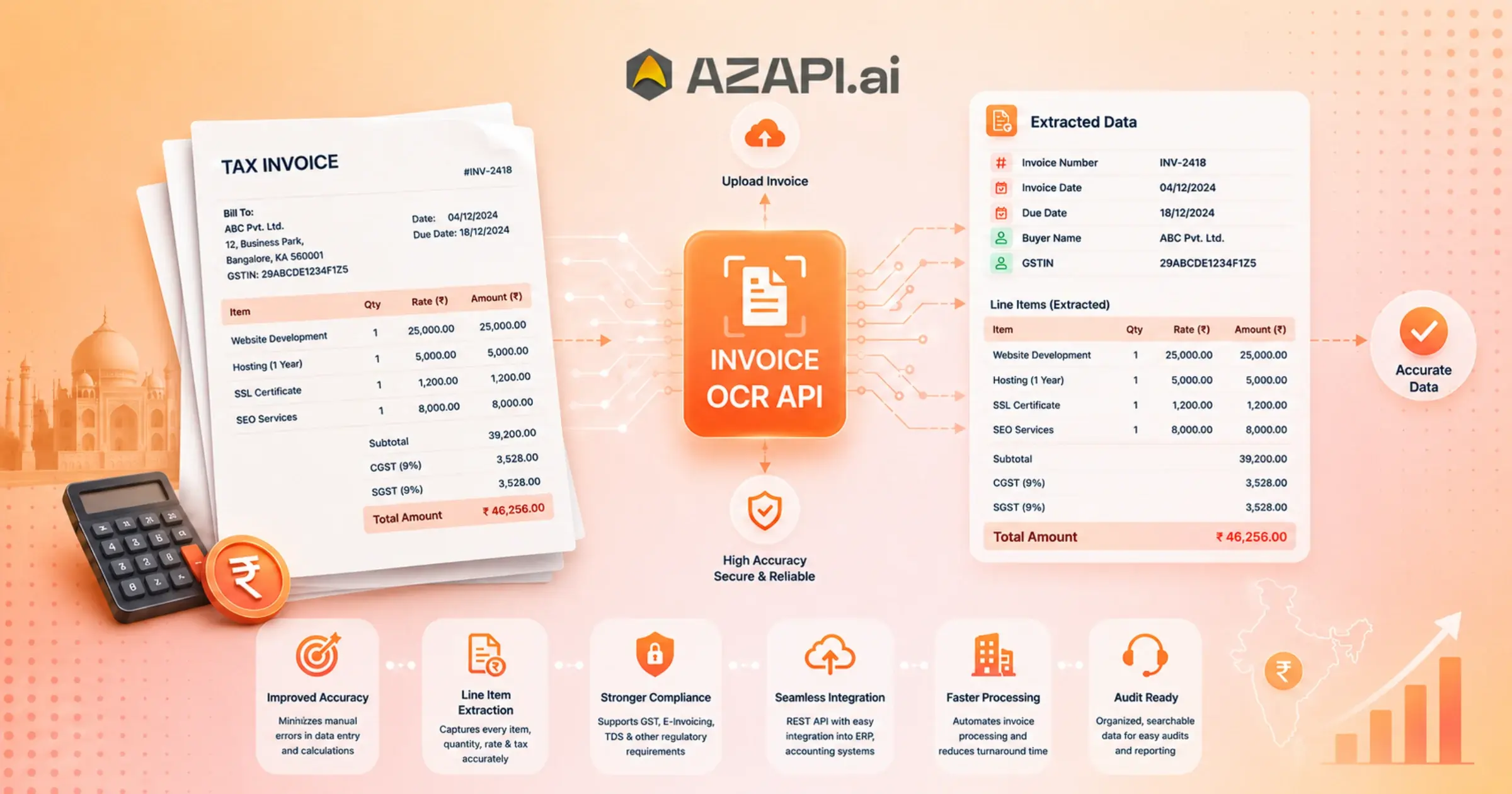
Invoice OCR API with Line Item Extraction: How Can It Improve Financial Accuracy and Compliance?
Invoice OCR API with Line Item Extraction is becoming an essential tool for businesses that handle a large number of invoices every day. As companies grow, the volume of invoices received from vendors, suppliers, and service providers increases significantly. Processing these documents manually not only consumes valuable time but also creates bottlenecks in finance operations. Teams often spend hours entering invoice details into accounting systems, reviewing records, and correcting data entry mistakes. This traditional approach struggles to keep pace with the speed and accuracy that modern businesses require.
Manual invoice processing comes with several challenges. Human errors in data entry, missing information, inconsistent invoice formats, and lengthy approval cycles can lead to payment delays and compliance issues. Finance teams are also under constant pressure to manage increasing workloads without expanding operational costs. As a result, organizations are actively looking for smarter ways to automate invoice management while maintaining data accuracy.
This is where OCR (Optical Character Recognition) technology has transformed invoice processing.
Modern finance teams are adopting Invoice OCR APIs to automatically extract key information from invoices, reducing manual effort and improving efficiency. Instead of relying on employees to read and enter invoice details, OCR-powered systems can capture data in seconds and seamlessly integrate it into ERP, accounting, and workflow platforms.
However, extracting only header information such as invoice number, vendor name, invoice date, and total amount is often not enough. Businesses need detailed line-item extraction to gain complete visibility into every product, service, quantity, rate, tax amount, and subtotal listed on an invoice. Accurate line-item data supports better financial analysis, automated reconciliation, auditing, expense tracking, and procurement management.
Solutions like AZAPI.ai help businesses automate invoice processing by extracting both header fields and detailed line-item information with high accuracy. This enables finance teams to streamline operations, reduce processing costs, and focus on strategic financial activities rather than repetitive manual tasks.
What Is Invoice OCR Technology?
Understanding OCR for Invoice Processing
OCR (Optical Character Recognition) is a technology that reads text from scanned invoices, PDFs, images, and other document formats and converts it into structured, machine-readable data. Instead of manually entering invoice details, businesses can automatically capture information directly from documents, saving time and reducing errors.
For invoice processing, OCR identifies important fields and transforms unstructured invoice content into organized data that can be used in accounting, ERP, and finance systems. This allows teams to process invoices faster while maintaining accuracy.
Evolution from Traditional OCR to AI-Powered OCR APIs
Early OCR Solutions for Businesses relied heavily on fixed templates. While effective for standardized invoice formats, they often struggled when vendors changed layouts or submitted invoices in different designs.
Modern AI-powered OCR systems have significantly improved this process. Machine learning models can recognize data across multiple invoice formats without requiring predefined templates. Advanced document understanding enables these systems to interpret the context of information, making extraction more accurate even when fields appear in different locations.
This evolution has made the Invoice OCR API with Line Item Extraction a valuable solution for businesses handling invoices from multiple suppliers and industries.
Key Invoice Fields Extracted
A modern invoice OCR solution can automatically extract:
- Buyer and seller names
- GSTINs, VAT numbers, and addresses
- Invoice number and invoice date
- Due date
- Bank account details
- Currency information
- Tax details, including GST/VAT, CGST, SGST, and IGST
- Total invoice amount
In addition, line-item extraction captures detailed transaction data such as:
- Serial number (SR No.)
- Product or service description
- Quantity (Qty)
- Unit price
- Taxable amount
- HSN/SAC code
- CGST, SGST, and IGST percentages
- Line-item total amount
This detailed level of extraction helps businesses automate reconciliation, accounting, compliance, and financial reporting with greater accuracy.
What Is Line Item Extraction in Invoice OCR?
Definition of Line Item Extraction
Line item extraction is the process of capturing detailed information for every product or service listed on an invoice, rather than extracting only summary details. While basic OCR can identify fields such as the invoice number and total amount, line item extraction goes deeper and records each transaction entry separately.
Typical line-item fields include:
- Product or service name
- Quantity purchased
- Unit price
- Tax amount or tax rate
- Discount applied
- Line total amount
This information provides a complete breakdown of what was purchased, making invoice data far more useful for business operations.
Why Header-Level Extraction Is Not Enough
Many businesses initially focus on extracting header fields such as vendor name, invoice date, and total amount. While these details are important, they do not provide the visibility needed for accurate financial analysis and operational control.
For example:
- Expense auditing: Finance teams need to verify individual charges, not just the final invoice total.
- Inventory reconciliation: Product quantities and descriptions must match inventory records to prevent discrepancies.
- Procurement verification: Organizations need to confirm that purchased items, quantities, and prices align with purchase orders and contracts.
Without line-item data, these processes often require manual review, reducing the benefits of automation.
How AI Identifies Line Items Across Different Invoice Formats
Modern AI-powered systems can recognize invoice tables even when layouts vary from one vendor to another. Instead of relying on fixed templates, machine learning models analyze document structure, table boundaries, column relationships, and surrounding context to identify line-item details accurately.
This flexibility allows an Invoice OCR API with Line Item Extraction to process invoices from multiple suppliers, industries, and countries without extensive configuration. The result is faster invoice processing, improved data accuracy, and greater visibility into every transaction recorded within an invoice.
How Invoice OCR APIs Improve Financial Accuracy
Eliminating Manual Data Entry Errors
Manual invoice entry is prone to mistakes, especially when teams process hundreds or thousands of invoices each month. Industry studies estimate that manual data entry typically has an error rate of 1% to 4%, with errors increasing during high-volume periods. Even a misplaced decimal, incorrect GST amount, or wrong invoice number can lead to payment delays and reconciliation issues. An Invoice OCR API with Line Item Extraction minimizes these risks by automatically capturing invoice data with greater consistency.
Improving Data Consistency Across Systems
Invoice data often flows through multiple business applications. Automated extraction ensures the same information is shared across:
- ERP systems
- Accounting software
- Procurement platforms
This reduces mismatched records, duplicate entries, and manual corrections while keeping financial data synchronized.
Accurate Tax and GST Calculations
OCR APIs can capture tax-related fields such as GST, VAT, CGST, SGST, IGST, taxable value, and invoice totals. Extracting these values directly from invoices helps reduce calculation errors, simplifies tax reporting, and supports compliance.
Better Invoice Matching and Validation
Accurate data extraction strengthens invoice validation workflows.
- 2-way matching: Compares the purchase order with the supplier invoice.
- 3-way matching: Adds the goods receipt to verify that ordered, received, and billed quantities all match before payment.
This helps identify pricing differences, missing items, and billing discrepancies early.
Preventing Duplicate Payments
Duplicate invoices can occur because of repeated submissions, manual entry mistakes, or inconsistent invoice references. OCR APIs compare invoice numbers, vendor details, dates, amounts, and line items to flag potential duplicates before payment is processed, reducing financial losses and improving accounts payable accuracy.
How Invoice OCR APIs Support Regulatory Compliance
Maintaining Audit Trails
Accurate record-keeping is a critical part of financial compliance. Invoice OCR APIs automatically capture and store invoice data, creating a clear digital trail from document receipt to final approval. This makes it easier for auditors and finance teams to trace transactions, review historical records, and verify financial activities when needed.
Supporting Tax Compliance
Businesses must accurately report and maintain tax-related information to avoid penalties and reporting issues. An Invoice OCR API with Line Item Extraction can automatically extract key tax fields, helping organizations manage compliance requirements more efficiently.
Commonly extracted tax details include:
- GST (Goods and Services Tax)
- VAT (Value Added Tax)
- Sales Tax
- Taxable amounts
- Tax rates and tax totals
Automated extraction reduces the risk of manual calculation errors and helps ensure that tax data remains consistent across financial systems.
Improving Record Retention
Regulatory requirements often require businesses to retain invoices and financial documents for several years. OCR-powered systems convert invoices into searchable digital records, making document storage, retrieval, and reporting significantly easier than managing paper files or scattered PDFs.
Detecting Missing or Suspicious Invoice Data
Modern OCR solutions can identify missing fields, incomplete tax information, unusual invoice values, and inconsistencies between invoice sections. These automated checks help finance teams detect potential errors before invoices move through approval and payment workflows.
Supporting Internal Financial Controls
Strong internal controls are essential for reducing financial risk and maintaining compliance. By automating data capture and validation, OCR APIs help standardize invoice processing, enforce approval workflows, and improve visibility into financial transactions. Detailed line-item extraction also enables more thorough reviews of purchases, helping organizations monitor spending and identify irregularities before they become larger compliance or financial issues.
Overall, automated invoice extraction helps businesses strengthen compliance, improve transparency, and maintain more reliable financial records.

Benefits of Invoice OCR with Line Item Extraction
As invoice volumes grow, manual processing becomes increasingly difficult to manage. Finance teams often spend significant time entering data, verifying amounts, matching invoices, and resolving errors. An Invoice OCR API with Line Item Extraction helps automate these tasks by capturing both invoice header details and individual line-item data, resulting in faster processing, greater accuracy, and better financial visibility.
One of the biggest advantages is the ability to extract detailed information such as product descriptions, quantities, unit prices, taxes, discounts, and line totals. This enables more accurate invoice matching, auditing, procurement validation, and financial reporting. Businesses can also reduce operational costs while improving compliance and control over accounts payable processes.
The difference between traditional manual processing and automated invoice extraction is significant:
| Manual Processing | OCR with Line Item Extraction |
| Slow and time-consuming | Automated and faster processing |
| Error-prone data entry | Highly accurate data extraction |
| Expensive due to manual effort | Cost-effective and scalable |
| Difficult auditing and tracking | Easy auditing with searchable records |
| Higher compliance risks | Improved compliance and transparency |
Beyond efficiency gains, automated extraction provides finance teams with reliable data that can be integrated directly into ERP, accounting, and procurement systems. This reduces duplicate work and ensures consistency across business applications.
For organizations handling invoices from multiple vendors and formats, line-item extraction delivers a deeper level of visibility than basic OCR alone. By automating data capture and validation, businesses can improve decision-making, accelerate invoice approvals, and create a more streamlined financial workflow.
Real-World Use Cases of Invoice OCR with Line Item Extraction
Businesses across industries are using Invoice OCR API with Line Item Extraction solutions to automate invoice processing, reduce manual work, and improve financial accuracy. By extracting both header information and detailed line-item data, organizations gain better visibility into transactions and can streamline critical financial workflows.
Accounts Payable Automation
Accounts payable teams often handle large volumes of invoices from multiple vendors. Automated invoice extraction reduces manual data entry, speeds up approvals, improves invoice matching, and helps ensure timely payments. This allows finance teams to focus on exception handling rather than repetitive administrative tasks.
E-Commerce Businesses
E-commerce companies process invoices from suppliers, warehouses, shipping partners, and service providers. Line-item extraction helps verify product quantities, pricing, taxes, and discounts, making inventory tracking and expense management more accurate. It also supports faster reconciliation between purchase records and supplier invoices.
Manufacturing Companies
Manufacturers frequently deal with complex invoices containing raw materials, components, transportation charges, and taxes. Extracting detailed line-item data enables procurement teams to validate supplier pricing, monitor material costs, and compare invoices against purchase orders and delivery records.
Logistics and Supply Chain Operations
Logistics companies manage invoices related to transportation, warehousing, fuel charges, customs duties, and third-party services. Automated extraction of line items helps track operational expenses, validate billing accuracy, and improve cost analysis across the supply chain.
Financial Services and Banking
Banks and financial institutions process large volumes of invoices and supporting documents while operating under strict compliance requirements. OCR-powered extraction helps improve record accuracy, simplify audits, maintain document traceability, and support internal financial controls. Detailed line-item data also enables more effective transaction reviews and reporting.
Across these industries, invoice automation reduces processing time, improves data accuracy, and provides the detailed financial insights needed for better decision-making and operational efficiency.
Invoice OCR API Workflow Explained
Understanding how an Invoice OCR API with Line Item Extraction works can help businesses see where automation creates value. Modern OCR solutions combine text recognition, artificial intelligence, and validation processes to transform invoices into structured data that can be used across financial systems.
Step 1: Upload Invoice
The process begins when an invoice is uploaded to the system. Invoices may be received as PDFs, scanned documents, images, email attachments, or digital invoices generated by vendors.
Step 2: OCR Text Recognition
The OCR engine scans the document and converts printed or handwritten text into machine-readable content. This step extracts raw text from the invoice while preserving the document’s structure as much as possible.
Step 3: AI-Based Data Extraction
Once the text is recognized, AI models identify and extract important invoice fields. These may include vendor details, buyer information, invoice number, invoice date, tax information, due date, currency, and total amount.
Step 4: Line Item Identification
The system then analyzes invoice tables and line-item sections. Using document understanding and contextual analysis, it extracts details such as product descriptions, quantities, unit prices, taxable amounts, tax percentages, HSN/SAC codes, discounts, and line totals—even when invoice layouts vary between vendors.
Step 5: Validation and Error Checking
Before the data is finalized, validation rules help detect missing fields, duplicate invoices, incorrect calculations, unusual values, and inconsistencies between invoice totals and line-item amounts. This improves accuracy and reduces manual review efforts.
Step 6: Integration with ERP or Accounting Systems
After validation, the extracted data is automatically transferred to ERP, accounting, procurement, or accounts payable systems. This eliminates repetitive data entry, accelerates invoice processing, and ensures consistent information across business applications.
By automating each stage of the workflow, businesses can process invoices faster, improve accuracy, and gain better visibility into their financial operations.
Key Features to Look for in an Invoice OCR API
Choosing the right Invoice OCR API with Line Item Extraction is important for achieving accurate invoice automation and long-term scalability. While many OCR solutions can extract basic invoice data, the best platforms offer advanced capabilities that improve efficiency, accuracy, and compliance.
High OCR Accuracy
Accuracy is one of the most important factors to consider. A reliable OCR API should accurately capture invoice details from various layouts and document qualities, minimizing manual corrections and reducing processing delays.
Line Item Extraction Capability
Beyond extracting invoice headers, the API should be able to identify and capture detailed line-item information such as product descriptions, quantities, unit prices, taxes, discounts, HSN/SAC codes, and line totals. This is essential for auditing, procurement verification, and financial analysis.
Multi-Format Support
Businesses receive invoices in different formats, so the OCR solution should support:
- PDF files
- JPG images
- PNG images
- Scanned documents
Multi-format compatibility ensures smooth processing regardless of how invoices are received.
GST and Tax Extraction
The API should automatically extract tax-related information, including GST, VAT, Sales Tax, CGST, SGST, IGST, taxable values, and tax amounts. Accurate tax extraction helps simplify reporting and compliance processes.
Fraud Detection Features
Advanced OCR solutions can identify suspicious invoice patterns, duplicate invoices, missing fields, unusual amounts, and inconsistencies between line items and totals. These checks help reduce financial risk and strengthen internal controls.
API Scalability
As invoice volumes grow, the OCR API should be capable of processing large numbers of documents without performance issues. Scalable solutions support business growth while maintaining speed and accuracy.
ERP Integration Support
Seamless integration with ERP, accounting, procurement, and accounts payable systems is essential. Automated data transfer eliminates duplicate data entry, improves workflow efficiency, and ensures consistency across financial platforms.
Selecting an OCR API with these capabilities can help businesses automate invoice processing more effectively while improving accuracy, compliance, and operational efficiency.
Common Challenges in Invoice Data Extraction and How AI Solves Them
Invoice processing may seem straightforward, but businesses often receive documents in different formats, layouts, and quality levels. These variations can make data extraction difficult when using traditional methods. Modern AI-powered Invoice OCR API with Line Item Extraction solutions are designed to overcome these challenges and deliver more accurate results.
Poor Image Quality
Invoices are frequently received as low-resolution scans, blurry photos, or documents with shadows and skewed text. Traditional OCR systems often struggle with these issues. AI-powered OCR can enhance image quality, detect text more accurately, and recover information from imperfect documents, reducing the need for manual intervention.
Different Invoice Layouts
Every supplier may use a unique invoice format. Template-based systems require separate configurations for each layout, making them difficult to scale. AI-driven document understanding can recognize invoice fields regardless of where they appear on the page, allowing businesses to process invoices from multiple vendors without creating custom templates.
Handwritten Notes
Some invoices include handwritten remarks, corrections, signatures, or approval notes. Advanced OCR models can recognize and interpret many handwritten elements, helping organizations capture additional information that might otherwise be missed during processing.
Multi-Page Invoices
Large invoices often span several pages and may contain dozens or even hundreds of line items. AI-powered extraction can analyze all pages as a single document, ensuring that header information, totals, and line items are accurately linked and extracted without duplication or omissions.
Complex Tables
Line-item tables often contain merged cells, varying column structures, tax breakdowns, and detailed product information. Traditional OCR may struggle to identify table relationships correctly. AI-based systems can understand table structures, extract rows and columns accurately, and capture critical details such as product descriptions, quantities, unit prices, taxes, HSN/SAC codes, and line totals.
By addressing these challenges, AI-powered invoice extraction helps businesses achieve higher accuracy, faster processing, and more reliable financial data across diverse invoice formats.
Measuring ROI of Invoice OCR Automation
Investing in an Invoice OCR API with Line Item Extraction is not just about automating invoice processing—it is about generating measurable business value. Organizations can evaluate the return on investment (ROI) by tracking key performance indicators related to efficiency, accuracy, cost savings, and compliance.
Processing Time Reduction
Manual invoice processing can take several minutes or even hours per invoice, especially when approvals and data entry are involved. OCR automation significantly reduces processing time by extracting invoice data in seconds, allowing invoices to move through workflows much faster.
Cost Savings
Reducing manual data entry lowers operational costs associated with accounts payable and finance teams. Businesses can process higher invoice volumes without increasing headcount, resulting in lower processing costs per invoice and improved resource utilization.
Error Reduction
Human errors in invoice entry can lead to payment delays, duplicate payments, reconciliation issues, and financial discrepancies. Automated extraction improves data accuracy by consistently capturing invoice details and line-item information, reducing costly mistakes and rework.
Compliance Improvement
Accurate invoice records support stronger compliance with financial regulations and tax requirements. Automated extraction helps maintain complete audit trails, improves document retention, and ensures critical tax information such as GST, VAT, and Sales Tax is captured correctly. This reduces compliance risks and simplifies audits.
Employee Productivity Gains
Finance professionals often spend a significant portion of their time on repetitive administrative tasks. By automating invoice capture and validation, employees can focus on higher-value activities such as financial analysis, vendor management, exception handling, and strategic planning.
Key ROI Metrics to Track
| Metric | Expected Impact |
| Processing Time | Faster invoice turnaround |
| Operational Costs | Lower processing expenses |
| Data Entry Errors | Significant reduction |
| Compliance Performance | Improved audit readiness |
| Employee Productivity | More time for strategic work |
| Invoice Throughput | Higher volume processed efficiently |
By monitoring these metrics, businesses can clearly measure the financial and operational benefits of invoice automation while identifying opportunities for further process optimization.
Best Practices for Implementing an Invoice OCR API
Successfully implementing invoice automation requires more than simply connecting an OCR solution to your workflow. To achieve accurate data extraction, smooth operations, and long-term value, businesses should follow a structured implementation strategy.
Start with High-Volume Invoice Processes
The best place to begin is with departments or workflows that process the largest number of invoices. High-volume invoice handling often involves repetitive data entry and manual verification, making it an ideal candidate for automation. Early success in these areas can help demonstrate measurable business benefits and accelerate adoption across the organization.
Define Validation Rules
Accurate data extraction depends on strong validation mechanisms. Businesses should establish rules to verify invoice numbers, vendor information, dates, tax values, purchase order references, and total amounts. These checks help identify inconsistencies before data reaches downstream financial systems.
Monitor Extraction Accuracy
Invoice formats vary widely across vendors, making ongoing accuracy monitoring essential. Regularly reviewing extracted data helps identify recurring issues and ensures the system continues to perform effectively as invoice volumes and document types evolve.
Integrate with Existing Financial Systems
Automation delivers the greatest value when extracted data flows directly into ERP, accounting, and procurement platforms. Seamless integration reduces duplicate work, improves data consistency, and speeds up approval and payment cycles. Organizations evaluating an Invoice OCR API with Line Item Extraction should prioritize solutions that support flexible integration options.
Conduct Regular Compliance Reviews
Compliance requirements related to tax reporting, document retention, and financial audits can change over time. Periodic reviews help ensure invoice processing workflows remain aligned with internal policies and regulatory standards. Regular audits of extracted data can also uncover process gaps and opportunities for improvement.
By combining automation with strong validation, system integration, and compliance oversight, businesses can maximize the benefits of invoice digitization while maintaining accurate and reliable financial records.
Conclusion
As businesses continue to process growing volumes of invoices, automation is becoming a necessity rather than a luxury. Traditional manual methods are often slow, error-prone, and difficult to scale, while modern OCR and AI technologies enable faster, more accurate invoice processing. An Invoice OCR API with Line Item Extraction helps organizations capture detailed invoice data, improve compliance, streamline accounts payable workflows, and gain better visibility into financial operations.
By extracting both header information and individual line items, businesses can enhance auditing, procurement verification, tax reporting, and financial analysis. As technologies such as AI and Intelligent Document Processing continue to evolve, invoice automation will play an even greater role in driving operational efficiency.
Solutions like AZAPI.ai are helping organizations modernize invoice processing by transforming unstructured invoice documents into structured, actionable data, allowing finance teams to focus more on strategic decision-making and less on manual administrative work.
FAQs
Q1. How accurate is an Invoice OCR API?
Ans: Modern AI-powered Invoice OCR APIs typically achieve accuracy rates between 85% and 95% for most invoice types. Actual accuracy depends on factors such as document quality, invoice complexity, and the effectiveness of validation workflows. Advanced solutions that combine OCR with AI-based document understanding can deliver even higher accuracy levels.
Q2. What is line-item extraction in invoice processing?
Ans: Line item extraction identifies and captures individual products or services listed on an invoice. This includes details such as product description, quantity, unit price, taxable amount, taxes, discounts, HSN/SAC codes, and line totals. It provides a complete breakdown of invoice transactions rather than just summary information.
Q3.Can Invoice OCR APIs extract GST details?
Ans: Yes. Most advanced Invoice OCR APIs can extract GST-related information, including GSTIN, CGST, SGST, IGST, taxable values, tax percentages, and tax amounts. This helps businesses simplify tax reporting and compliance processes.
Q4.How does OCR improve compliance?
Ans: OCR helps create searchable digital records, maintain audit trails, reduce manual errors, and ensure consistent financial data across systems. These capabilities support tax compliance, financial reporting, and regulatory audits.
Q5.What industries benefit most from Invoice OCR APIs?
Ans: Industries that process large volumes of invoices often see the greatest benefits. These include manufacturing, retail, logistics, healthcare, financial services, e-commerce, distribution, and procurement-intensive businesses.
Q6. Can Invoice OCR APIs integrate with ERP software?
Ans: Yes. Most modern APIs support integration with ERP and accounting systems such as SAP, Oracle ERP, Microsoft Dynamics 365, NetSuite, as well as custom finance and procurement platforms.
Q7. Can OCR process invoices from multiple vendors and formats?
Ans: Yes. AI-powered OCR solutions can handle invoices from different vendors, layouts, and industries without requiring separate templates for every format. This makes them suitable for organizations that work with a large supplier network.
Q8. Can Invoice OCR APIs process scanned PDFs and images?
Ans: Most solutions support multiple formats, including PDF files, scanned documents, JPG images, PNG images, and invoices received through email attachments or document management systems.
Q9. What accuracy can businesses expect from AZAPI.ai?
Ans: While many invoice OCR solutions deliver average accuracy rates between 85% and 95%, AZAPI.ai is designed to achieve 99.91%+ extraction accuracy for invoice data and line-item capture through advanced AI models, validation mechanisms, and intelligent document processing capabilities. This helps reduce manual corrections and improves overall automation efficiency.
Q10. How do I choose the best Invoice OCR API with Line Item Extraction?
Ans: When evaluating an Invoice OCR API with Line Item Extraction, consider the following factors:
- Extraction accuracy
- Line-item recognition capabilities
- GST and tax extraction support
- Compliance and audit readiness
- Template-free processing
- ERP and accounting software integrations
- Scalability for growing invoice volumes
- Transparent and cost-effective pricing
Businesses should look for a solution that combines all of these capabilities in a single platform. AZAPI.ai offers high accuracy, template-free invoice processing, comprehensive tax extraction, strong compliance support, flexible integrations, and scalable pricing, making it a strong choice for organizations seeking end-to-end invoice automation.
Q11. How long does it take to implement an Invoice OCR API?
Ans: Implementation timelines vary based on business requirements and integration complexity. Many cloud-based solutions can be integrated within days, while larger enterprise deployments may require additional configuration, workflow design, and testing.