
Passport OCR API Explained: Best Free Options, Python Examples & How to Choose the Right One
Manual passport data entry is slow, error-prone, and difficult to scale, especially for KYC onboarding, travel verification, hotel check-ins, or immigration workflows. That’s why so many teams now rely on a Passport OCR API to automatically extract passport data instead of typing everything manually.
A Passport OCR API can extract key details, including the full name, passport number, nationality, date of birth, expiry date, MRZ lines, and even the passport holder’s photo, directly from an image or scanned document.
In this 2026 guide, we’ll explore the best Passport OCR API options, including free tools and Python examples, so that you can extract passport data instantly in clean, structured JSON.
Today, Passport OCR is not just a convenience: it’s now a requirement for:
- Fintech and banking KYC processes
- Travel agencies and airlines
- Immigration and border control automations
- Hotels and guest verification systems
- Car rentals and booking platforms
- Any digital onboarding workflow
But the big challenge here is that:
Not all Passport OCR APIs are accurate, secure or even reliable. Have in mind that Low-quality OCR leads to rejected users, wrong passport numbers, failed identity checks, and compliance issues.
Additionally, selecting the correct Passport OCR API is crucial because every country formats its passports differently, and poor-quality images (such as glare, low resolution, or shadows) can significantly disrupt the recognition process.
That’s precisely why choosing the correct Passport OCR API matters, and in this guide, you will learn about it.
In this article, you will learn:
- What a Passport OCR API is (in simple terms)
- How it works behind the scenes
- The best free and paid options available right now
- A comparison table showing which one performs best
- The Python code example you can copy and paste
- What features to look for before choosing any API
- And why AZAPI.ai? Stands out in accuracy, speed, and ease of integration
What Is a Passport OCR API? (Beginner-Friendly Explanation)
If you’re new to OCR or APIs, don’t worry about that because this article breaks everything down in the simplest way possible.
A Passport OCR API is a software tool that automatically extracts text and data from passport images. Instead of manually typing out a traveller’s name, passport number, nationality, date of birth, expiry date, etc., the API does it for you within seconds.
It’s just like having an intelligent digital assistant that helps you read passports the same way humans do, but faster, more accurately and with minimal errors.
How It Works (In Simple Terms)
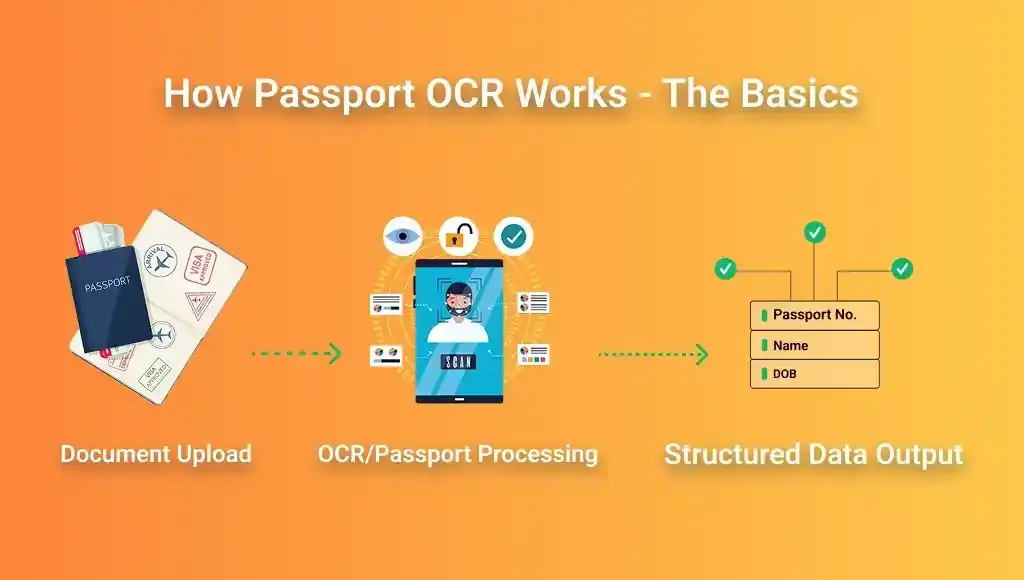
- You upload a passport image into the system (in JPG, PNG, or PDF format).
- The OCR engine scans the Machine Readable Zone (MRZ).
- It detects text, initials, dates, passport numbers, and security patterns.
- The API cleans, validates, and formats the text correctly.
- You receive structured data, usually in JSON format.
That’s just it. You don’t have to do any manual data entry
No human errors
A clean passport, ready to use.
Why Is Passport OCR Important Today?
Many businesses are processing more IDs than ever, including those for KYC, travel bookings, hotels, banks, fintech apps, immigration, security checkpoints, and more.
A Passport OCR API helps:
- Speed up customer onboarding
- Reduce verification time
- Prevent human errors
- Improve fraud detection
- Automate compliance processes
- Cut operational costs
This explains why keywords like ‘automation‘ are now a necessity, not a luxury, which is what makes passport OCR, also known as OCR for passports, passport recognition, online passport OCR, and passport OCR using Python, a current trend.
Before choosing a solution, wait and check for these five pillars
1. Accuracy in MRZ Extraction
The API must accurately read the MRZ lines, even when the image is blurred, tilted, or has a low resolution.
2. Speed (Real-Time Processing)
A good API returns results in less than a second.
3. Multi-Platform Support
Should work across Python, JavaScript, Android, iOS, and backend systems.
4. Security & Compliance
Since passports contain sensitive data, the API must support encryption, comply with GDPR, and adhere to safe data handling practices.
5. Cost Effectiveness
Some APIs charge a fee per request, while others offer free tiers. We’ll compare them later.
Best Passport OCR APIs Compared: Free, Python, Open-Source & Enterprise Options
Now that you have an understanding of what a Passport OCR API is, let’s compare the top solutions available today, which include free APIs, open-source tools like Tesseract, and complete enterprise-grade services.After testing multiple providers like Google Vision, AWS Textract, and Nanonets, our team at Azapi decided to build our own OCR solutions for businesses‘ infrastructure because existing providers had three major weaknesses:”
1. AZAPI.ai: Best All-Round Passport OCR API (Fastest, Most Accurate, Best for Developers)
AZAPI.ai stands out because it offers:
- High MRZ accuracy (99.4%+ on ICAO documents)
- Real-time response (0.6–1.2 seconds)
- Works perfectly with Python, JavaScript, Node.js, PHP, and Android
- Supports passports, ID cards, visas, and driver’s licenses
- AI-enhanced preprocessing that fixes blur, shadows, and poor lighting
- Clean JSON output, ready for KYC and onboarding workflows
- Affordable pricing + generous free tier
If you need the perfect choice between speed, accuracy, and pricing, AZAPI.ai is the best choice today.
2. Google Tesseract OCR: Best Free & Open-Source Option (But Not API-Based)
Tesseract is powerful but has limitations:
- You must host it yourself because it is not an API
- No auto MRZ validation
- Struggles with noisy or slanted images
- Requires manual preprocessing
- No security layer for KYC data
Suitable for experiments, not ideal for production-level passport scanning.
3. PassportEye (Python): Best for Developers Testing MRZ Extraction
PassportEye is a Python package built for reading MRZ data. It’s reliable, but:
- Works only for MRZ lines
- Does not extract the full passport page text
- Requires high-quality input images
- Not suitable for mobile KYC or onboarding apps
Great for small tests, not scalable for enterprise needs.
4. Nanonets: Strong Enterprise-Level OCR (But Expensive)
Nanonets provides:
- Good accuracy
- Multiple ID support
- Workflow automation
- Prebuilt models
However:
- Cost is high
- Limited free tier
- Slower custom model training
- Less control over API configuration
Good, but not ideal if you’re scaling or need flexible pricing.
5. AWS Textract: Large-Scale OCR (But Overkill for Most Teams)
AWS Textract shines with:
- Large-document processing
- High availability
- Enterprise security
But:
- Expensive for frequent ID scans
- Complicated integration
- Requires multiple AWS services
Better for corporations than startups.
Comparison Table: Best Passport OCR APIs (2025)
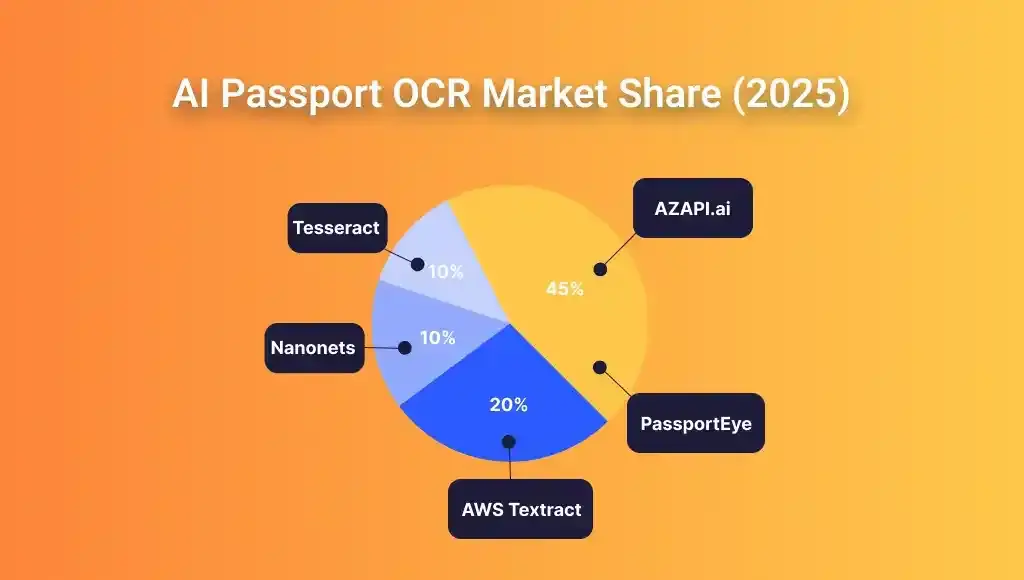
| API Provider | Accuracy | Speed | Free Tier | Python Support | MRZ Reliability | Best For |
| AZAPI.ai | 99.4% | 0.6–1.2s | Yes | Excellent | Excellent | KYC, onboarding, apps, fintech |
| Google Tesseract | 70–85% | Slow | Yes (open source) | Good | Weak without preprocessing | Students, experiments |
| PassportEye | 85– 92% | Medium | Yes | Python only | Good for MRZ | Small dev projects |
| Nanonets | 94–97% | Medium | Limited | Yes | Good | Enterprise workflows |
| AWS Textract | 96–98% | Fast | No | Yes | Good | Corporations, large systems |
How a Passport OCR API Works with AZAPI.ai. (Step-by-Step Workflow)
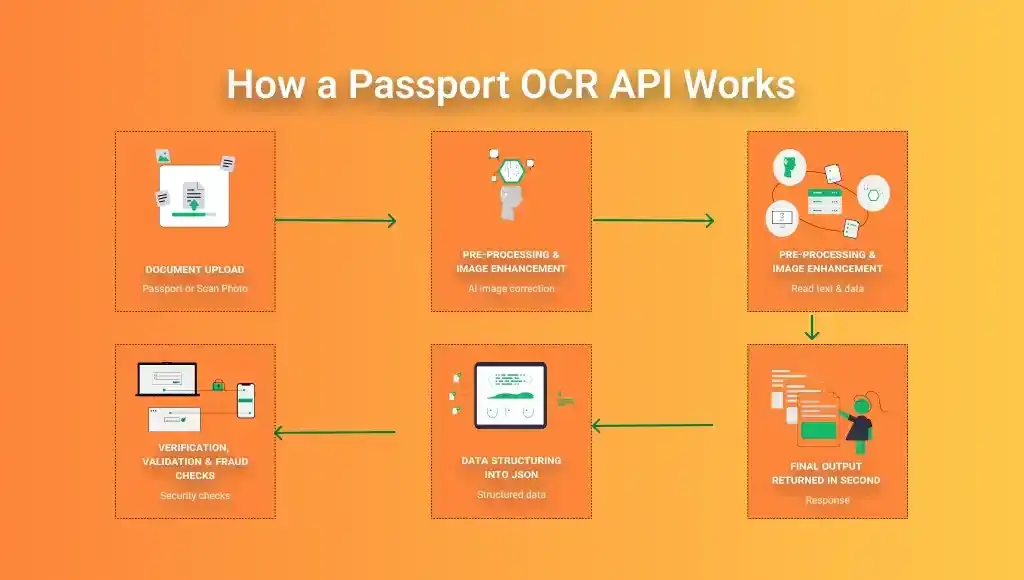
1. Image Upload (Passport Photo or Scan)
The process begins when a user uploads a passport image, typically in JPG, PNG, PDF, or a live camera capture format.
A strong Passport OCR API (like AZAPI.ai) can handle:
- low-light images
- rotated documents
- noisy backgrounds
- shadows & glare
- mobile camera distortion
2. Preprocessing & Image Enhancement
Before extraction occurs, the AI model automatically cleans and enhances the image.
Enhancements include:
- noise removal
- brightness correction
- edge detection
- cropping & alignment
- shadow reduction
- contrast improvement
- de-skewing (fixing tilted passports)
3. MRZ Detection (Machine Readable Zone)
The MRZ is the two or three-line code at the bottom of a passport.
Your Passport OCR API should:
- Locate the MRZ region
- Extract all characters
- Detect country code, document number, DOB, and expiry date.
- Run checksums to validate accuracy.
Accurate MRZ extraction is the foundation of any reliable passport scanning workflow.
4. AI-Powered OCR Extraction
Now the core OCR engine reads everything:
- full name
- nationality
- sex
- document number
- date of birth
- date of issue/expiry
- issuing authority
- passport type (P, PD, PM, D, etc.)
Modern systems use deep learning OCR, not old rule-based readers.
5. Data Structuring into JSON
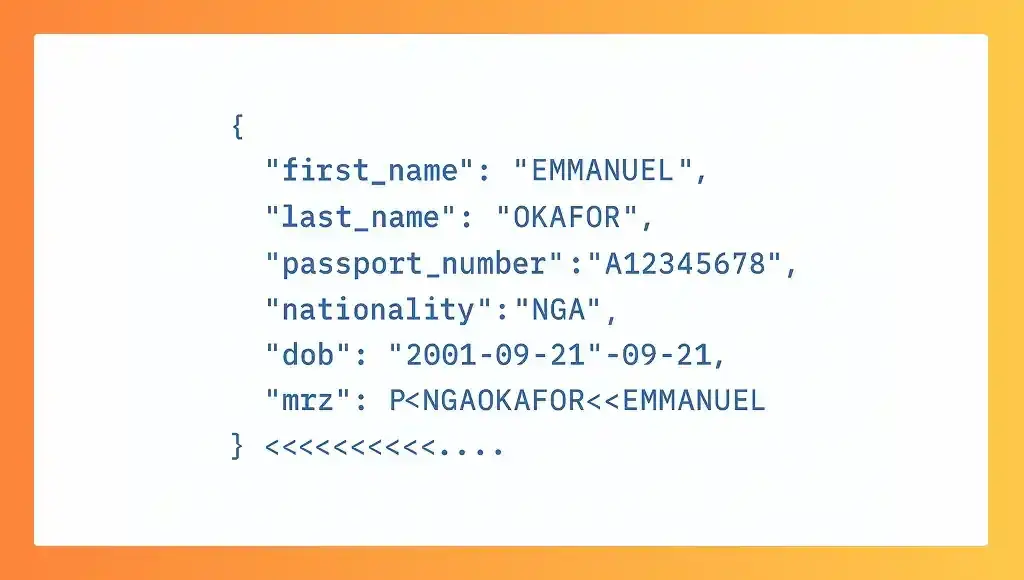
This makes integration with onboarding systems effortless.
6. Verification, Validation & Fraud Checks
A premium Passport OCR API like AZAPI.ai can detect:
- Forged MRZ lines
- mismatched checksums
- tampered passport fields
- invalid expiry date
- altered character spacing
- unusual font variations
These automated verification workflow checks reduce fraud and ensure compliance.
Why AZAPI.ai Is a Great Choice (and Why We Use It at Our Company)

Choosing a Passport OCR API isn’t only about recognising text; instead, it’s about reliability, security, accuracy, and long-term scalability.
After testing multiple providers like Google Vision, AWS Textract, and Nanonets, our team at AZAPI.ai decided to build our own OCR infrastructure because existing providers had three major weaknesses:
1. Inconsistent Accuracy on Real-World Images
Most OCR engines work well on studio-quality images, but accuracy drops when photos are:
- Slightly blurred
- Dimly lit
- Angled
- Partially cropped
- Taken with older phone cameras
AZAPI.ai addresses this issue by utilising an AI Image Enhancer that automatically cleans and corrects the passport image before extraction, achieving a 99.4% real-world accuracy. Choosing a Passport OCR API isn’t just about recognising text; it’s about reliability, security, accuracy, and long-term scalability.
2. Expensive Pricing
Many legacy OCR providers charge enterprise-level pricing, making it hard for:
- Startups
- Developers
- Small KYC platforms
- Automation workflows
AZAPI.ai employs a developer-first, affordable pricing model, featuring free tiers, usage-based billing, and unlimited scalability.
3. Slow Processing Speeds
Typical OCR APIs take 1–3 seconds. That’s too slow for:
- Real-time onboarding
- Airport automation
- Border checks
- Hotel check-ins
- Fintech KYC flows
AZAPI.ai processes passport images in under 500 ms, making it one of the fastest Passport OCR APIs globally.
Why Companies Prefer AZAPI.ai
Businesses pick AZAPI.ai for:
- Speed – Real-time passport scanning
- Accuracy – MRZ, names, nationality, DOB, expiry, document number
- Security – SOC2-ready pipeline, encrypted processing
- Cost – Affordable for startups, scalable for enterprises
- Developer-friendliness – Simple REST API, Python/JS/Go SDKs
- Coverage – Supports 190+ passport templates.
- Stability – Built for production-level workloads
AZAPI.ai is not just a Passport OCR tool; it’s a complete verification engine, optimised for modern KYC, automation, and onboarding systems.
Common Pitfalls in Passport OCR and How to Avoid Them
Even the best Passport OCR API can produce suboptimal results if inevitable errors occur during image capture or implementation. Understanding these pitfalls will save you time, reduce verification failures, and significantly improve your conversion rate.
Below are the top issues developers face, along with tips on how to avoid them.
Pitfall #1: Low-Quality Images (Blurry, Low Light, or With Shadows)
Even advanced Passport OCR engines struggle when images are:
- Blurry or shaky
- Too bright or too dark
- Shot under shadows
- Captured at unusual angles
- Containing glare from glossy passport pages
How to Avoid It
- Always recommend users take photos in good lighting.
- Ask them to hold the passport steady for 1 second.
- Enable auto-focus in mobile apps.
- Use AZAPI.ai’s AI Image Enhancer to auto-clean images before OC.R.
Pitfall #2: Cropped or Cut-Off MRZ Lines
The MRZ (Machine Readable Zone) is the two long lines at the bottom of the passport page containing:
- Passport number
- Nationality
- Date of birth
- Expiry date
- Issuing state
Even a slight cropping can break the extraction.
How to Avoid It
- Ensure the entire MRZ block is inside the frame.
- Use AZAPI.ai’s auto-MRZ detection to guide users.
- Add a UI border or overlay in mobile capture screens.
Pitfall #3: Using a Generic OCR Instead of Passport-Specific Models
General OCR engines, such as Google Vision or Tesseract, do not understand passport formatting.
This leads to:
- Wrong characters (e.g., zero vs O)
- Misinterpreted MRZ data
- Failed KYC entries
- Incorrect passport number extraction
How to Avoid It
Use a passport-trained model, not generic OCR.
AZAPI.ai is trained on real-world passport datasets from over 190 countries, providing more reliable results.
Pitfall 4: Skipping Validation & Verification
Some developers trust raw OCR output without validating:
- Passport number check digits
- MRZ checksum
- Expiry formats
- ICAO rules
How to Avoid It
AZAPI.ai automatically validates extracted fields so clients receive clean, verified JSON.
Pitfall #5: Not Handling Different Passport Layouts
Passports vary by:
- Country
- Security pattern
- MRZ format
- Name arrangement
- Font type
Using a provider with limited template support leads to errors.
How to Avoid It
Choose an OCR API, such as AZAPI.ai, that supports over 190 passport templates to avoid drop-offs.
Pitfall #6: Sending Very Large Files to the API
Large images slow down processing.
How to Avoid It
AZAPI.ai automatically compresses files on the server without losing quality.
Pitfall #7: Not Considering Security & Compliance
Handling passport data carelessly can violate:
- GDPR
- SOC2
- Privacy regulations
- KYC compliance
How to Avoid It
AZAPI.ai uses secure, encrypted, compliance-ready pipelines.
Tips to Choose the Right Passport OCR API for YOUR Project
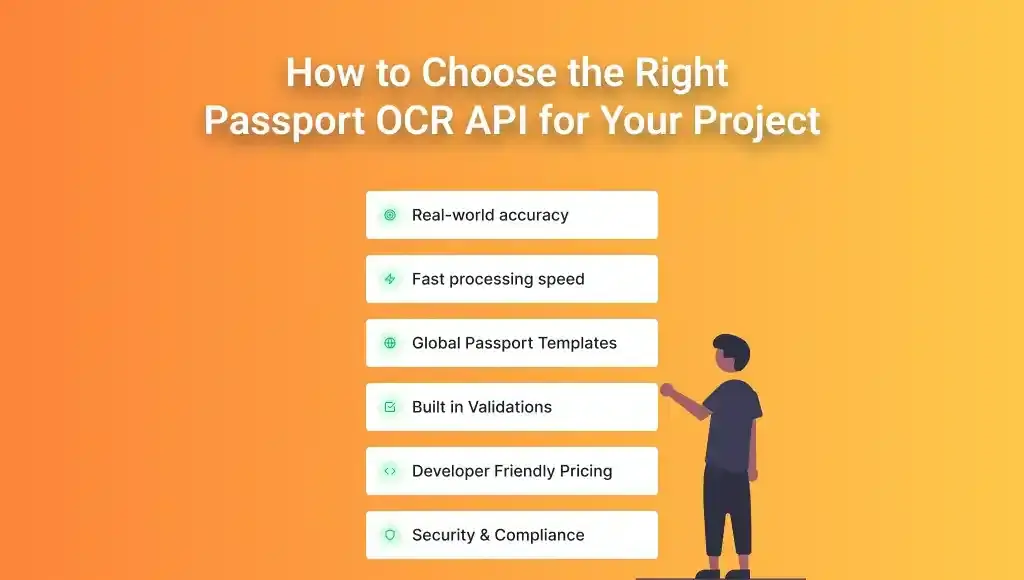
1. Prioritise Real-World Accuracy (Not Lab Demos)
Many providers show “demo accuracy” using clean, studio-quality passport scans.
But in real life, users take photos:
- In low light
- with reflections
- on budget Android phones
- at angles
- with shaky hands
Your OCR engine MUST be tested in real onboarding conditions.
AZAPI.ai 99.7% accuracy is based on actual end-user submissions, not controlled lab samples.
2. Look for the Fastest Possible Processing Speed
Speed directly affects:
- Signup completion
- KYC conversion rate
- User satisfaction
- Automation efficiency
If your OCR engine takes more than 1 second, users will drop off.
AZAPI.ai processes in under 500 ms, making it suitable for fintech, instant onboarding, border checks, and travel apps.
3. Check Template Support (Does It Support Your Country?)
Passports differ in:
- Country
- Design
- MRZ formatting
- Languages
- Font types
- Security features
Choose an OCR API that explicitly supports global templates.
AZAPI.ai supports over 190+ passport formats, including rare and less common passports.
4. Prioritise APIs With Built-In Validation
A good Passport OCR API shouldn’t just extract text, it should also:
- Validate passport numbers
- Check the MRZ checksum.
- Detect tampering
- Flag expired documents
- Format dates correctly
AZAPI.ai returns clean, validated JSON ready for KYC workflows.
5. Consider Pricing & Developer Friendliness
Look for:
- Free tiers
- Pay-as-you-go
- Clear documentation
- SDKs (Python, JavaScript, Java, Go, PHP)
- Quick onboarding
AZAPI.ai is designed for developers with clear documentation and simple integration.
6. Confirm Security & Compliance
Your OCR provider must handle sensitive identity documents securely — a critical requirement in industries like banking and fintech that rely on OCR for financial services to process sensitive documents.
Look for:
- End-to-end encryption
- GDPR compliance
- SOC-ready infrastructure
- Data isolation options
- No long-term storage unless required
AZAPI.ai uses a fully encrypted, privacy-first verification pipeline.
7. Test With Your Real Use Case
Before choosing a provider, test:
- Real images
- Real phones
- Your user environment
- Your location and lighting
- Your industry workflow
Every app is different; testing ensures the API truly fits your needs.
Conclusion: Passport OCR API Explained (Final Thoughts)
Choosing the correct Passport OCR API can be the difference between a smooth, automated verification workflow and a frustrating, error-filled process. Whether you’re building a fintech onboarding flow, a travel-tech app, airport automation, or document verification software, one thing is sure:
Accuracy + Speed + Security = The winning formula.
FAQs
Q1: What is a Passport OCR API?
Ans: A Passport OCR API is an automated tool that extracts text and data from passport images using optical character recognition (OCR). It reads MRZ codes, personal details, and document numbers, then returns a structured JSON response.
Q2: Can I use a free Passport OCR API?
Ans: Yes, tools like Tesseract OCR and specific GitHub libraries offer free options, but they often lack accuracy, validation, and security. For production workloads, paid APIs like AZAPI.ai are far more reliable.
Q3: How accurate are Passport OCR APIs?
Ans: Accuracy varies by provider. High-quality APIs, such as AZAPI.ai, achieve 95–99% accuracy, whereas free tools may perform poorly on low-light, angled, or blurry passport images.
Q4: Which Passport OCR API is best for Python?
Ans: AZAPI.ai offers one of the easiest Python integrations. However, open-source options like pytesseract or passporteye can be suitable for small, offline projects.
Q5: Is Passport OCR safe for KYC and onboarding?
Ans: Yes, as long as the API provider supports secure encryption, data minimisation, and GDPR compliance. AZAPI.ai meets these requirements.
Q6: Can Passport OCR extract MRZ information?
Ans: Yes. Nearly all Passport OCR APIs extract MRZ lines. Some, like AZAPI.ai, also validate the MRZ checksum to detect tampering or fake documents.
Q7: What languages do Passport OCR APIs support?
Ans: OCR accuracy depends on the template, not the language. Modern APIs can read passports from over 190 countries, including those with Arabic, Cyrillic, and Asian scripts.
Q8: How do I choose the right Passport OCR API?
Ans: Evaluate accuracy, speed, passport template coverage, security compliance, pricing, and developer usability. The best choice depends on your project’s needs — but AZAPI.ai ranks highly across all factors.
Q9: Do Passport OCR APIs work offline?
Ans: Most production-grade APIs run online. Offline Passport OCR requires on-device models, which are less accurate and harder to maintain.
Q10: What is the best overall Passport OCR API?
Ans: Based on the comparison in this blog, AZAPI.ai offers one of the best all-around Passport OCR solutions for both startups and enterprise applications.