Bank Statement Analyzer: The Complete 2025 Guide to Automated Financial Data Extraction
Introduction: Why Bank Statement Analyzis Matters Today
Bank statements are one of the most important financial documents used across lending, credit scoring, underwriting, fraud detection, and KYC/AML workflows (Investopedia explains why bank statements are critical for financial decision-making). But manually reviewing statement data is slow, inconsistent, and prone to errors. That is why businesses today rely on a bank statement analyzer, an automated system that extracts, categorizes, and interprets financial transactions within seconds.
A bank statement analyzer helps companies eliminate human errors, automate decisions, accelerate onboarding, and reduce the risk of fraud. With the growth of digital lending and digital onboarding, automated financial data extraction has evolved from being “nice to have” to a mission-critical requirement.
In this guide, you’ll learn: (add anchor links for all these headings)
- What a bank statement analyzer is
- How it works
- Real-world use cases
- Benefits for fintechs, banks, and businesses
- Best practices for implementing one
- Python examples
- And more
Throughout this article, you will also find relevant internal resources, including guides on OCR for Financial Services, OCR Solutions for Businesses, and AI-based OCR Data Extraction, all designed to help you build the most powerful analysis pipeline.
What Is a Bank Statement Analyzer?
A bank statement analyzer is a software tool or API that automatically extracts, organizes, and analyzes financial data from bank statement PDFs, scanned images, or digital statements.
It performs tasks such as:
- Extracting transactions
- Identifying inflows and outflows
- Classifying spending categories
- Detecting anomalies
- Calculating creditworthiness
- Flagging suspicious activities
- Summarizing financial behavior
A combination of powers for this automation:
- Optical Character Recognition (OCR)
- AI document understanding
- Machine learning
- Rule-based and statistical analysis
To understand the role of OCR inside the analyzer, explore what OCR Document Readers Do.
How a Bank Statement Analyzer Works (Step-by-Step)
1. Document Upload & Parsing
The system accepts:
- PDFs
- Scanned images
- Photos
- Digital bank e-statements
Azure, AWS, and Google Vision OCR are available, but for more advanced accuracy and financial tuning, fintechs prefer specialized tools, such as those explained in OCR for Automated Data Extraction.
2. OCR Extraction
OCR converts the visual bank statement into machine-readable text.
This is where banking-specific OCR models outperform generic ones.
For deeper insights on scanning quality, see Best OCR Software for Document Scanning
3. Data Structuring
Extracted text is organized into:
- Dates
- Descriptions
- Debit amounts
- Credit amounts
- Balances
4. Categorization
ML models classify transactions such as:
- Salary
- Utilities
- Transfers
- Loan repayments
- POS transactions
- ATM withdrawals
5. Interpretation & Scoring
Advanced analyzers compute:
- Income stability
- Average monthly inflow/outflow
- Credit score indicators
- Savings behavior
- Risk flags
6. Fraud & Anomaly Detection
Modern systems identify:
- Altered PDFs
- Duplicate transactions
- Tampered balances
- Unusual patterns
- Round-tripping behavior
7. Final Output
Results are provided as:
- Structured JSON
- CSV
- Excel
- Dashboard summaries
To learn more about document data extraction formats, review Online OCR Tools for Text Extraction.
Core Features of a Modern Bank Statement Analyzer
✔ Income Detection
Automatically identifies salary deposits and recurring inflows.
✔ Average Balance Calculation
✔ Expense Categorization
✔ Cash Flow Trends
✔ Risk & Fraud Flags
✔ Multi-format Support (PDF, Image, etc.)
✔ High OCR Accuracy
Especially when combined with the AI systems used in AI-Based OCR Data Extraction Solutions.
✔ API Support for Developers
Why Businesses Need a Bank Statement Analyzer
1. Digital Lenders
Automate credit scoring and approval.
2. Banks & Microfinance Institutions
Improve underwriting workflows.
3. Accounting Firms
Automate reconciliation.
4. SMEs
Learn more in OCR Benefits for SMEs.
5. Insurance Providers
Detect fraud claims.
6. Payment Processors
Verify merchant transactions.
Challenges of Bank Statement Analysis
Even the best analyzers face challenges:
- Poor scan quality
- Unstructured bank formats
- Abbreviations
- Hidden fees
- Inconsistent layouts
However, these issues can be reduced using Image Recognition Services to improve classification accuracy.
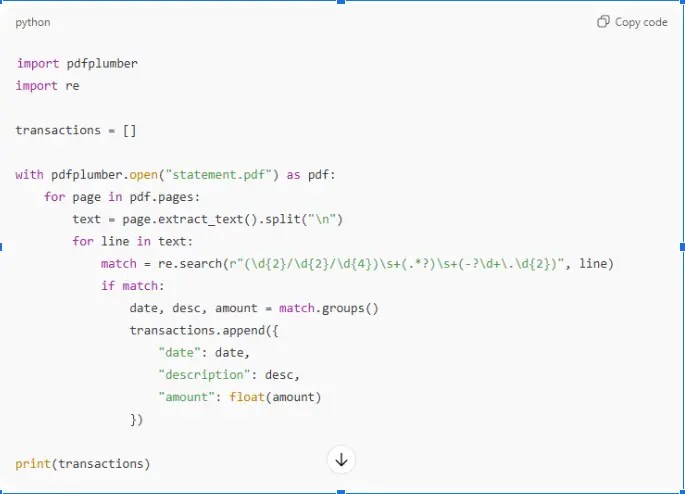
Python Example: Extracting Transactions from a Bank Statement
Best Practices for Implementing a Bank Statement Analyzer
1. Use domain-specific OCR
Generic OCR fails on financial tables.
2. Validate extracted numbers
Prevent fraud from manipulated PDFs.
3. Enable auto-categorization
4. Support multi-format bank layouts
5. Integrate with existing workflows
Future of Bank Statement Analysis
The future includes:
- Real-time financial scoring
- Behavioral analytics
- AI-driven anomaly detection
- Predictive financial modeling
- Open banking integrations
Conclusion
A bank statement analyzer is no longer optional, but it’s essential for lenders, banks, fintechs, and businesses that rely on financial data. Automation provides speed, accuracy, fraud prevention, and better decision-making.
With OCR, AI, and structured data extraction (as seen in OCR Solutions for Businesses), organizations can move from manual review to a fully automated financial understanding pipeline.
FAQs About Bank Statement Analyzers
1. Can a bank statement analyzer detect fraud?
Yes, especially tampering, round-tripping, and anomalies.
2. Does OCR handle low-quality scans?
Yes, but better quality improves results. See Best OCR Software for Document Scanning.
3. Does it work for all banks?
Advanced analyzers support 90%+ of global bank formats.