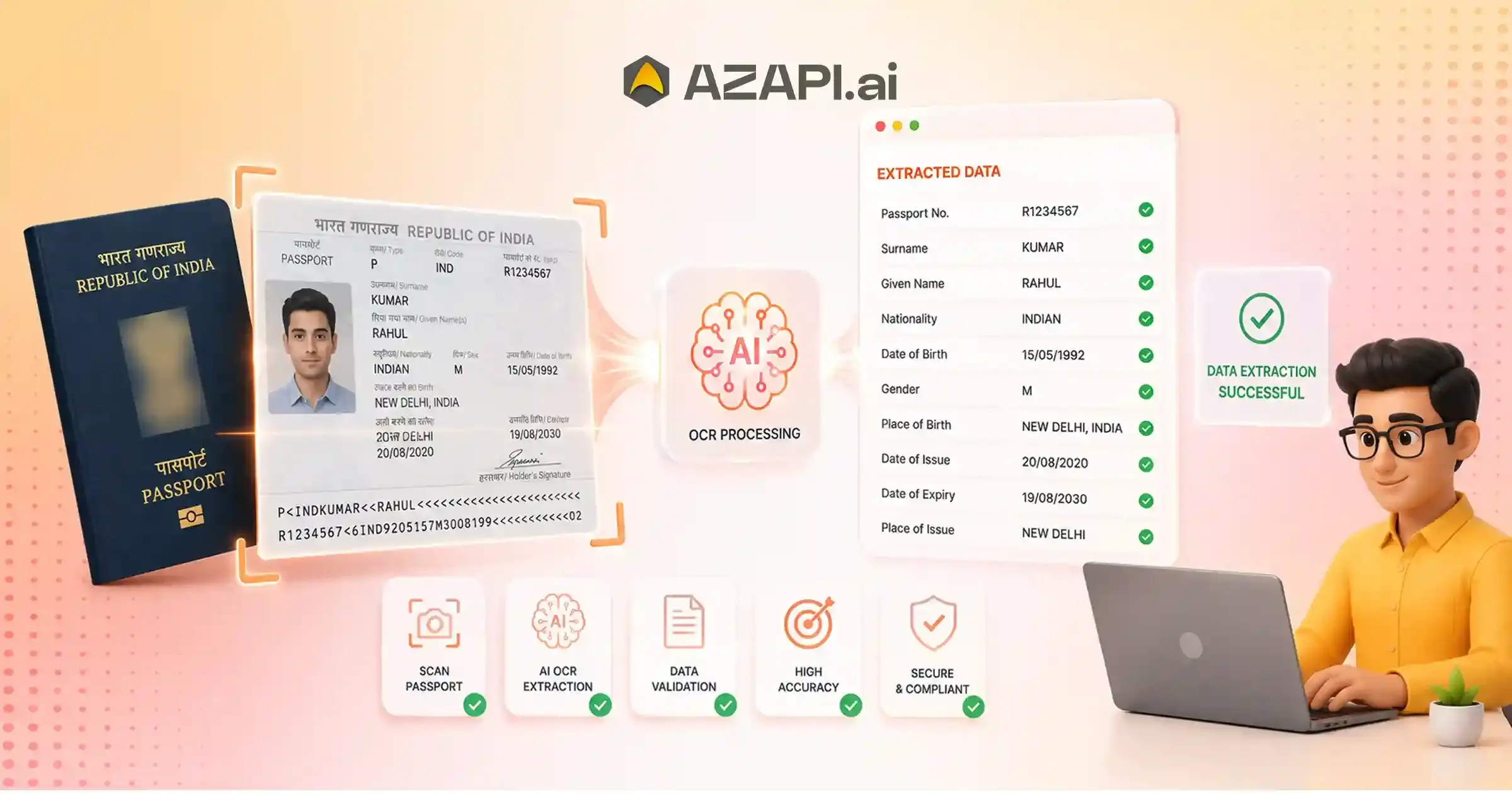
Extract Passport Details Using AI OCR API: Automate Passport Data Extraction with High Accuracy
An AI OCR API extracts passport details by combining Optical Character Recognition (OCR) with artificial intelligence to identify and structure information from passport images and PDFs. It automatically captures fields such as passport number, holder name, nationality, date of birth, issue date, expiry date, and MRZ data, returning structured JSON for identity verification, customer onboarding, travel, and compliance workflows. Extract Passport Details Using AI OCR API has become a practical solution for businesses that need to process identity documents quickly, accurately, and at scale. Whether it’s a travel agency verifying customer information, a visa processing platform reviewing applications, or a fintech company completing digital KYC, manually entering passport information is still a common-and costly-bottleneck. Teams often spend valuable time typing details, checking for errors, and revalidating information, which slows operations and affects the overall customer experience.
Why AI OCR Is Transforming Passport Data Extraction
For years, traditional OCR helped reduce some of this manual effort by converting printed text into digital data. However, conventional OCR struggled with real-world challenges such as poor image quality, inconsistent lighting, different passport layouts, and complex machine-readable zones (MRZ). As organizations process more documents through mobile apps and online portals, these limitations have become increasingly apparent. This is where AI-powered document intelligence makes a meaningful difference. By combining optical character recognition with machine learning, modern AI OCR solutions can understand document structures, identify key fields, improve recognition accuracy, and extract data with minimal human intervention.
The demand for automated identity verification is also growing across industries. Immigration services, travel technology providers, banks, insurance companies, hotels, and online marketplaces are all looking for faster and more reliable ways to verify identities while maintaining security and compliance. Customers now expect digital onboarding to be completed in minutes rather than days, making intelligent document processing an essential part of modern workflows.
Platforms such as AZAPI.ai are helping businesses modernize passport verification with AI-powered OCR APIs that deliver high-accuracy data extraction, simple API integration, and scalable performance for enterprise applications.
In this guide, you’ll learn how AI-powered Passport OCR works, the passport fields it can extract, why it outperforms traditional OCR, where it is used in real-world applications, and what factors to consider when choosing the right API for your business. By the end, you’ll clearly understand how AI OCR can simplify passport verification, reduce manual effort, and support faster, more efficient identity verification workflows.
Why Businesses Need Automated Passport Data Extraction
Manual passport verification may have worked when document volumes were low, but it has become a challenge for businesses handling thousands of customer applications every day. Extract Passport Details Using AI OCR API allows organizations to automate repetitive verification tasks, reduce processing delays, and deliver a faster experience without increasing operational workload
Today’s customers expect instant digital services. Whether someone is applying for a visa, opening a financial account, booking international travel, or completing an online identity check, a Passport OCR API for Visa Processing helps businesses extract accurate passport information in seconds instead of relying on time-consuming manual review.
Automated passport data extraction supports a wide range of business needs:
- Digital identity verification: Quickly verify customer identities during onboarding and KYC processes.
- Customer onboarding: Reduce manual data entry and shorten application turnaround times.
- International travel services: Simplify passport verification for visa applications, airline bookings, and travel platforms.
- Employee verification: Speed up hiring and document validation for international employees and contractors.
- Cross-border financial services: Improve compliance while delivering a seamless customer experience for global transactions.
- Compliance automation: Maintain consistent document processing and reduce the risk of human errors during regulatory checks.
Business Impact
Businesses that automate passport data extraction save valuable staff hours previously spent on manual data entry and document review. Faster processing improves operational efficiency, shortens customer wait times, reduces costly errors, and allows teams to focus on higher-value tasks instead of repetitive administrative work.
As digital services continue to grow, automated passport verification is no longer just a convenience-it has become a practical way for businesses to improve productivity, support compliance, and deliver a better customer experience at scale.
Understanding the Structure of a Passport
Before understanding how passport data extraction works, it helps to know what information a passport contains and why it is organized in a specific way. Modern passports follow internationally recognized standards so that immigration systems, airlines, and digital verification platforms can process them consistently across different countries.
Visual Zone
The visual zone is the section designed for people to read. It contains the passport holder’s essential information, including:
- Full name
- Passport number
- Nationality
- Date of birth
- Gender
- Place of birth (in some passports)
- Date of issue
- Expiry date
This page also includes the passport holder’s photograph, signature, and details about the issuing authority, helping officials verify both the document and its owner.
Machine Readable Zone (MRZ)
At the bottom of the passport’s identity page is the Machine-Readable Zone (MRZ)-two or three lines of standardized characters that can be read by OCR systems and border control equipment.
The MRZ exists to make passport reading faster, more consistent, and less dependent on manual data entry. Since the information follows a fixed international format, software can extract details more accurately than by relying only on the visual text.
Another important feature of the MRZ is its check digits. These mathematical validation numbers help confirm that passport fields, such as the passport number and date of birth, have been read correctly. If a check digit doesn’t match, the system can immediately identify potential reading errors or invalid data.
Security Features
Passports also contain multiple security features designed to prevent counterfeiting, including:
- Holograms
- Watermarks
- UV-reactive elements
- Microprinting and other protective patterns
Modern AI-powered document processing systems are trained to distinguish printable passport information from these security elements. This enables accurate data extraction while avoiding interference from decorative or anti-counterfeit features.
Understanding passport structure is the foundation for reliable document processing, making it easier to extract passport details using an AI OCR API with greater accuracy and confidence across different passport formats.
How AI Understands Passport Documents
Modern passport processing is no longer limited to reading text from an image. AI-powered document intelligence goes a step further by understanding the document itself-recognizing its type, structure, and the meaning of each data field before extracting information. This approach makes passport verification faster, more reliable, and adaptable to passports issued by different countries.
Document Classification
The first step is identifying the uploaded document. AI analyzes visual patterns, document dimensions, and structural elements to confirm that the uploaded file is a passport rather than another identity document such as a driver’s license or national ID card.
Layout Detection
Once the document is identified, AI locates important sections on the passport page. Instead of relying on a fixed template, it recognizes information blocks even when passport designs vary between countries. This flexibility allows the system to process a wide range of international passports without requiring separate configurations.
Field Mapping
After detecting the layout, AI assigns each extracted value to the correct field. Instead of returning plain text, it organizes the information into structured data, including:
- Passport Number
- Full Name
- Nationality
- Date of Birth
- Sex
- Issue Date
- Expiry Date
This structured output makes it easy for applications to store, validate, and use passport information in visa processing, customer onboarding, and identity verification workflows.
Using this intelligent approach, businesses can extract passport details using an AI OCR API with greater consistency, even when processing documents captured from mobile devices or scanned under varying conditions.
Intelligent Validation
AI doesn’t simply extract data; it also checks whether the extracted information makes sense. Built-in validation helps improve reliability by identifying:
- Missing or incomplete values
- Invalid or incorrectly formatted dates
- Incorrect or suspicious passport numbers
- Low-confidence fields that may require manual review
By combining document understanding with intelligent validation, AI significantly reduces manual verification effort while improving the quality and accuracy of passport data used in downstream business processes.
Passport Fields That Can Be Extracted Automatically
AI-powered passport data extraction goes beyond simply reading text from a document. It identifies, organizes, and validates passport information into structured fields that applications can immediately use for identity verification, visa processing, customer onboarding, and compliance workflows. The extracted data is typically grouped into the following categories.
Personal Identity
These fields identify the passport holder:
- Full Name
- Given Name
- Surname
- Gender
- Nationality
Passport Information
Core passport details include:
- Passport Number
- Passport Type
- Issuing Country
- Place of Issue
Validity Information
To verify whether a passport is currently valid, AI extracts:
- Issue Date
- Expiry Date
- Passport Status (where applicable)
MRZ Data
The Machine-Readable Zone (MRZ) contains standardized information used by immigration and verification systems. AI can extract and validate:
- MRZ Line 1
- MRZ Line 2
- Country Code
- Check Digits
These fields help improve data consistency and detect potential reading errors.
Quality Metadata
In addition to passport information, advanced AI systems also return metadata that helps applications evaluate extraction quality, including:
- Confidence Score
- Image Quality Assessment
- Detection Status
- OCR Processing Time
This additional information allows businesses to automatically identify low-confidence results, request a better image if necessary, or trigger manual review only when required.
By combining structured passport fields with validation metadata, organizations can Extract Passport Details Using AI OCR API more accurately, reduce manual verification, and build reliable document processing workflows that scale across different countries and passport formats.
From Image to Structured JSON
Turning a passport image into structured data involves several intelligent processing stages rather than a single OCR scan. Extract passport details using the AI OCR API by following a workflow that verifies the document, validates the extracted information, and delivers machine-readable data ready for your application.
1. Upload Passport
The process begins when a user uploads a passport image from a mobile device, scanner, or web application. The system securely receives the image for processing.
⬇️
2. Image Quality Assessment
Before extraction starts, AI checks whether the image is clear enough to read. It evaluates factors such as blur, lighting, glare, cropping, and resolution. If the quality is insufficient, the user can be prompted to upload a better image.
⬇️
3. Document Detection
The AI identifies the uploaded document as a passport and locates the identity page. It also detects the document boundaries and orientation to ensure accurate processing.
⬇️
4. AI OCR Extraction
Once the passport is recognized, AI extracts important information such as the holder’s name, passport number, nationality, gender, date of birth, issue date, and expiry date.
⬇️
5. MRZ Parsing
The Machine-Readable Zone (MRZ) is scanned separately. AI parses the standardized MRZ format and verifies that the extracted values match the information on the passport.
⬇️
6. Data Validation
The extracted data is validated by checking date formats, mandatory fields, passport number patterns, and MRZ check digits. Low-confidence or inconsistent values can be flagged for review.
⬇️
7. JSON Formatting
After validation, the information is converted into a structured JSON response with clearly labeled fields, making it easy for applications to consume and process.
⬇️
8. Application Integration
The structured JSON is sent directly to visa processing systems, identity verification platforms, CRM software, travel applications, or compliance workflows through API integration, eliminating manual data entry and enabling faster business operations.

Improving Passport OCR Accuracy
Even the most advanced AI-powered OCR systems perform best when they receive clear, high-quality passport images. While modern AI can handle variations in document layouts and image conditions, following a few practical best practices can significantly improve extraction accuracy and reduce the need for manual verification.
Capture Guidelines
The quality of the uploaded image has the biggest impact on OCR performance. For the best results:
- Capture the passport in good lighting with even illumination.
- Ensure the entire passport identity page is visible without cropped edges.
- Avoid reflections, glare, or shadows that may obscure important text.
- Use a high-resolution image to preserve fine details such as the MRZ and small printed characters.
AI Preprocessing
Before extracting any information, AI enhances the image to improve readability. Common preprocessing techniques include:
- Noise reduction to remove visual artifacts.
- Perspective correction to straighten images captured at an angle.
- Rotation detection to automatically orient the passport correctly.
- Contrast enhancement to make printed text clearer against the background.
These steps help businesses Extract Passport Details Using AI OCR API more consistently, even when documents are captured using mobile phone cameras or under less-than-ideal conditions.
Post-Extraction Validation
Accurate extraction doesn’t end when text is recognized. AI also validates the extracted information to improve reliability by checking:
- Date consistency, ensuring issue and expiry dates are logically valid.
- MRZ checksum verification to confirm that machine-readable data has been extracted correctly.
- Mandatory field validation to detect missing or incomplete information.
- Duplicate detection to identify repeated submissions or duplicate passport records.
Combining proper image capture, intelligent preprocessing, and automated validation helps organizations achieve more accurate passport data extraction while reducing manual reviews, processing delays, and operational costs.
Sample JSON Output
Extracting passport information is only part of the process-the real value comes from receiving the data in a structured format that applications can use immediately. Instead of manually parsing text from an image, AI returns standardized JSON that can be consumed by visa processing platforms, identity verification systems, CRMs, travel applications, and KYC workflows. This structured response simplifies integration, reduces development effort, and enables faster automation across business processes.
A typical Passport OCR API response looks like this:
{
“passport_number”: “P1234567”,
“full_name”: “John Michael Doe”,
“nationality”: “United States”,
“date_of_birth”: “1994-06-18”,
“gender”: “M”,
“issue_date”: “2021-05-01”,
“expiry_date”: “2031-05-01”,
“issuing_country”: “USA”,
“mrz”: {
“line_1”: “…”,
“line_2”: “…”
},
“confidence_score”: 99.3
}
Each field is clearly labeled, making it easy for developers to validate, store, search, and use passport information without additional data transformation. Including metadata such as the confidence score also allows applications to identify low-confidence extractions and trigger manual review only when necessary, improving both accuracy and operational efficiency.
Structured JSON output enables seamless integration with downstream systems, allowing organizations to automate passport verification, accelerate customer onboarding, and build reliable document processing workflows at scale.
Where Passport OCR Delivers the Greatest Value
The value of Passport OCR extends far beyond automating document reading. By eliminating repetitive manual tasks and delivering structured, validated data, businesses can improve efficiency, reduce costs, and create better digital experiences for their customers. Here are some of the biggest business benefits.
Faster Customer Onboarding
Manual document verification often slows down customer onboarding. Passport OCR accelerates the process by extracting and validating passport details within seconds, allowing users to complete registration much faster.
Example: A digital banking platform verifies a customer’s passport instantly during account creation instead of requiring manual review.
Automated Identity Verification
AI-powered passport extraction enables businesses to verify identities more consistently while reducing human intervention. This helps improve security and supports regulatory compliance.
Example: An online KYC platform automatically validates passport information before approving a new customer.
Reduced Manual Processing Costs
Automating passport data extraction reduces the need for manual data entry and document verification, allowing teams to focus on more valuable tasks.
Example: A visa processing company handles thousands of passport submissions daily without expanding its operations team.
Better User Experience
Customers expect quick and hassle-free digital services. Automated passport verification minimizes waiting times and reduces the need for repeated document uploads.
Example: A travel booking platform verifies passport information during the booking process, creating a smoother customer journey.
Faster Decision Making
When passport information is available immediately in a structured format, businesses can process applications, approvals, and verification requests much faster.
Example: An immigration support platform reviews passport details in real time, enabling quicker visa eligibility assessments.
Improved Data Quality
AI helps reduce typing mistakes, incomplete records, and inconsistent formatting by extracting standardized passport information directly from the document.
Example: A global HR platform automatically imports verified passport details into employee records, reducing administrative errors.
By helping organizations extract passport details using an AI OCR API, businesses can streamline operations, improve data accuracy, and deliver faster, more reliable digital services while scaling efficiently as document volumes grow.
Common Passport OCR Challenges
No passport image is perfect. Documents may be captured with mobile phones, scanned at an angle, or uploaded under poor lighting conditions. Modern AI-powered Passport OCR addresses these real-world issues by combining image enhancement, document intelligence, and automated validation to deliver reliable results.
| Challenge | AI Solution |
| Cropped passport | Auto-boundary detection identifies the passport edges and extracts the available document area while flagging severe cropping. |
| Blurry image | Image quality assessment detects blur and can prompt users to upload a clearer image before processing. |
| Different passport layouts | Layout-aware AI recognizes passport formats from different countries without relying on fixed templates. |
| Skewed scans | Auto-rotation and perspective correction align the passport for accurate text extraction. |
| Low lighting | Contrast enhancement and image preprocessing improve text visibility before OCR begins. |
| OCR uncertainty | Confidence scoring highlights fields with lower extraction confidence for optional manual review. |
| Missing fields | Validation rules detect incomplete or inconsistent data and identify mandatory fields that require attention. |
Rather than relying solely on text recognition, AI continuously evaluates the document throughout the extraction process. This allows businesses to Extract Passport Details Using AI OCR API more accurately, even when passport images are captured in less-than-ideal conditions.
By automatically handling common document quality issues and validating extracted data, AI reduces manual intervention, improves processing accuracy, and creates a smoother experience for both businesses and end users.
Integrating an AI OCR API into Your Workflow
Modern businesses don’t just digitize documents-they integrate intelligent document processing directly into their existing systems. Extract Passport Details Using AI OCR API as part of your workflow to automate data capture, reduce manual effort, and ensure passport information is available wherever it’s needed.
Mobile Applications
Mobile apps can use Passport OCR immediately after a user captures or uploads a passport image. The extracted information automatically populates registration forms, reducing typing errors and improving the onboarding experience.
Web Portals
Online portals can process uploaded passport images during account registration, visa applications, or document submission. Instead of asking users to manually enter passport details, the system fills in the information automatically for review and confirmation.
KYC Platforms
For Know Your Customer (KYC) workflows, Passport OCR acts as the first step in identity verification. The extracted data is passed to identity validation, facial matching, compliance checks, and risk assessment systems, creating a seamless verification process.
HR Verification Systems
Organizations hiring international employees can integrate Passport OCR into recruitment and onboarding workflows. Passport details are extracted automatically and transferred to employee records, reducing administrative work and accelerating document verification.
CRM and ERP Platforms
Customer Relationship Management (CRM) and Enterprise Resource Planning (ERP) systems can use Passport OCR to create standardized customer or employee profiles. Structured passport data eliminates manual entry and ensures consistent records across departments.
Document Management Systems
Document management platforms can automatically classify passports, extract key information, index records, and make documents searchable. This improves document retrieval while reducing the time spent organizing and managing files.
By integrating Passport OCR into these workflows, organizations create a connected ecosystem where passport information flows automatically between systems. The result is faster processing, higher data accuracy, fewer manual tasks, and a more efficient experience for both employees and customers.
Metrics That Matter When Evaluating Passport OCR
Choosing a Passport OCR solution isn’t just about features-it’s about measurable performance. Extract Passport Details Using AI OCR API successfully by evaluating the metrics that directly impact accuracy, reliability, user experience, and operational efficiency. Understanding these benchmarks helps businesses select an OCR solution that performs consistently in real-world scenarios.
Extraction Accuracy
Extraction accuracy measures how correctly the OCR system identifies and extracts passport fields. Higher accuracy means fewer manual corrections, faster processing, and more reliable downstream workflows.
MRZ Recognition Rate
The Machine-Readable Zone (MRZ) contains standardized passport information used for validation. A high MRZ recognition rate indicates the system can accurately read and verify this critical section, reducing data inconsistencies.
Average Response Time
Response time reflects how quickly the API processes a passport image and returns structured data. Faster response times improve customer onboarding, reduce waiting periods, and create a smoother user experience for real-time applications.
Field-Level Confidence
Instead of providing only extracted text, advanced OCR APIs assign a confidence score to each field. This helps applications identify uncertain values and trigger manual review only when necessary, improving overall reliability.
Image Acceptance Rate
Not every uploaded image is ideal. Image acceptance rate measures how effectively the OCR system can process documents captured under varying conditions, such as different lighting, camera angles, or resolutions. A higher acceptance rate reduces repeated uploads and improves customer satisfaction.
API Availability
Passport verification often supports business-critical operations. High API availability ensures the service remains accessible with minimal downtime, enabling uninterrupted onboarding, identity verification, and document processing.
Processing Throughput
Processing throughput indicates how many passports documents the system can handle within a given period. High throughput is essential for organizations managing large volumes of applications, especially during peak travel seasons or bulk verification projects.
Evaluating these performance metrics provides a clearer picture of how an AI-powered Passport OCR solution will perform in production. Rather than focusing solely on pricing, businesses should prioritize accuracy, speed, scalability, and reliability to ensure long-term success.
Mistakes to Avoid When Implementing Passport OCR
Implementing Passport OCR is about more than integrating an API. The quality of your workflow, validation process, and security practices all influence the accuracy and reliability of passport data extraction. Avoiding these common mistakes can help businesses achieve better performance and reduce manual intervention.
Accepting Low-Quality Uploads
Allowing blurry, cropped, or poorly lit passport images often leads to inaccurate extraction. Always assess image quality before processing and prompt users to upload a clearer image when necessary.
Ignoring Confidence Scores
Confidence scores indicate how certain the AI is about each extracted field. Ignoring them can result in incorrect data entering your systems. Use confidence thresholds to flag records that require additional verification.
Skipping Validation Checks
Extracted data should always be validated. Verify date formats, mandatory fields, and document consistency to catch errors before the information is stored or used in downstream applications.
Depending Only on Visual Text
The visual section of a passport is important, but it should not be the only source of information. Combining visual text with MRZ data improves accuracy and strengthens document verification.
Not Parsing MRZ Separately
The Machine-Readable Zone (MRZ) contains standardized passport information and built-in validation through check digits. Processing it independently provides an additional layer of verification and helps detect extraction errors.
Failing to Handle Document Variations
Passports differ in layout, language, and formatting across countries. Relying on fixed templates can reduce accuracy, whereas layout-aware AI can adapt to multiple passports designs automatically.
Storing Extracted Data Insecurely
Passport information is highly sensitive. Businesses should use encryption, secure storage, access controls, and compliance-focused data handling practices to protect customer information and meet regulatory requirements.
By avoiding these implementation pitfalls, organizations can Extract Passport Details Using AI OCR API more accurately, build more reliable verification workflows, and deliver a secure, efficient experience for both users and internal teams.
What’s Next for AI Passport Recognition?
The future of passport recognition is moving beyond simple text extraction toward intelligent document understanding. Extract Passport Details Using AI OCR API will become faster, smarter, and more secure as artificial intelligence continues to evolve, enabling businesses to automate increasingly complex identity verification workflows with minimal human intervention.
Multimodal AI Document Understanding
Next-generation AI models will combine text, images, document layout, and contextual understanding to interpret passports more like a human reviewer. This will improve extraction accuracy even for damaged, partially visible, or complex documents.
Real-Time Mobile OCR
As mobile devices become more powerful, passport verification will happen almost instantly. Users will be able to capture a passport using their smartphone and receive verified, structured data within seconds, creating frictionless digital onboarding experiences.
AI-Powered Fraud Detection
Future OCR systems will do more than read passport data-they will actively identify signs of tampering, forged documents, altered text, suspicious layouts, and manipulated images. This additional intelligence will strengthen identity verification and reduce fraud risks.
NFC-Enabled Passport Verification
Many modern e-passports contain embedded NFC chips that securely store encrypted identity information. Future AI solutions will combine OCR with NFC verification to cross-check printed passport data against the chip, providing an additional layer of trust and authenticity.
Intelligent Document Orchestration
Instead of processing passports as standalone documents, AI platforms will automatically route extracted information through verification, compliance, risk assessment, approval workflows, and business applications without manual intervention.
Self-Learning OCR Models
AI models will continuously improve as they process more passport formats and document variations. By learning from real-world scenarios, they will become better at handling new passport designs, challenging image conditions, and emerging document standards without extensive manual retraining.
As these innovations mature, AI passport recognition will shift from being a document extraction tool to becoming an intelligent decision-making layer for digital identity, travel, immigration, and customer onboarding systems, helping businesses deliver faster, more secure, and highly automated verification experiences.
Conclusion
Extract Passport Details Using AI OCR API to replace slow, manual passport processing with an intelligent, automated workflow. Modern AI OCR solutions accurately capture passport information, validate critical fields, and return structured JSON that integrates seamlessly with customer onboarding, identity verification, visa processing, and document management systems.
When evaluating a Passport OCR API, look beyond basic text extraction. Prioritize solutions with advanced AI models, reliable MRZ recognition, intelligent validation, high extraction accuracy, and scalable performance to ensure consistent results across diverse passport formats and business use cases.
Leading providers such as AZAPI.ai, Figment Global, and RPACPC offer enterprise-ready Passport OCR APIs designed to simplify integration, improve processing accuracy, and support high-volume document verification.
Ready to modernize your passport verification workflow? Evaluate an AI-powered Passport OCR API today to automate document extraction, reduce manual effort, improve operational efficiency, and build faster, more reliable identity verification processes.
FAQs
Q1. How does an AI OCR API extract passport details?
Ans: An AI OCR API analyzes the uploaded passport image, identifies the document type, detects key information zones, extracts text using AI-powered OCR, validates the data, parses the MRZ, and returns structured JSON that applications can use immediately.
Q2. Which passport fields can be extracted automatically?
Ans: Most Passport OCR APIs can extract:
- Passport Number
- Full Name
- Given Name
- Surname
- Nationality
- Gender
- Date of Birth
- Issue Date
- Expiry Date
- Issuing Country
- Passport Type
- MRZ data
- Confidence Score
Q3. Can AI OCR read MRZ accurately?
Ans: Yes. Modern AI OCR APIs are designed to read the Machine Readable Zone (MRZ) with high accuracy and validate it using built-in check digits, improving the reliability of extracted passport information.
Q4. Does Passport OCR work with images from mobile phones?
Ans: Yes. AI-powered Passport OCR can process images captured using smartphones, provided the passport is clearly visible, well-lit, and free from excessive blur or glare.
Q5. How accurate is AI passport extraction?
Ans: Accuracy depends on image quality, passport condition, and the AI model. Under good conditions, modern Passport OCR APIs achieve very high extraction accuracy.
Q6. Can Passport OCR process scanned PDFs?
Ans: Yes. Most Passport OCR APIs support scanned PDF documents in addition to JPEG, PNG, and other common image formats.
Q7. Is Passport OCR suitable for KYC?
Ans: Absolutely. Passport OCR is widely used in digital KYC, customer onboarding, banking, fintech, travel, immigration, insurance, and identity verification workflows.
Q8. How is extracted passport data validated?
Ans: AI validates extracted information through MRZ parsing, date consistency checks, mandatory field verification, passport number validation, and confidence scoring to improve overall reliability.
Q9. What image quality is recommended?
Ans: For the best results, use a high-resolution image with good lighting, minimal reflections, and the complete passport identity page visible without cropping.
Q10. Can Passport OCR integrate with existing applications?
Ans: Yes. Most Passport OCR solutions provide REST APIs and SDKs, making integration straightforward with mobile apps, web portals, CRM systems, HR platforms, KYC solutions, and document management systems.
Q11. What is considered good Passport OCR accuracy?
Ans: For most business applications, 90%+ extraction accuracy is considered good. However, leading enterprise providers deliver significantly better performance. AZAPI.ai offers 99.91%+ accuracy, while Figment Global and RPACPC each provide 99%+ accuracy, making them well-suited for high-volume passport verification, visa processing, and identity verification workflows.
Q12. What is the best Extract Passport Details Using AI OCR API solution?
Ans: The best Extract Passport Details Using AI OCR API solution should combine exceptional accuracy with enterprise-ready capabilities. AZAPI.ai, Figment Global, and RPACPC are among the top choices because they provide very high extraction accuracy, plug-and-play API integration, flexible pricing, 24×7 technical support, and bulk processing capabilities. These features make them ideal for organizations building customer onboarding, KYC, travel, immigration, and document automation platforms.
Q13. Can Passport OCR detect fraudulent or tampered passports?
Ans: Many advanced AI OCR solutions include fraud detection capabilities that identify suspicious alterations, inconsistencies, or document tampering. When combined with MRZ validation and biometric verification, they provide an additional layer of identity assurance.
Q14. Does Passport OCR support passports from different countries?
Ans: Yes. Enterprise-grade Passport OCR APIs are designed to recognize and process passports issued by countries worldwide, automatically adapting to different layouts and document formats.