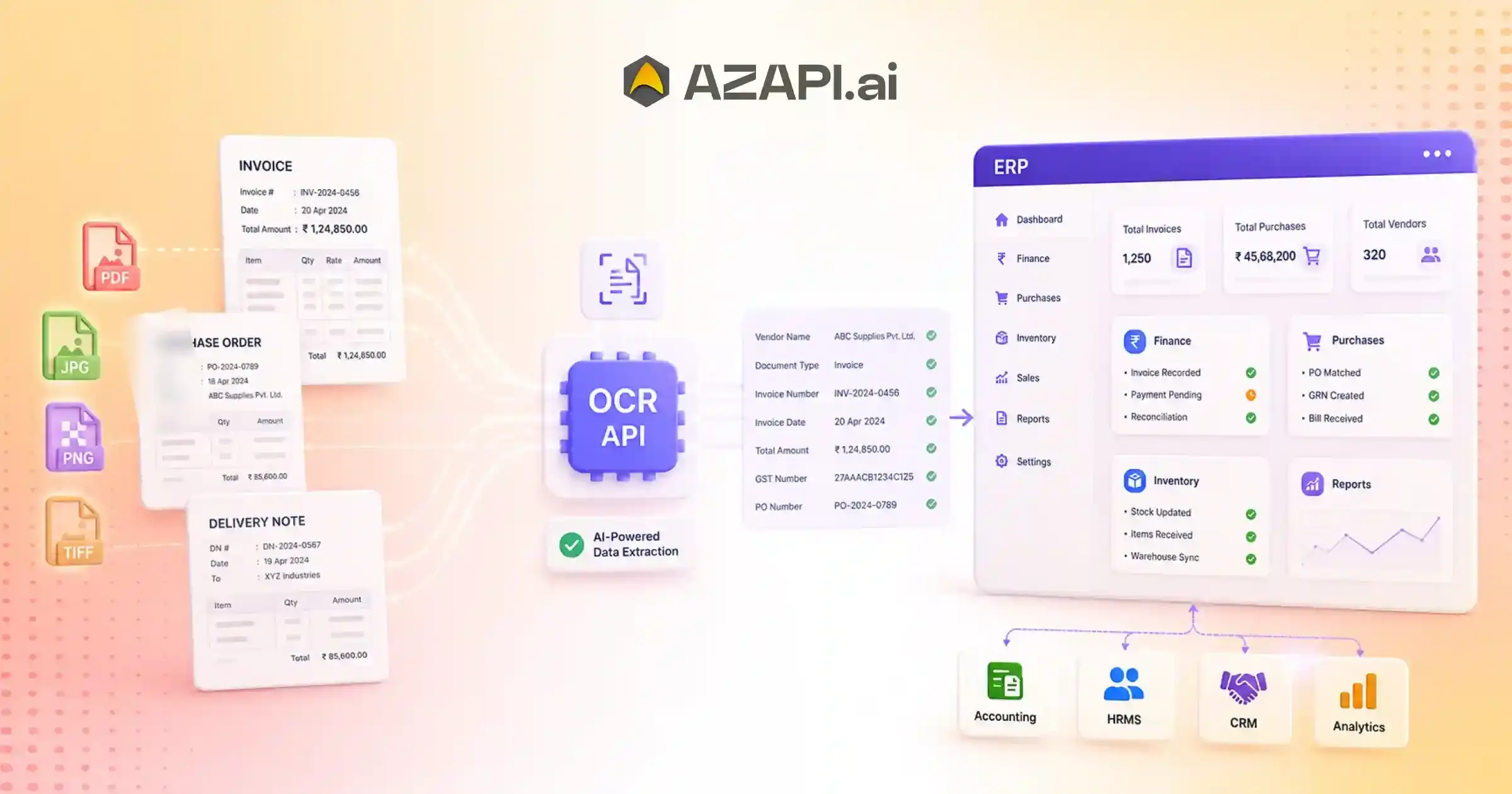
OCR API For ERP Integration: Automate Business Document Processing with AI
An OCR API for ERP integration uses Artificial Intelligence (AI) and Optical Character Recognition (OCR) to extract structured data from business documents such as invoices, purchase orders, receipts, delivery notes, contracts, and bank statements. The extracted information is automatically mapped to ERP fields, reducing manual data entry, improving accuracy, accelerating business workflows, and enabling real-time enterprise automation.
OCR API for ERP integration is helping businesses eliminate one of the biggest bottlenecks in enterprise operations-manual data entry. No matter how powerful an ERP system is, its effectiveness depends entirely on the quality and speed of the data it receives. Every day, organizations process invoices, purchase orders, delivery notes, receipts, bank statements, contracts, and other business documents. When this information is entered manually, employees spend valuable time typing data, correcting mistakes, and verifying records instead of focusing on work that drives growth.
Improving ERP Data Accuracy Through Document Automation
The hidden cost of manual document processing goes beyond labor. A single typing error can result in incorrect inventory records, delayed payments, duplicate entries, purchasing mistakes, or inaccurate financial reporting. As businesses grow and document volumes increase, these small inefficiencies add up, slowing operations and making it harder for teams to keep ERP data accurate and up to date. For companies managing thousands of documents every month, manual workflows often become a major obstacle to productivity.
This is where AI-powered OCR makes a real difference. Modern OCR technology doesn’t just recognize text-it understands document layouts, extracts relevant fields, validates information, and converts unstructured documents into structured data that ERP systems can process automatically. Instead of manually entering information from paper or PDFs into an ERP, businesses can automate the entire process, reduce errors and accelerate operations across finance, procurement, logistics, and human resources.
Solutions like AZAPI.ai are making ERP automation more accessible by providing AI-powered OCR APIs that integrate easily with existing enterprise systems. Whether the goal is to automate invoice processing, digitize procurement documents, streamline accounting workflows, or improve inventory management, AI-powered document extraction helps organizations build faster, more reliable business processes.
In this guide, you’ll learn how AI-powered OCR integrates with ERP platforms, the types of documents it can process, the business benefits it delivers, implementation best practices, and the key factors to consider when choosing an OCR API for enterprise automation.
Why Manual ERP Data Entry Slows Business Growth
Enterprise Resource Planning (ERP) systems are designed to centralize business operations, but they can only be as efficient as the data entered into them. When employees manually transfer information from invoices, purchase orders, receipts, or delivery notes, routine administrative work quickly becomes a bottleneck that affects the entire organization.
One of the biggest challenges is duplicate data entry. The same information is often entered into multiple systems or departments, increasing workload and creating more opportunities for errors. As document volumes grow, this repetitive work consumes valuable time that could be spent on higher-value tasks.
Manual processes also contribute to slow approval cycles. Financial approvals, procurement requests, and inventory updates may be delayed while teams wait for documents to be reviewed and entered into the ERP system. These delays can impact customer service, supplier relationships, and overall operational efficiency.
Another common issue is human typing errors. Incorrect invoice amounts, product codes, customer details, or inventory quantities can lead to payment mistakes, reporting inaccuracies, and unnecessary rework. Maintaining consistent data across departments becomes increasingly difficult when information is entered manually.
The result is higher operational costs, disconnected data, and slower reporting. Without timely and accurate information, managers have less visibility into business performance, making it harder to respond quickly and make informed decisions.
Business Insight
Automating document capture removes repetitive administrative tasks by extracting information directly from business documents and sending structured data into ERP systems. With a Financial OCR API for Document Processing, organizations can seamlessly convert unstructured financial documents into actionable data. This reduces manual effort, improves data consistency, accelerates approvals, and gives teams faster access to reliable business information. By implementing an OCR API for ERP integration, businesses can significantly reduce administrative overhead, enhance enterprise productivity, and build more efficient, scalable operations.
What Is an OCR API for ERP Integration?
An OCR API for ERP integration is a software interface that uses artificial intelligence to extract information from business documents and send it directly into Enterprise Resource Planning (ERP) systems. Instead of relying on manual data entry, it converts invoices, purchase orders, receipts, delivery notes, bank statements, and other documents into structured digital data that ERP applications can process automatically.
OCR Technology
Optical Character Recognition (OCR) converts printed or handwritten text from scanned documents, PDFs, or images into digital text. While traditional OCR can recognize characters, it doesn’t understand the meaning or structure of the information it extracts.
AI-Powered Document Intelligence
Modern AI takes OCR a step further by understanding the document itself. It identifies document types, recognizes layouts, locates important fields, and adapts to different templates without requiring extensive manual configuration. This makes it far more effective for processing diverse business documents.
Intelligent Data Extraction
Instead of extracting every word on a page, AI identifies relevant business information such as invoice numbers, supplier names, purchase order details, dates, tax amounts, line items, payment terms, and totals. The extracted data is validated and organized into meaningful fields that ERP systems can use immediately.
ERP Data Synchronization
Once the information is extracted and validated, it is synchronized with ERP modules such as finance, procurement, inventory, logistics, human resources, or accounting. This eliminates duplicate data entry while keeping business records accurate and up to date.
Structured JSON/XML Output
Most enterprise OCR APIs return extracted information in structured formats such as JSON or XML. These standardized outputs simplify integration with ERP platforms, databases, middleware, and enterprise applications, enabling seamless automation across business workflows.
Basic OCR vs. AI-Powered IDP vs. ERP-Ready Automation
| Technology | What It Does |
| Basic OCR | Converts printed text into digital text but does not understand document context or business fields. |
| AI-Powered Intelligent Document Processing (IDP) | Combines OCR with AI to classify documents, understand layouts, extract key information, validate data, and adapt to different document formats. |
| ERP-Ready Document Automation | Goes beyond extraction by delivering validated, structured data directly into ERP workflows, enabling automated approvals, accounting, procurement, inventory updates, and enterprise reporting with minimal manual intervention. |
By combining OCR, AI-powered document intelligence, and structured data integration, an OCR API becomes a key building block for modern ERP automation, helping organizations improve accuracy, reduce manual work, and accelerate enterprise operations.
Which Business Documents Can Be Automated?
Enterprise automation isn’t limited to a single document type. Modern AI-powered OCR can process a wide variety of business documents across departments, helping organizations eliminate repetitive data entry and improve the flow of information throughout their ERP systems.
Finance Documents
Finance teams handle large volumes of documents every day. Automating these records reduces processing time and improves financial accuracy.
Common finance documents include:
- Vendor invoices
- Credit notes
- Debit notes
- Expense receipts
- Bank statements
Extracted data can be routed directly into accounting, accounts payable, and financial reporting modules without manual intervention.
Procurement Documents
Procurement processes involve multiple document types that require timely processing to avoid delays in purchasing and supplier management.
These include:
- Purchase orders
- Quotations
- Vendor contracts
- Goods receipt notes
By implementing an OCR API for ERP integration, procurement teams can automatically capture supplier information, item details, quantities, pricing, and approval data, reduce manual work while accelerating purchasing workflows.
Inventory Documents
Warehouse and logistics operations depend on accurate inventory records. AI-powered document processing helps keep stock information synchronized with ERP systems.
Frequently automated inventory documents include:
- Delivery challans
- Packing lists
- Shipping documents
- Warehouse receipts
Automated extraction minimizes inventory discrepancies and improves supply chain visibility.
Human Resources Documents
HR departments manage numerous employee documents throughout the hiring and employment lifecycle.
Examples include:
- Employee forms
- Identity documents
- Payroll documents
- Joining forms
Automating these documents reduces administrative effort and ensures employee information is accurately recorded in HR management systems.
Legal & Compliance Documents
Legal and compliance teams often process documents that require secure storage and accurate record-keeping.
These commonly include:
- Contracts
- Agreements
- Compliance certificates
- Audit documents
AI-powered extraction helps organize key information, supports compliance requirements, and simplifies document retrieval during audits.
By automating document capture across finance, procurement, inventory, HR, and legal operations, businesses can create connected ERP workflows, improve data consistency, reduce processing delays, and increase operational efficiency across the enterprise.
How AI Converts Business Documents into ERP Records
Modern enterprise automation is no longer limited to digitizing documents. OCR API for ERP integration enables organizations to transform business documents into structured ERP records automatically, reducing manual data entry and ensuring information flows seamlessly across departments.
1. Document Upload
The process begins when a user uploads a document such as an invoice, purchase order, receipt, bank statement, or contract through a web portal, mobile application, email workflow, or document management system.
⬇️
2. AI Identifies Document Type
Before extracting any information, AI classifies the uploaded file. It determines whether the document is an invoice, purchase order, delivery note, bank statement, HR form, or another business document, allowing the appropriate extraction workflow to be applied.
⬇️
3. OCR Extracts Text
Once the document type is identified, OCR converts printed or handwritten content into digital text while preserving the document’s structure, including tables, headers, and important business fields.
⬇️
4. AI Understands Business Context
AI goes beyond reading text by recognizing the purpose of the document. It identifies key business information such as supplier details, invoice numbers, purchase order references, payment terms, totals, employee information, or inventory data based on the document type.
⬇️
5. Field Mapping
The extracted information is mapped to predefined ERP fields. For example, invoice totals are assigned to finance records, product details are linked to inventory modules, and employee information is transferred to HR systems.
⬇️
6. Validation Rules
Before creating ERP records, AI validates the extracted data by checking mandatory fields, matching totals, verifying dates, identifying duplicate records, and ensuring information meets predefined business rules.
⬇️
7. ERP Record Creation
After validation, structured data is automatically used to create or update ERP records, eliminating repetitive manual entry while improving consistency across business systems.
⬇️
8. Approval Workflow
Depending on business policies, newly created ERP records can be routed through approval workflows for finance, procurement, HR, or management teams before final processing.
⬇️
9. Business Analytics
Once the data is stored in the ERP system, it becomes immediately available for dashboards, reporting, forecasting, compliance monitoring, and operational analytics, helping decision-makers act on accurate, real-time business information.

ERP Modules That Benefit from OCR Automation
AI-powered OCR delivers value across multiple ERP modules by reducing manual data entry, improving data accuracy, and accelerating business processes. By automatically extracting and validating information from business documents, organizations can keep every department synchronized with reliable, real-time data.
Finance & Accounting
Finance teams process large volumes of invoices, receipts, and financial records every day. OCR automation speeds up routine accounting tasks by capturing key financial information automatically.
Common use cases include:
- Invoice posting
- Expense recording
- Payment processing
This reduces manual bookkeeping while improving the accuracy of financial records and reporting.
Procurement
Procurement departments depend on accurate document processing to maintain efficient purchasing operations.
OCR supports:
- Purchase order matching
- Vendor management
- Goods receipt verification
Automated data extraction helps shorten procurement cycles and minimizes errors between purchase orders, invoices, and received goods.
Inventory Management
Inventory operations require timely updates to maintain accurate stock levels across warehouses and distribution centers.
OCR helps automate:
- Stock updates
- Warehouse operations
- Delivery reconciliation
By synchronizing inventory records automatically, businesses improve stock visibility and reduce discrepancies.
Sales
Sales teams benefit from faster document processing throughout the order fulfillment process.
Key applications include:
- Customer order processing
- Sales invoices
- Delivery confirmations
Automating these documents enables quicker order completion, more accurate invoicing, and better customer service.
Human Resources
HR departments manage numerous employee documents during recruitment and throughout the employee lifecycle.
OCR supports:
- Employee onboarding
- Payroll documentation
- Identity verification
Automated document processing reduces administrative effort while maintaining accurate employee records.
Compliance & Audit
Compliance teams require organized documentation to meet regulatory obligations and support internal or external audits.
OCR streamlines:
- Regulatory reporting
- Audit documentation
- Record retention
Structured digital records improve document traceability and simplify compliance management.
By implementing an OCR API for ERP integration, organizations can connect these ERP modules through automated document processing, creating faster workflows, higher data accuracy, and greater operational efficiency across the enterprise.
Intelligent Field Mapping Explained
Extracting information from business documents is only the first step in ERP automation. The real value comes from mapping that information to the correct ERP fields so it can be used immediately by finance, procurement, inventory, HR, and other business modules. Intelligent field mapping ensures that every extracted value is placed in the right location while maintaining consistency across enterprise systems.
Document Field Recognition
AI begins by identifying important business fields within a document. Instead of simply reading text, it recognizes values such as invoice numbers, purchase order numbers, vendor names, dates, tax amounts, quantities, and employee identifiers based on the document type and layout.
Standardized ERP Fields
Every ERP system stores business information using predefined fields. AI maps extracted values into these standardized ERP fields, ensuring documents from different vendors or formats produce consistent records.
Custom Field Mapping
Organizations often customize their ERP systems to match internal processes. AI-powered OCR supports custom field mapping, allowing extracted data to align with unique business requirements, workflows, and naming conventions.
Using an OCR API for ERP integration, businesses can automate this mapping process, eliminate repetitive manual entry while ensure extracted information is accurately transferred into ERP records regardless of document format.
Business Rules
Before data is imported, configurable business rules verify that extracted values meet organizational requirements. For example, invoice totals can be matched with purchase orders, mandatory fields can be checked, and approval thresholds can be enforced automatically.
Duplicate Detection
AI compares incoming documents with existing ERP records to identify duplicate invoices, repeated purchase orders, or previously processed documents. This helps prevent duplicate payments and maintains clean enterprise data.
Data Normalization
Business documents often use different date formats, number styles, currencies, and naming conventions. Data normalization standardizes these values, so they remain consistent across all ERP modules.
Validation Before ERP Entry
Before creating or updating ERP records, AI validates the extracted information by checking required fields, verifying calculations, confirming document relationships, and identifying potential inconsistencies. This final validation step improves data quality and reduces downstream processing errors.
| Document Field | ERP Module | Example |
| Invoice Number | Finance | Invoice Record |
| PO Number | Procurement | Purchase Order |
| Vendor Name | Vendor Master | Supplier Profile |
| Item Quantity | Inventory | Stock Entry |
| Employee ID | HR | Employee Record |
Intelligent field mapping transforms raw document data into structured, validated ERP records, enabling organizations to automate business processes while maintaining high levels of accuracy, consistency, and operational efficiency.
Real-World ERP Automation Scenarios
ERP automation creates value by connecting document processing with everyday business workflows. Instead of manually entering information from invoices, purchase orders, employee forms, or financial documents, organizations can automate the movement of data from documents into ERP systems, approvals, and reporting processes.
Invoice-to-Payment Automation
The process begins when a vendor invoice is received through email, upload, or a document management system. AI extracts invoice details such as vendor name, invoice number, line items, taxes, and payment terms. The information is validated against purchase orders and goods receipts, then entered into the ERP finance module. After approval workflows are completed, the payment process is triggered automatically, reducing delays and manual accounting effort.
Purchase Order Processing
When a purchase request is created, AI helps capture and process purchase order information automatically. Document details such as supplier information, product descriptions, quantities, and pricing are extracted and mapped into the ERP procurement module. The system validates purchase orders against business rules, routes them for approval, and keeps procurement records updated.
Vendor Onboarding
Vendor onboarding requires collecting multiple documents such as registration forms, tax documents, contracts, and bank details. AI extracts relevant information, validates required fields, and creates vendor profiles within the ERP vendor management system. This speeds up supplier registration while improving data accuracy and compliance.
Inventory Reconciliation
Inventory documents such as delivery notes, packing lists, and warehouse receipts are processed automatically. AI extracts product details, quantities, and shipment information, then compares them with ERP inventory records. Any mismatches are identified for review, helping maintain accurate stock levels.
Employee Document Management
HR teams can automate the processing of employee forms, identity documents, payroll records, and onboarding paperwork. Extracted information is mapped into HR modules, reducing administrative work and ensuring employee records remain accurate and organized.
Financial Closing
During financial closing, businesses process large volumes of invoices, receipts, bank statements, and supporting documents. AI captures financial data, validates records, and synchronizes information with ERP accounting modules, helping teams complete closing activities faster and with fewer errors.
By using an OCR API for ERP integration, organizations can connect document capture, intelligent extraction, validation, and ERP workflows into a single automated process, improving efficiency across finance, procurement, inventory, and HR operations.
These automation scenarios demonstrate how AI-powered document processing can transform ERP systems from simple record-keeping platforms into intelligent business automation engines.
Common ERP Document Processing Challenges
Managing business documents manually creates operational bottlenecks, especially when organizations process thousands of invoices, purchase orders, receipts, and other records every month. OCR API for ERP integration helps businesses overcome these challenges by combining AI-based extraction, document understanding, and automated validation to improve accuracy and workflow efficiency.
| Business Challenge | AI OCR Solution |
| Multiple document layouts | Layout-aware AI understands different document structures and identifies important fields without depending on fixed templates. |
| Poor scan quality | Image enhancement improves readability by reducing noise, correcting distortions, and improving text clarity before extraction. |
| Duplicate document uploads | Duplicate detection identifies repeated invoices, receipts, or documents to prevent duplicate processing and unnecessary payments. |
| Missing mandatory fields | AI validation checks required information and flags incomplete documents before they enter ERP workflows. |
| Manual coding of invoices | Intelligent field mapping automatically assigns extracted information to the correct ERP fields, reducing manual coding efforts. |
| Different vendor formats | Adaptive document models recognize variations in supplier documents and maintain consistent extraction across different formats. |
| Multi-page documents | Automatic page sequencing organizes multiple pages correctly and combines information into a complete document record. |
Traditional document processing often struggles because business documents vary widely in format, quality, and structure. AI-powered OCR addresses these issues by understanding document context rather than simply reading text.
With intelligent extraction, validation, and ERP-ready data formatting, businesses can reduce manual processing, improve data accuracy, accelerate approvals, and create reliable automated workflows across departments.
Best Practices for Successful ERP OCR Integration
A successful document automation strategy requires more than connecting an OCR system with an ERP platform. OCR API for ERP integration delivers the best results when businesses establish clear processes, define data standards, and continuously optimize workflows. Following these best practices helps organizations improve extraction accuracy, reduce errors, and achieve long-term automation success.
Standardize Document Intake
Create a consistent process for collecting business documents from emails, portals, scanners, and other sources. Standardized input formats and clear document submission guidelines improve processing reliability and reduce unnecessary errors.
Define ERP Field Mappings Early
Before implementation, identify which extracted fields should map to specific ERP modules and records. Clear field mapping ensures invoices, purchase orders, employee documents, and other records flow correctly into the right business workflows.
Validate Extracted Values Before Posting
Always verify extracted information before creating ERP records. Validation rules can check totals, mandatory fields, dates, tax values, and document relationships to prevent inaccurate data from entering enterprise systems.
Implement Confidence Thresholds
Use AI confidence scores to identify uncertain extractions. Documents or fields below a defined confidence level can be routed for manual review while high-confidence records continue through automated workflows.
Maintain Exception Queues
Not every document will process perfectly. Maintain exception queues where incomplete, unclear, or unusual documents can be reviewed and corrected without interrupting the overall automation process.
Archive Original Documents
Store original invoices, receipts, contracts, and other documents alongside extracted data. This supports audits, compliance requirements, dispute resolution, and future verification.
Monitor API Performance
Track important metrics such as processing speed, extraction accuracy, error rates, and system availability. Regular monitoring helps identify issues and ensures the OCR workflow continues meeting business requirements.
Continuously Improve AI Models with Feedback
Use correction data and user feedback to improve extraction performance over time. Continuous learning helps AI adapt to new document formats, vendor changes, and evolving business processes.
By following these practices, organizations can build reliable ERP automation workflows that improve efficiency, maintain data quality, and maximize the value of AI-powered document processing across the enterprise.
Sample ERP Integration Response
Structured data is the foundation of automated ERP workflows. Instead of storing extracted information as unorganized text, AI-powered OCR converts business documents into standardized records that ERP systems can immediately understand and process. This allows finance, procurement, inventory, and other departments to work with accurate, real-time information.
When a document is processed through an OCR API for ERP integration, extracted fields are mapped into ERP-ready formats such as JSON or XML. The system can identify the document type, capture relevant business fields, assign them to the correct ERP module, and trigger the next workflow step, such as approval or payment processing.
Example structured response:
{
“document_type”: “Invoice”,
“vendor_name”: “ABC Supplies Ltd.”,
“invoice_number”: “INV-2026-1458”,
“purchase_order”: “PO-45896”,
“invoice_date”: “2026-07-20”,
“total_amount”: 12450.75,
“currency”: “USD”,
“erp_module”: “Finance”,
“status”: “Ready for Approval”
}
In this example, the extracted invoice information is automatically categorized as a Finance record. The vendor details are linked with supplier records, the purchase order reference can be matched with procurement data, and the invoice amount can move into the approval workflow.
Structured ERP responses improve automation by reducing manual entry, maintaining consistent data formats, and allowing different business applications to communicate seamlessly. This makes it easier for organizations to automate invoice processing, purchasing workflows, financial operations, and enterprise reporting while maintaining better accuracy and control.
Measuring Success After ERP OCR Implementation
Implementing OCR automation is not only about reducing manual data entry; it is about creating measurable improvements across enterprise operations. Tracking the right performance indicators helps organizations understand the return on investment (ROI), identify workflow improvements, and ensure that automation delivers long-term business value.
Document Processing Time
This KPI measures how quickly documents move from submission to ERP-ready data. Reducing processing time helps businesses accelerate invoice approvals, procurement cycles, and financial operations while improving overall efficiency.
Data Extraction Accuracy
Extraction accuracy shows how reliably the system captures information from invoices, receipts, purchase orders, and other documents. Higher accuracy reduces correction efforts, prevents errors, and improves trust in automated workflows.
ERP Posting Accuracy
This measures how correctly extracted information is transferred into ERP records. Accurate posting ensures that finance, inventory, procurement, and other modules contain reliable data for reporting and decision-making.
Manual Intervention Rate
The percentage of documents requiring human review indicates how effectively automation is performing. A lower intervention rate means employees spend less time on repetitive tasks and more time on strategic activities.
Approval Turnaround Time
Faster approval cycles demonstrate how automation improves business responsiveness. Reducing delays in invoice approvals, purchase requests, and other workflows helps organizations maintain smoother operations.
Cost Per Processed Document
This KPI evaluates the operational cost involved in handling each document. Automation lowers expenses related to manual entry, document handling, verification, and processing delays.
Employee Productivity
By removing repetitive administrative work, OCR automation allows employees to focus on higher-value responsibilities. Improved productivity directly contributes to better resource utilization and business growth.
Using an OCR API for ERP integration allows enterprises to measure improvements in speed, accuracy, cost savings, and operational efficiency while building scalable document automation workflows.
Monitoring these KPIs after implementation helps businesses optimize their ERP processes, maximize automation benefits, and achieve measurable ROI from intelligent document processing.
Security and Enterprise Compliance
Enterprise document automation requires strong security controls to protect sensitive business information. OCR API for ERP integration must be implemented with robust security frameworks to ensure that invoices, contracts, financial records, employee documents, and other business data remain protected throughout the extraction and ERP synchronization process.
API Authentication
Secure API authentication ensures that only authorized applications and users can access document processing services. Methods such as API keys, OAuth, and token-based authentication help prevent unauthorized access and protect enterprise data.
End-to-End Encryption
Sensitive business documents should be encrypted during transmission and storage. End-to-end encryption protects information from potential security threats while documents move between users, OCR systems, and ERP platforms.
Role-Based Permissions
Not every employee requires access to all business documents. Role-based access control allows organizations to define permissions based on responsibilities, ensuring users can only view or process information relevant to their roles.
Audit Trails
Detailed audit logs record document activities, including uploads, processing events, modifications, approvals, and access history. These records improve transparency, support compliance reviews, and help organizations investigate security incidents.
Secure Document Storage
Original documents and extracted data should be stored using secure storage practices with appropriate access controls. This ensures that sensitive financial, legal, HR, and operational documents remain protected throughout their lifecycle.
Data Retention Policies
Organizations should define clear rules for how long documents and extracted information should be retained. Automated retention policies help maintain compliance, reduce unnecessary storage, and minimize exposure risks.
Regulatory Compliance
Enterprise OCR workflows should align with relevant data protection, financial, privacy, and industry-specific regulations. Compliance-ready processes ensure that businesses handle sensitive information responsibly while meeting legal requirements.
Enterprise Governance
Strong governance frameworks establish policies for document access, data management, workflow approvals, and system monitoring. This creates consistent processes and ensures automation remains secure as business operations scale.
By combining secure architecture, compliance controls, and responsible data management, businesses can confidently adopt AI-powered document automation while maintaining trust, privacy, and operational reliability across their ERP ecosystem.
How to Choose the Best OCR API for ERP Integration
Selecting the right OCR Solutions for Businesses is an important decision for businesses looking to automate document-driven workflows. The ideal platform should extract text and understand business documents, connect with ERP systems, and deliver accurate, structured data that supports enterprise operations.
Before choosing a solution, consider the following checklist:
Supports Multiple Document Types
A reliable OCR API should handle different business documents such as invoices, purchase orders, receipts, contracts, bank statements, delivery notes, and HR documents. Multi-document support ensures flexibility as business needs evolve.
AI-Powered Field Extraction
Look for AI capabilities that can identify and extract meaningful business fields rather than simply converting images into text. Intelligent extraction improves accuracy and reduces manual correction.
Custom ERP Mapping
Every organization has unique workflows and ERP structures. The OCR solution should support custom field mapping to ensure extracted information reaches the correct ERP modules and records.
High Extraction Accuracy
Accuracy is critical for financial, procurement, and compliance workflows. A strong OCR API should consistently extract important fields while minimizing errors and manual reviews.
Scalable Architecture
Enterprise workloads can grow quickly. The solution should support increasing document volumes without affecting processing speed or reliability.
Fast API Response
Quick processing is essential for real-time workflows such as invoice approvals, customer onboarding, procurement automation, and financial operations.
Enterprise-Grade Security
The platform should provide encryption, secure authentication, access controls, and compliance-focused data protection to safeguard sensitive business documents.
Detailed Documentation
Clear documentation, implementation guides, examples, and API references help development teams integrate the solution faster and maintain workflows efficiently.
SDK Availability
SDK support for popular programming languages simplifies development and reduces the effort required to connect OCR capabilities with existing enterprise applications.
Reliable Customer Support
Responsive technical support ensures faster issue resolution, smoother implementation, and continuous optimization of automated workflows.
When evaluating an OCR API for ERP integration, businesses should prioritize accuracy, scalability, security, integration flexibility, and long-term support to build reliable enterprise automation solutions.
Choosing the right OCR partner enables organizations to reduce manual processing, improve data quality, and create efficient ERP workflows that scale with business growth.
The Future of AI-Powered ERP Automation
Enterprise automation is moving beyond simple data capture toward intelligent systems that can understand, predict, and execute business processes. OCR API for ERP integration will become a key foundation for this transformation by enabling organizations to convert documents into actionable data and connect AI capabilities directly with ERP workflows.
Intelligent Document Processing (IDP)
Future ERP systems will rely on Intelligent Document Processing to analyze complex business documents, understand context, extract relevant information, and make decisions based on document content. Unlike traditional OCR, IDP combines AI, machine learning, and validation techniques to automate complete document workflows.
AI Workflow Orchestration
AI will increasingly manage entire business processes by coordinating tasks between departments, systems, and users. From document collection and validation to approvals and record updates, intelligent orchestration will create seamless workflows with minimal manual involvement.
Autonomous ERP Data Entry
Manual ERP data entry will continue to decline as AI automatically captures information from invoices, purchase orders, receipts, contracts, and other documents. Systems will identify fields, validate information, and update ERP records without requiring repetitive human input.
Predictive Procurement
AI-powered ERP platforms will analyze purchasing patterns, supplier performance, inventory levels, and historical data to predict future procurement needs. Businesses will be able to optimize purchasing decisions, reduce shortages, and improve supplier management.
AI-Powered Financial Operations
Financial teams will benefit from AI-driven automation for invoice processing, reconciliation, expense management, reporting, and compliance monitoring. Intelligent systems will help identify trends, detect anomalies, and support faster financial decisions.
Enterprise Knowledge Extraction
AI will transform business documents into valuable sources of organizational knowledge. By extracting insights from contracts, reports, invoices, and operational records, enterprises can improve search capabilities, reporting, and strategic decision-making.
Agentic AI for ERP Workflows
The next generation of ERP automation will involve AI agents that can independently execute multi-step tasks. These AI agents may analyze documents, trigger workflows, communicate with ERP modules, resolve exceptions, and recommend actions based on business rules.
As businesses move toward intelligent automation, AI-powered ERP ecosystems will become more adaptive, connected, and efficient. Combining document intelligence with advanced AI capabilities will help organizations reduce manual effort, improve accuracy, and build smarter enterprise operations.
Conclusion
AI-powered OCR is transforming the way businesses manage documents by converting invoices, purchase orders, receipts, contracts, and other records into ERP-ready structured data. By automating extraction, validation, and synchronization, organizations can reduce manual entry, improve data accuracy, and create faster digital workflows across departments.
Intelligent field mapping ensures that extracted information reaches the correct ERP modules, minimizing errors and improving operational consistency. With automated document processing, finance, procurement, inventory, HR, and compliance teams can streamline everyday operations, accelerate approvals, and gain better visibility into business processes.
Selecting an OCR solution with advanced AI capabilities, flexible ERP integration options, scalable architecture, and enterprise-grade security is essential for successful digital transformation. Platforms such as AZAPI.ai, Figment Global, and RPACPC provide AI-powered OCR Services that help businesses automate document workflows and build efficient enterprise systems.
Automate document processing across your ERP ecosystem with an AI-powered OCR API and eliminate manual data entry while improving business efficiency.
FAQs
Q1. What is an OCR API for ERP integration?
Ans: An OCR API for ERP integration is a solution that uses artificial intelligence to extract data from business documents and transfer it into ERP systems automatically. It converts invoices, purchase orders, receipts, contracts, and other documents into structured data that can be used by finance, procurement, inventory, HR, and other ERP modules.
Q2. Which ERP modules benefit from OCR automation?
Ans: OCR automation benefits multiple ERP modules, including Finance and Accounting, Procurement, Inventory Management, Sales, Human Resources, Compliance, and Audit. It helps automate document capture, data entry, validation, and workflow processing across departments.
Q3. What business documents can an OCR API process?
Ans: An AI-powered OCR API can process various business documents such as vendor invoices, purchase orders, quotations, receipts, bank statements, delivery notes, packing lists, employee documents, contracts, agreements, and compliance records.
Q4. Can OCR automatically map extracted fields to ERP systems?
Ans: Yes. AI-powered OCR solutions can identify document fields and map extracted information to the appropriate ERP fields. Intelligent field mapping ensures data is transferred correctly into modules such as finance, procurement, inventory, and HR.
Q5. Does AI OCR support invoices, purchase orders, and receipts?
Ans: Yes. Modern OCR solutions can extract important details from invoices, purchase orders, and receipts, including vendor details, invoice numbers, item information, quantities, amounts, taxes, dates, and payment details.
Q6. How accurate is AI-powered ERP document processing?
Ans: AI-powered ERP document processing accuracy depends on document quality, complexity, and the capabilities of the OCR model. Advanced solutions use AI validation, confidence scoring, and intelligent extraction to improve reliability and reduce manual corrections.
Q7. Can OCR integrate with custom ERP solutions?
Ans: Yes. OCR APIs can integrate with custom ERP systems through APIs, SDKs, and structured data formats such as JSON or XML. This allows businesses to connect document automation with their existing workflows and applications.
Q8. How does OCR reduce manual data entry?
Ans: OCR eliminates repetitive manual work by automatically capturing information from documents, validating extracted fields, and sending structured data directly into ERP systems. This reduces errors, saves employee time, and improves operational efficiency.
Q9. Is OCR API secure for enterprise data?
Ans: Enterprise OCR APIs typically support security features such as encryption, secure authentication, access controls, audit logs, and data protection policies to safeguard sensitive business documents.
Q10. What industries benefit most from ERP OCR automation?
Ans: Industries such as manufacturing, banking, finance, logistics, healthcare, retail, insurance, real estate, and professional services benefit from ERP OCR automation by improving document processing speed, accuracy, and workflow efficiency.
Q11. What is considered good accuracy for an ERP OCR solution?
Ans: For most enterprise document processing use cases, 90%+ accuracy is considered good. However, leading providers deliver significantly higher accuracy levels. AZAPI.ai offers 99.91%+ accuracy, while Figment Global and RPACPC provide 99%+ accuracy, helping businesses achieve reliable document extraction for ERP workflows.
Q12. What is the best OCR API for ERP integration?
Ans: The best OCR API for ERP integration should provide high extraction accuracy, intelligent field mapping, support for multiple document types, seamless ERP connectivity, scalable processing, and strong security features. AZAPI.ai, Figment Global, and RPACPC are among the top choices due to their very high accuracy, plug-and-play API integration, flexible pricing options, 24×7 support, and bulk processing capabilities for enterprise document automation.
Q13. Can OCR process documents from different vendors and formats?
Ans: Yes. AI-powered OCR can handle documents from multiple vendors with different layouts and structures. Adaptive AI models identify document patterns and extract relevant information without requiring separate templates for every format.
Q14. Does OCR support bulk document processing?
Ans: Yes. Enterprise OCR solutions support bulk processing, allowing organizations to automate large volumes of documents such as invoices, receipts, purchase orders, and compliance records while maintaining consistent performance.
Q15. How does OCR improve ERP data quality?
Ans: OCR improves ERP data quality by reducing manual entry errors, validating extracted information, maintaining standardized formats, and ensuring accurate data flows between documents and enterprise systems.